


How to copy text from built in "Help browser"?
Posted
#1
(In Topic #1558)
Regular

I also tried to download the wiki with
Code (gambas)
- wget --mirror --convert-links --adjust-extension --page-requisites --no-parent https://gambaswiki.org/wiki


Posted

Guru


<IMG src="https://www.cogier.com/gambas/gbhelp_offline.png">
 </IMG>
Posted
Regular
cogier said
If you go to Preferences [Ctrl]+[Alt]+P, click on help and select 'Use offline documentation'
Thats what I'm using. But the "Help browser F1" won't let me select text with a mouse for copy pasting. I can only look at text and click links. I'm looking for a way to highlight and copy help texts offline. So far I can only select and copy text if I'm online and use a web browser to access / - Gambas Documentation
Posted
Banned
only way if you need to copy text is to use the online wiki in your browser.
/ - Gambas Documentation
EDIT: or do not use offline mode
Posted
Regular
:cry:BruceSteers said
You can't.
Posted
Regular
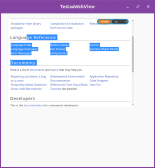
(Click to enlarge)
Posted
Banned
We have asked Benoit for the same in the past.
He says he cannot do it.
It seems Cogier had the correct answer, only to be more precise you must "click" offline documentation so it is de-selected,
If you look at the source more closely you will find it uses HtmlView not WebView if using "offline help"
Only if you use online help will it use HelpBrowser.class that inherits WebView, then copying text is possible.
Posted

Regular
b
Posted

Administrator



It shouldn't be to hard to use webview instead of htmlview.thatbruce said
So would it be possible to build a help viewer based on something "better" than htmlview?
b
Webview can read local files as well and I suppose offline means there is some folder structure with help in html format.
I do something likewise with my guides (local folders with html files) and use webview.
I guess Benoit's idea here is that either
1. webview is an overkill for handling local html files compared to htmlview.
It is a bare bone viewer of local html files, not much more. To get the functionality of webview would require al lot of own code to handle what webview offeres default. If I didn't have online references in my guides, I would have used htmlview as well as it is way more lightweight and easier to use for local html files with NO online references. htnlview doesn't handle online links, you would have to code getting it using gb.net.curl
OR
2 if you use webview for local offline docs, clicking on a link in there might get you online instead of local.
This would defeat the whole purpose of offline docs

I don't know, I haven't studied the code, just my 2 cents on options and possibilities with possible caveats.
gbWilly
- Gambas Dutch translator
- Gambas wiki content contributor
- Gambas debian/ubuntu package recipe contributor
- GambOS, a distro for learning Gambas and more…
- Gambas3 Debian/Ubuntu repositories
… there is always a Catch if things go wrong!
- Gambas Dutch translator
- Gambas wiki content contributor
- Gambas debian/ubuntu package recipe contributor
- GambOS, a distro for learning Gambas and more…
- Gambas3 Debian/Ubuntu repositories
… there is always a Catch if things go wrong!
Posted
Regular
1 guest and 0 members have just viewed this.