






Change the font when printing source code
Posted
#1
(In Topic #2098)

Trainee

With thanks.
Mike


Posted

Administrator



MBMike said
I'm old school and like a hardcopy of my source code. The built-in print capability works fine, however the default font is very unattractive. Does anybody know if there is a config file somehwere in the GAMBAS install where I can tweak these settings? I'm using ver 3.19.0 on Linux Mint w/Cinnamon.
With thanks.
Mike
From “Change the font when printing source code”, March 27th 2026, 8:03 PM
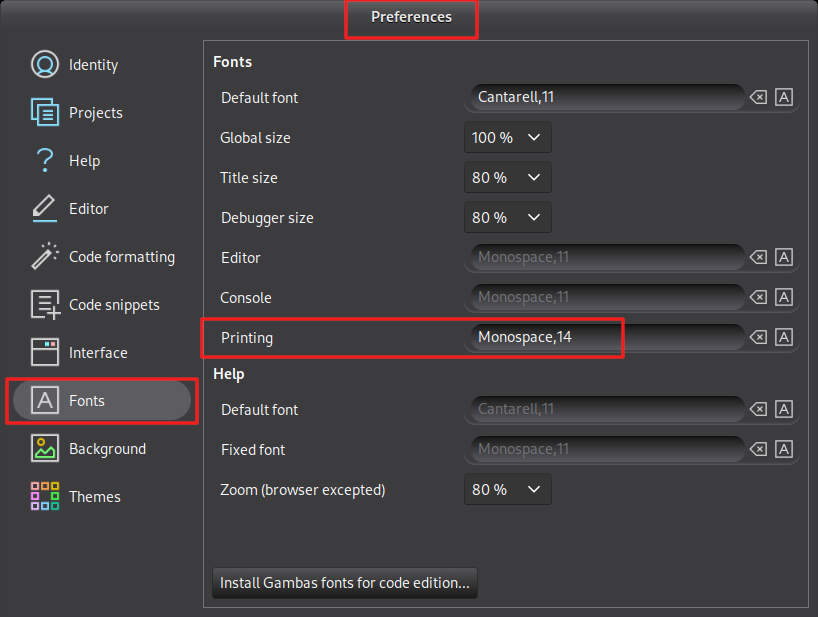
In IDE menu Tools -> Preferences
On Tab Fonts make the font for printing larger
gbWilly
- Gambas Dutch translator
- Gambas wiki content contributor
- Gambas debian/ubuntu package recipe contributor
- GambOS, a distro for learning Gambas and more…
- Gambas3 Debian/Ubuntu repositories
… there is always a Catch if things go wrong!
- Gambas Dutch translator
- Gambas wiki content contributor
- Gambas debian/ubuntu package recipe contributor
- GambOS, a distro for learning Gambas and more…
- Gambas3 Debian/Ubuntu repositories
… there is always a Catch if things go wrong!
1 guest and 0 members have just viewed this.