





Band Font Size error when trying to use Gambas IDE with QT5
Posted
#1
(In Topic #1108)
Regular

Code
$ env GB_GUI=gb.qt5 gambas3Code
			user@nuc ~ $ env GB_GUI=gb.qt5 gambas3
QFont::setPointSizeF: Point size <= 0 (-2147483648.000000), must be greater than 0
QFont::setPointSizeF: Point size <= 0 (-1.000000), must be greater than 0
QFont::setPointSizeF: Point size <= 0 (-1.000000), must be greater than 0
QFont::setPointSizeF: Point size <= 0 (-1.000000), must be greater than 0
QFont::setPointSizeF: Point size <= 0 (-1.000000), must be greater than 0
QFont::setPointSizeF: Point size <= 0 (-2147483648.000000), must be greater than 0
QFont::setPointSizeF: Point size <= 0 (-1.000000), must be greater than 0
QFont::setPointSizeF: Point size <= 0 (-1.000000), must be greater than 0
QFont::setPointSizeF: Point size <= 0 (-1.000000), must be greater than 0
QFont::setPointSizeF: Point size <= 0 (-1.000000), must be greater than 0
QFont::setPointSizeF: Point size <= 0 (-1.000000), must be greater than 0
QFont::setPointSizeF: Point size <= 0 (-1.000000), must be greater than 0
QFont::setPointSizeF: Point size <= 0 (-1.000000), must be greater than 0
QFont::setPointSizeF: Point size <= 0 (-1.000000), must be greater than 0
QFont::setPointSizeF: Point size <= 0 (-1.000000), must be greater than 0
QFont::setPointSizeF: Point size <= 0 (-1.000000), must be greater than 0
QFont::setPointSizeF: Point size <= 0 (-2147483648.000000), must be greater than 0
QFont::setPointSizeF: Point size <= 0 (-1.000000), must be greater than 0
QFont::setPointSizeF: Point size <= 0 (-2147483648.000000), must be greater than 0


Posted

Guru


<IMG src="https://www.cogier.com/gambas/BandFont.png">
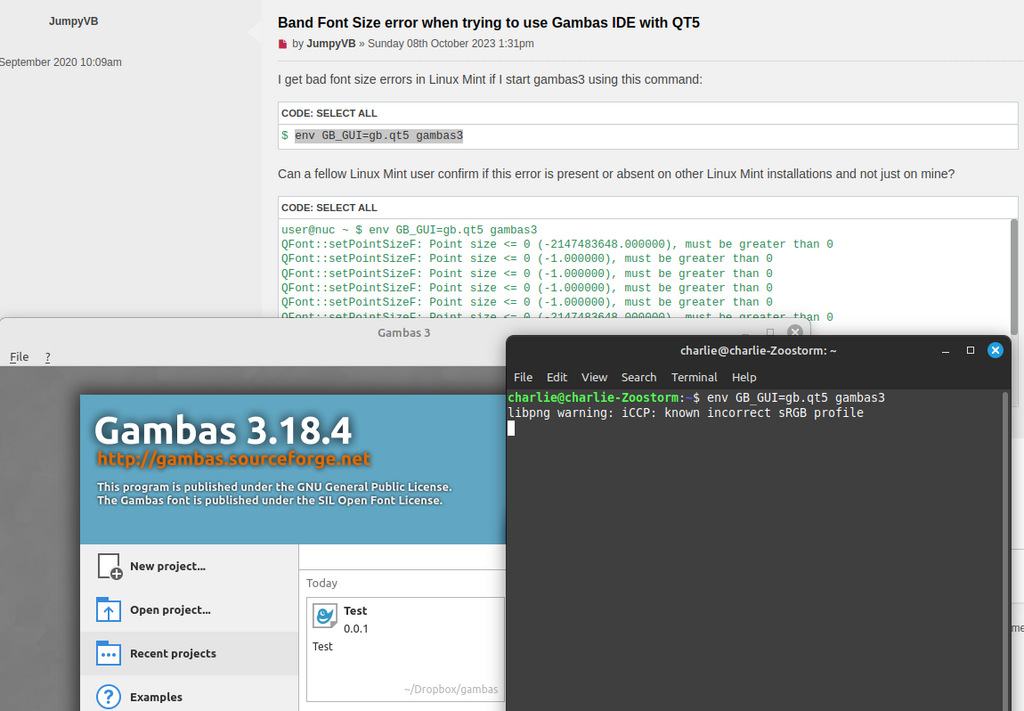 </IMG>
Posted
Regular
Thank you for confirming. That means that this issue is related to my evironment. This lead me to experiment and try to find out what this error was linked to. I was able to fix it in "Qt5 Configuration Tool" under the "Fonts"-tab.cogier said
I am using Linux Mint 21.2 with the Cinnamon desktop and I did not get the same error as you.
PS: I now have no errors there on the commandline. Not even the libpng error you have.
1 guest and 0 members have just viewed this.