






Snippet: CopyProgress

Post

Posted
Rating:
#1 (In Topic #806)
Regular
Diverod is in the usergroup ‘Regular’
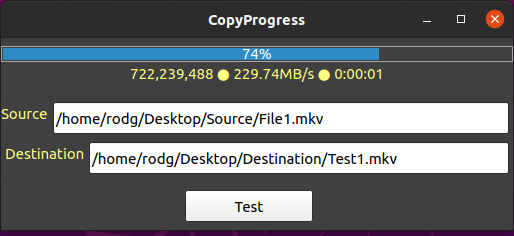
I needed to copy large files to a Samba server and wanted a visual indication of the progress.
You will need ‘rsync’ installed if you don’t have it. (or just change to something else in the class and update the parsing)
You will need a ProgressBar and a TextLabel also if used as is.
It's not as smooth as I'd like but good enough for my needs.
I’m not good at ‘Class’ objects but tried my hand at it. (Thanks stevedee)
I want to see if I can get this to run in the background and found Cogier’s TaskExample and will attempt it later.
Haven’t done much error checking as it’s just a snippet.
<IMG src="https://i.postimg.cc/hjDVpz8b/Copy-Progress.png"> </IMG>
Code (gambas)

  1. ' Gambas class file
  2.  
  3. Property Source As String         ' Source Path & File Name
  4. Property Destination As String    ' Destination Path & File Name
  5. Property StatusTXL As TextLabel   ' TextLabel on FMain to update
  6. Property Progress As ProgressBar  ' ProgressBar on FMain to update
  7.  
  8. Private sSource As String
  9. Private sDestination As String
  10. Private cStatusTXL As TextLabel
  11.  
  12. Private Function Source_Read() As String          ' Retrieve Value
  13.   Return sSource
  14.  
  15. Private Function Destination_Read() As String     ' Retrieve Value
  16.   Return sDestination
  17.  
  18. Private Function StatusTXL_Read() As TextLabel    ' Retrieve Value
  19.   Return cStatusTXL
  20.  
  21. Private Function Progress_Read() As ProgressBar   ' Retrieve Value
  22.   Return cProgress
  23.  
  24. Private Sub Source_Write(Value As String)         ' Set Value
  25.   sSource = Value
  26.  
  27. Private Sub Destination_Write(Value As String)    ' Set Value
  28.   sDestination = Value
  29.  
  30. Private Sub StatusTXL_Write(Value As TextLabel)   ' Set Value
  31.   cStatusTXL = Value
  32.    
  33. Private Sub Progress_Write(Value As ProgressBar)  ' Set Value
  34.   cProgress = Value
  35.  
  36. Public Sub Run()
  37.  
  38.   ' https://linux.die.net/man/1/rsync
  39.   Shell "rsync --progress " & sSource & " " & sDestination For Read As "Process"
  40.  
  41.  
  42. Public Sub Process_Read()
  43.  
  44.   Dim sLine As String
  45.   Dim saParts As String[]
  46.  
  47.   sLine = Read #Last, -2048
  48.   sLine = Trim(sLine)                     ' Remove white spaces
  49.  
  50.   If InStr(sLine, "B/s") > 1 Then         ' Does it have Status Info?
  51.     saParts = Split(sLine, " ", "", True) ' saParts = Bytes Copied | % Copied | Rate | Time Remaining
  52.     cStatusTXL.Text = saParts[0] & " ● " & saParts[2] & " ● " & saParts[3] ' Update Status label
  53.     cProgress.Value = Val(Replace(saParts[1], "%", "")) / 100               ' Update Progressbar
  54.  

Usage Example:

Code (gambas)

  1. ' Gambas class file
  2.  
  3. Public Sub Form_Open()
  4.  
  5.   If Not System.Exist("rsync") Then
  6.     Message.Error("You need to install the 'rsync' command for this example to work.", "OK")
  7.     Me.Close
  8.   End If
  9.  
  10.  
  11. Public CopyFile As New ClsCopyFile
  12.  
  13. Public Sub btnTest_Click()
  14.  
  15.   CopyFile.Source = txbSource.Text
  16.   CopyFile.Destination = txbDestination.Text
  17.   CopyFile.StatusTXL = txlCopyStatus
  18.   CopyFile.Progress = pgbCopyFile
  19.   CopyFile.Run
  20.  
  21.  

Attachment
Online now: No Back to the top
1 guest and 0 members have just viewed this.
