





ScreenShot
Posted
Regular

I tried your program. It did not explain that I needed to install 'get-iplayer'. All I got was a message that the directory did not exist. I installed it but I couldn't get a program to play. The program said it had finished playing after a couple of seconds. I tried it on TV and Radio but got the same result. I am in the correct region to get the BBC. The log file says 'Unknown option: player'.
I need to put words about how to install latest get_iplayer in the description of iRecorder on Gambas Farm. I use Ubuntu 18.04 currently (as I'm loath to use anything but LTS of Ubuntu and I wait till the .1 version of LTS Ubuntu is released). The latest version of get_iplayer is at:
https://launchpad.net/…rchive/ubuntu/get-iplayer.
It's now changed to use snap to install it rather than adding a repository. Hopefully the snap version will automatically update get_iplayer, as the BBC occasionally change their server usage and get_iplayer thus has to be updated.
I looked at get_iplayer's coding once and it's horrendous to understand. I would incorporate get_iplayer's usage of the BBC iPlayer's servers if I knew (or could find out) their details.
Here is iRecorder deb again, though I've now found out that it hangs on entry to the form. I'll take a look at the Gambas coding and get back to you:
https://app.box.com/s/…uwau71bzrejyyc7etqqhcugsq
I think also that there may be a problem with the sound codecs (AAC) on Ubuntu Bionic.
BTW I couldn't work out how to update an on Gambas Farm. Does it do it automatically when you Publish an app again?
John


Posted

Guru


BTW I couldn't work out how to update an on Gambas Farm. Does it do it automatically when you Publish an app again?
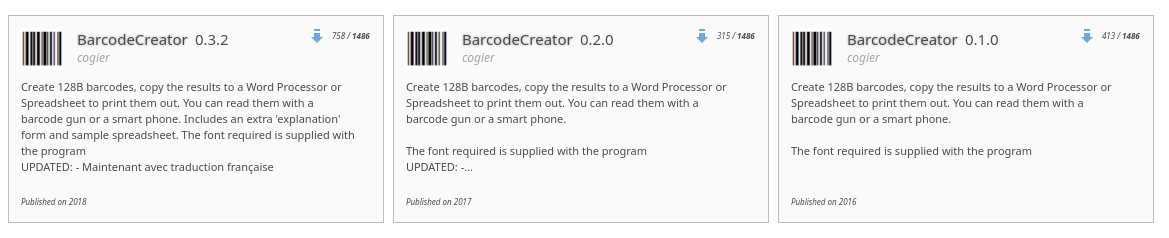
Just publish again. If you use the same version number it will overwrite the original. If you use a later version number both copies will be published as below: -
<IMG src="https://www.cogier.com/gambas/farm.png">
 </IMG>
Posted
Regular
I've uploaded latest version of iRecorder to Gambas Farm.
But until get-iplayer problems resolved, may or may not work at any time.
Jon,
Thanks for your reply. However, I think that there's a fundamental problem with get-iplayer / get_iplayer v3.25 (on snap, which also happens with get_iplayer from your Launchpad ppa).
This console output (with the first 2 ERRORs taking over a minute to appear) demonstrates this:
john@JohnPC:~$ get-iplayer . –refresh –type=TV
get_iplayer v3.25, Copyright (C) 2008-2010 Phil Lewis
This program comes with ABSOLUTELY NO WARRANTY; for details use –warranty.
This is free software, and you are welcome to redistribute it under certain
conditions; use –conditions for details.
INFO: Indexing tv programmes (concurrent)
ERROR: Failed to download BBC Four schedule page (3/3): BBC Four - Schedules, 15 - 21 June 2020
ERROR: Connection error: SSL connect attempt failed
If I go to the BBC iPlayer web site (https://www.bbc.co.uk/iplayer using Chromium) it comes up instantly and it's quick to access & play any programme from that web page in a few seconds (e.g. Racism in the Ranks BBC Three - Racism in the Ranks
or Art of Persia Series 1 Episode 1 on BBC4 Art of Persia - Series 1: Episode 1 - BBC iPlayer).
I've never had a problem like the above ERRORs until recently.
I'm running Ubuntu Bionic on an 8GB Celeron Barebones NUC and I don't have speed problems with any other apps and Systems Monitor showed 2GB of memory free.
John
07476 041418
01902 331266
On 15/06/2020 15:17, Jon Davies wrote:
> I don't maintain the snap, so even if I could work out what was wrong I wouldn't be able to fix it.
>
> But I tried installing the snap on a fresh install of Ubuntu Focal, and it works perfectly here. Sometimes the BBC website does funny things, sometimes other things go wrong. Suggest you just try again?
>
> Incidentally, gip hasn't been updated since the last build I uploaded to launchpad, so you don't /need/ to switch to the snap just yet.
>
> Jon
>
>
>
>
>
>
> On Mon, 15 Jun 2020 at 11:06, John Rose <john.aaron.rose@gmail.com> wrote:
>
> Jon,
>
> I noticed that get_iplayer is no longer maintained on the Launchpad URL
> of https://launchpad.net/~jon-hedgerows/+archive/ubuntu/get-iplayer
>
> So I uninstalled get_iplayer and installed get-iplayer by using "snap
> install get-iplayer".
>
> However, running "get-iplayer . –force –type=TV" gave errors and it
> kept repeating the errors. I've attached a list of errors generated
> after running get-iplayer for a few minutes. Here's the Terminal output
> showing the first one.
>
> john@JohnPC:~$ get-iplayer . –force –type=TV
> get_iplayer v3.25, Copyright (C) 2008-2010 Phil Lewis
> This program comes with ABSOLUTELY NO WARRANTY; for details use
> –warranty.
> This is free software, and you are welcome to redistribute it under
> certain
> conditions; use –conditions for details.
>
>
>
> INFO: Indexing tv programmes (concurrent)
>
> ERROR: Failed to download BBC Alba schedule page (3/3):
> BBC ALBA - Schedules, 11 - 17 May 2020
> ERROR: Connection error: SSL connect attempt failed
>
>
> –
> John
> 07476 041418
> 01902 331266
>
John
Posted
Regular
I had a reply, on Gambas User Lists, from Benoît this morning. He said:
It means that you have to do:
Object.Lock(MyDrawingArea)
instead of:
MyDrawingArea.Lock()
So using this method (after removing coding to have a form emulating a MsgBox), that app is now working properly. I'll now be able to move onto my StreamRecorder app: it does recording of a video stream whether desktop screen, window or an area). What a marathon!
I'm corresponding still with Jon Davies (maintainer of get-iplayer) about why my iRecorder app gives connection errors to BBC servers. He's scratching his head at the moment! Could you try downloading the app from the Gambas Farm and see if it runs OK for you?
John
Posted
Guru
I have also been working on this. I think your life would be a lot easier if you used the gb.Desktop component. The details of the open windows, their location and size details are all there for the taking. Just find the open window you want and PictureBoxMain.Picture = hWindow.GetScreenshot(). Have alook at the attached.
I'll look at the other program and report back later…
UPDATE
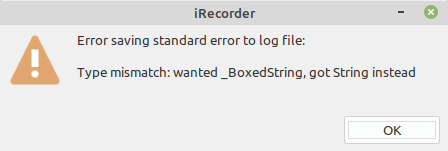
All I got was "Please Try Again Later as BBC iPlayer Servers Not Responding"
and
<IMG src="https://www.cogier.com/gambas/Screenshot%20irecorder.png">
 </IMG>
Posted
Regular
Thanks for suggestion but no need to use the gb.Desktop component as the SelectWindow app is now working OK. Using the Desktop.Windows property (with that component) returns a list of windows but documentation does not say whether it's sorted in priority order (which is needed to select window on top where user clicks on area of overlapping windows). I also like the idea that current method is consistent with the SelectArea app (both apps' appropriate Form & its Class code becoming part of my StreamRecorder app).have also been working on this. I think your life would be a lot easier if you used the gb.Desktop component. The details of the open windows, their location and size details are all there for the taking. Just find the open window you want and PictureBoxMain.Picture = hWindow.GetScreenshot(). Have alook at the attached.
UPDATE
the image you showed (when I tried to copy that by right clicking it and pasting it, didn't work. The Type Mismatch was an error in my coding, it should have said something like "Connection Error". This is the same problem I have with get-iplayer running in Terminal mode after more than a minute e.g. get-iplayer . (BTW You must key that dot). Stop get-iplayer by use of Ctrl & Z.All I got was "Please Try Again Later as BBC iPlayer Servers Not Responding"
and
Code
john@JohnPC:~$ get-iplayer .
get_iplayer v3.25, Copyright (C) 2008-2010 Phil Lewis
  This program comes with ABSOLUTELY NO WARRANTY; for details use --warranty.
  This is free software, and you are welcome to redistribute it under certain
  conditions; use --conditions for details.


INFO: Indexing tv programmes (concurrent)

ERROR: Failed to download BBC Alba schedule page (3/3): https://www.bbc.co.uk/schedules/p00fzl67/2020/w26
ERROR: Connection error: SSL connect attempt failed


ERROR: Failed to download BBC Four schedule page (3/3): https://www.bbc.co.uk/schedules/p00fzl6b/2020/w26
ERROR: Connection error: SSL connect attempt failed

^Z
[8]+  Stopped                 get-iplayer .
John
Posted
Regular
Could you try running get-iplayer in Terminal?
To do this key "get-iplayer ." as below (BTW You must key that dot). Stop get-iplayer by use of Ctrl & Z.
john@JohnPC:~$ get-iplayer .
get_iplayer v3.25, Copyright (C) 2008-2010 Phil Lewis
This program comes with ABSOLUTELY NO WARRANTY; for details use –warranty.
This is free software, and you are welcome to redistribute it under certain
conditions; use –conditions for details.
INFO: Indexing tv programmes (concurrent)
ERROR: Failed to download BBC Alba schedule page (3/3): BBC ALBA - Schedules, 22 - 28 June 2020
ERROR: Connection error: SSL connect attempt failed
ERROR: Failed to download BBC Four schedule page (3/3): BBC Four - Schedules, 22 - 28 June 2020
ERROR: Connection error: SSL connect attempt failed
^Z
[8]+ Stopped get-iplayer .
PS You can check the BBC iPlayer Schedule servers (which get-iplayer uses) are operative by using the appropriate URL (e.g. BBC ALBA - Schedules, 22 - 28 June 2020) in your browser.
John
Posted

Regular
johnaaronrose said
Charlie,
Could you try running get-iplayer in Terminal?
I must confess that I have not been following this thread at all, but just noticed you were asking Charlie to run get-iplayer. If its of any help, I just ran it from the terminal and it lists lots of programs as expected (actually, 8556 programs). The version I'm running is V3.25.
I'm using Peppermint 9 which is based upon Ubuntu 18.04 LTS. If this is of no help, then please disregard.
Posted
Regular
Thanks for the feedback. I'm using Ubuntu 18.04
Bionic Desktop 64bit. Jon Davies (get-iplayer maintainer) says that it works OK with Ubuntu Focal which he installed in VirtualBox. As I previously said get-iplayer used to work OK but it stopped working I guess about a month or two ago. I have tried it on my 2 Barebones PCs as well as a Laptop, but it fails on all three computers. That's why I suspect that the problem is in my Router or my ISP.
John
Posted
Regular
Putting on my Sherlock Holmes hat: it can't be the Firewall on my 3 Ubuntu Bionic computers as it works Ok on Windows 10 (in VirtualBox) on my main one. It can't be my ISP as it works on both Windows 10 & Raspbian. So it must be package(s) in Bionic which are not in Raspbian or vice-versa.
I've informed Jon Davies of the situation but no reply as yet. Any ideas?
John
Posted
Regular
Got get-iplayer 3.26 working on all computers i.e. Ubuntu Bionic (problem there was I had somehow disabled the Universe Ubuntu repo. When I re-enabled the Ubuntu Universe repo (which caused an update of 2 other packages), it then worked using Jon Davies' ppa) , RaspberryPi with Raspbian Buster (once I usedhttps://packages.hedgerows.org.uk/raspbian stable), Windows10 (in Virtualbox).
I'm now using snap (for get-iplayer) on Ubuntu Bionic & Raspbian Buster. That works fine.
So it looks like iRecorder problem (using get-iplayer) is resolved. Could you check it out for me using Compressed Source attached or the version on Gambas Farm (should be the same)?
PS I'll install Gambas stable on Raspberry Pi and check out iRecorder.
John
Posted
Guru
Posted
Regular
I know that sinking feeling when something has gone disastrously wrong.
John
1 guest and 0 members have just viewed this.