





InFile
Posted
Banned
PJBlack said
why not integrate bruces scripted into charlies infile or vice versa?
All things are possible

Can you make it take args Charlie?
I was thinking about doing something plugin like with ScriptEd
I love "External Tools" in Pluma, very handy , was thinking of something similar.
InFile could be easily added to a customisable list of tools.
would be good to auto-fill the fields and search by adding some args at runtime.
gb.args can take the effort out of it


Posted

Guru


..would be good to auto-fill the fields and search by adding some args at runtime.
OK here is a start.
<COLOR color="#FF0000">WARNING</COLOR> This is a development version of the program
Code
./InFile.gambas --helpWill get you: -
Code
			Usage: InFile <options> <arguments>

Options:
 -p --pattern <Pattern>                 File pattern to search e.g.'*.jpg,*.jepg'
 -s --search <Search>                   Text to search for
 -f --folder <Folder>                   Folder to search e.g.'~/pictures'
 -i --ignorecase <IgnoreCase>           Ignore the case when searching
 -R --recusive <Recursive>              Search in the sub folder of 'Folder'
 -V --version                           Display version
 -h --help                              Display this help
A sample command: -
Code
./InFile.gambas -p *.class -s WebView -f ~/Dropbox/gambas -i t -R tThe -i and -R commands need to start with "t" to be True. If it starts with anything else its False, but it must contain some text. I haven't worked out how to set it up without text - YET!.
Posted
Banned
cogier said
..would be good to auto-fill the fields and search by adding some args at runtime.
OK here is a start.
<COLOR color="#FF0000">WARNING</COLOR> This is a development version of the programCode
./InFile.gambas --help
Will get you: -Code
			Usage: InFile <options> <arguments>

Options:
 -p --pattern <Pattern>                 File pattern to search e.g.'*.jpg,*.jepg'
 -s --search <Search>                   Text to search for
 -f --folder <Folder>                   Folder to search e.g.'~/pictures'
 -i --ignorecase <IgnoreCase>           Ignore the case when searching
 -R --recusive <Recursive>              Search in the sub folder of 'Folder'
 -V --version                           Display version
 -h --help                              Display this help
A sample command: -Code
./InFile.gambas -p *.class -s WebView -f ~/Dropbox/gambas -i t -R t
The -i and -R commands need to start with "t" to be True. If it starts with anything else its False, but it must contain some text. I haven't worked out how to set it up without text - YET!.
try this..
Code (gambas)
- bArgCase = Args.Has("i", "ignorecase", "Ignore the case when searching")
- bArgRecursive = Args.Has("R", "recusive", "Search in the sub folder of 'Folder'")
Another useful thing is getting leftover args with Args.End
If once you have catered for args using Get() and Has() calls you can use the following to read any other args (it handy if you want to pass multiple args like a bunch of file names , search strings, etc withoug having to prefix them all)
Awesome stuff
I almost have a "External Tools" like thing going with my Editor now.
i can parse file name / file dir / selected text or all text to any shell command so should be able to select some text then search.
just having an issue with my variables at mo..
Posted
Banned
I had to fix the -i -R flag stuff.
i changed the vars to boolean and used Args.Has()
I've added it to my "External Tools" list of commands so it searches my gambas source code folder for selected text in class and module files.
(attachment removed)
It's quick
<VIDEO content="http://bws.org.uk/images/screenrecord-2021-02-13_00.46.31.mp4">[video]
Posted
Banned
Posted
Guru
BruceSteers said
Oh and recusive , typo on long arg :roll:
And 'folder' instead of 'folders' and '.*jepg' instead of 'jpeg, all fixed. Nice video too!
Posted
Banned
cogier said
BruceSteers said
Oh and recusive , typo on long arg :roll:
And 'folder' instead of 'folders' and '.*jepg' instead of 'jpeg, all fixed. Nice video too!
Haha , isn't it always the way

I thought you may like the vid , it's good to see it all in action
you should be able to use InFile now with Pluma "External tools" too.
I've uploaded ScriptED with my "External tools" addition now.
cheers for the nudge , been meaning to do that for a while
Bruce Steers / scripted · GitLab
Posted
Regular

Code (gambas)
- TaskGetFiles.Main()
So the interesting question for me is what triggers/runs the function Main() in GetFiles.class in FMain.class?
Posted
Guru
Copy the GetFiles class from InFiles into your new program then in FMain run this code: -
Code (gambas)
- TaskGetFiles As Task
Hopefully that will help. The line TaskGetFiles = New GetFiles As "TaskGetFiles" causes the 'Task' to run.
Posted
Regular
To make long story short:
The minute I removed the debug code in my task function, it works pretty well. Weird

Code (gambas)
- ' Gambas class file
- 'MyTask_FTS.class
- Inherits Task
- 'Debug sToday
- $QueryUpdate = "UPDATE App_variables SET Val='" & sToday & "' WHERE Var='LastCreateFTS'"
- 'Debug $Query
- $Query = "SELECT * FROM App_variables WHERE Var='LastCreateFTS'"
- 'Message("No variable defined")
- 'Debug "Action: Create Virt. Table: --> sToday '" & sToday & "' ist größer als der letzte Eintrag: '" & $Rec!Val & "'"
- DBS.Refresh_FTS
- 'Debug "No activities required sToday '" & sToday & "' ist NICHT größer oder jedoch gleich letzter Eintrag: '" & $Rec!Val & "'"
Posted
Guru
The problem with Task is that if it does nothing you can't see what's gone wrong. If you look at the second Task in InFile (SearchFile.class) on line 27 there is a Print statement. You can see this in your main program by using Task_Read(), see line 400 in FMain. In this case it returns the amount of files that have been searched, but you can Print anything helpful and return it to your program to get an idea of what's going on.
Posted
Banned
I've been checking out Dbus "gb.dbus"
Your filemanager opening function could possibly be done better with Dbus
I just tried the following on Cinnamon and it worked a treat
Code (gambas)
- DBus["session://org.freedesktop.FileManager1"]["/org/freedesktop/FileManager1", "org.freedesktop.FileManager1"].ShowItems([sFileName], "SHF")
no need to use filmeanager searching at all.
Notes
"SHF" is just an id string, can be anything
sFileName is full file path (multiple filenames can be given)
Darn , sorry dude seems it only works on Cinnamon and MATE (plus on mate it neede a file:// prefix)
So code more like this…
Code (gambas)
- OpenFM("/path/to/file")
- DBus["session://org.freedesktop.FileManager1"]["/org/freedesktop/FileManager1", "org.freedesktop.FileManager1"].ShowItems([sFile], "SHF")
- ' Other code here
Sorry fella I assumed that command would be on all desktops

Posted
Guru
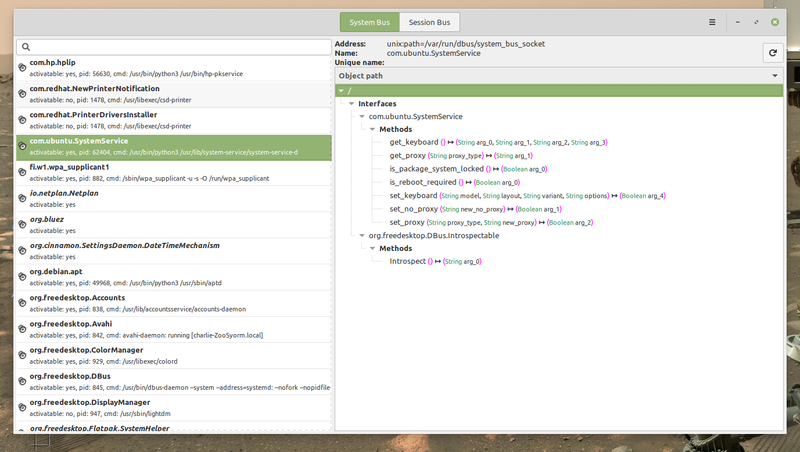
There is a program called D-feet (available from the Ubuntu Repos) that shows all the available connections on the D-Bus.
Have you created an example program in Gambas that will demonstrate what can be done with this?
<IMG src="https://www.cogier.com/gambas/D-feet.png">
 </IMG>
Posted
Banned
cogier said
I have just been having a look at D-Bus. I just need to go into a darkened room for an hour! Am I any wiser - Er.. NO!
There is a program called D-feet (available from the Ubuntu Repos) that shows all the available connections on the D-Bus.
Have you created an example program in Gambas that will demonstrate what can be done with this?
<IMG src="https://www.cogier.com/gambas/D-feet.png">
No I didn't , there is one on the Farm though made by Fabien Bodard and Benoît Minisini.
I've attached it here , this version i tweaked in 2 ways.
1. you only have to single click (as opposed to doubleclick) the left hand list to populate the right hand list
2. if you doubleclick a command in the right list it copies the command to the clipboard in a way you can use it (almost).
It was tricky finding the right application name/path/interface with dbus until i added the doubleclick feature
I've mostly been learning DBus by loooking for what commands i have in the DBus_Explorer then googling the application for command reference.
1 guest and 0 members have just viewed this.