





InFile
Posted
#1
(In Topic #575)

Guru


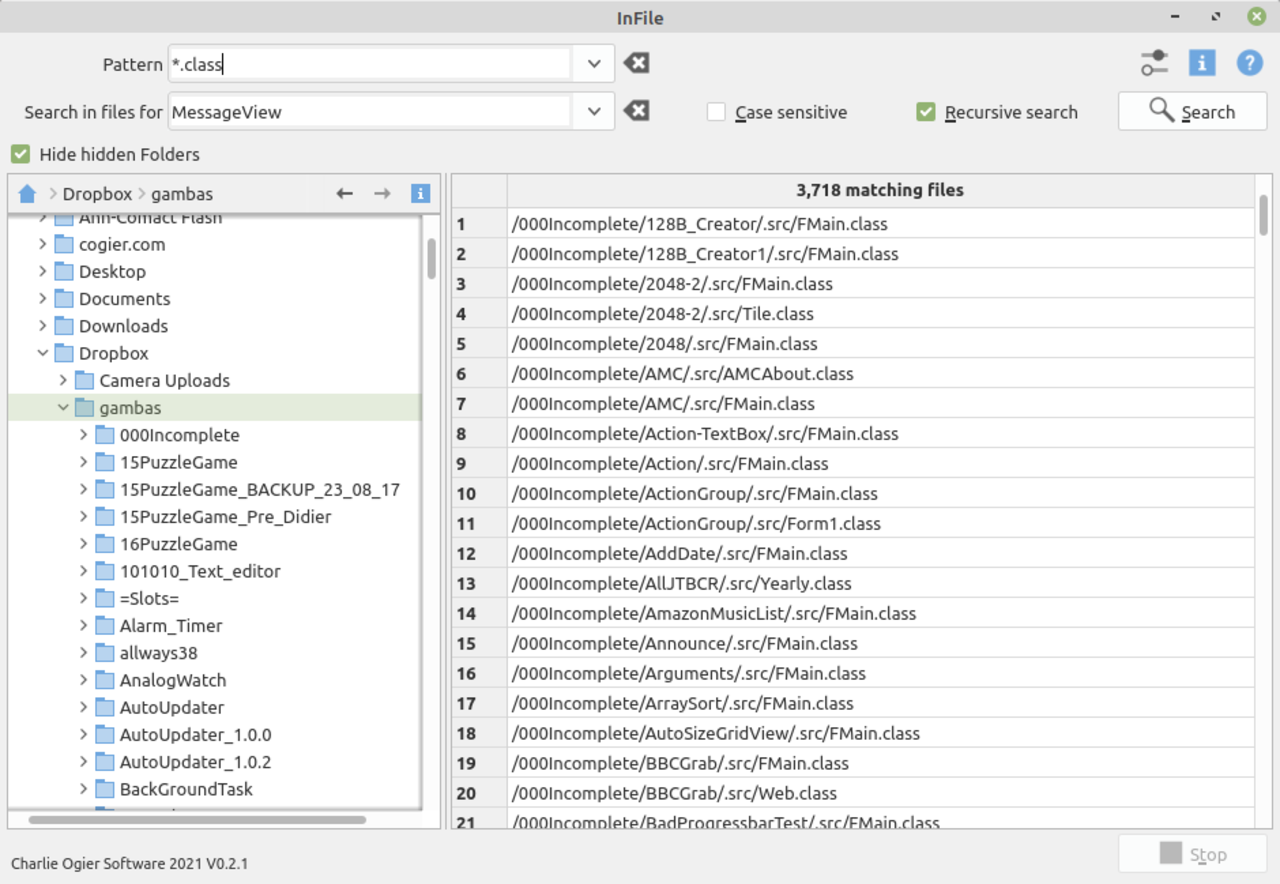
<COLOR color="#FF0000">The program searches for text within files.</COLOR>
I wrote this program to help me find code I have already written. One of its uses is as an addition to Steve's 'Little Helper', for example if you wanted a refresher on how you managed to get a TrayIcon to work a year ago, then this will find the code in seconds. It uses 2 'Tasks' to make the program flow nicely and the search is very fast, especially if searching text files. (3,718 Gambas class files searched in less than 2 seconds).
Please feed back any comments or issues.
<IMG src="https://www.cogier.com/gambas/In%20File.png">
 </IMG>

Posted

Regular

cogier said
…Please feed back any comments or issues….
Hi Charlie, I can't get this to load properly in the IDE. I think the problem is that there are no files in the .gambas folder.
Can you re-upload?
Posted

Enthusiast

Posted
Guru
Posted
Regular
The tar is now almost twice the size.
Thanks Charlie.
Posted
Banned
stevedee said
cogier said
…Please feed back any comments or issues….
Hi Charlie, I can't get this to load properly in the IDE. I think the problem is that there are no files in the .gambas folder.
Can you re-upload?
I think there was a recent change in gambas that no longer makes these files, i think they are made at runtime now so any new gambas project will be missing them.
This should not stop a project loading in the IDE tough.
Sometime I delete my .gambas folder and then load in the IDE and recompile the project to fix a glitch, it just remade the .gambas folder/files, only thing i found the IDE did not like is a missing .project file.
Wishing well.
Bruce
Posted
Banned
BruceSteers said
stevedee said
cogier said
…Please feed back any comments or issues….
Hi Charlie, I can't get this to load properly in the IDE. I think the problem is that there are no files in the .gambas folder.
Can you re-upload?
I think there was a recent change in gambas that no longer makes these files, i think they are made at runtime now so any new gambas project will be missing them.
Wishing well.
Bruce
Darn it, this could potentially stop ANY pre-made gambas exe working on an older without recompiling as the binaries will be missing

I need to investigate this…
Okay I investigated and found the files DO get made :-\
not sure where i'm getting my odd ideas from lol sorry
Posted
Banned

I just had to add this to FMain ..
Just so pressing return launched the search too
also after my first try I though some more default options would be good like for example "exclude .gambas files / hidden files / backup files / etc" a little for loop on the resulting string[] after the patern matching was my thought.
Nice though. muchos handy
Bruce
Posted
Guru
also after my first try I though some more default options would be good like for example "exclude .gambas files / hidden files / backup files / etc" a little for loop on the resulting string[] after the patern matching was my thought.
I'll look into that. Thanks again for the input.
EDIT
Bruce, in your code above what is the advantage of Object.Raise(ButtonSearch, "Click") compared with ButtonSearch_Click?
Posted
Banned
cogier said
Nice code Bruce, thanks. I will add this to InFile.
also after my first try I though some more default options would be good like for example "exclude .gambas files / hidden files / backup files / etc" a little for loop on the resulting string[] after the patern matching was my thought.
I'll look into that. Thanks again for the input.
EDIT
Bruce, in your code above what is the advantage of Object.Raise(ButtonSearch, "Click") compared with ButtonSearch_Click?
It seemed to me to be a more "correct" way.
Usually i would just use ButtonSearch_Click() but i have had issues when running functions from inside a KeyHandler event. I wasn't sure if the Activate was a proper Key event but just played it safe, i figured raising the event properly was a better way
Posted
Guru
..also after my first try I though some more default options would be good like for example "exclude .gambas files / hidden files / backup files / etc" a little for loop on the resulting string[] after the patern matching was my thought.
I thought long and hard about this but the program works the other way round. Setting the 'Pattern' to '*.class' would not show any .gambas files, hidden files, backup files etc. However, I have added the option to search through multiple 'Patterns'.
New features: -
<LIST>
- <LI>You can now search multiple 'Patterns' by separating each 'Pattern' with a comma e.g. *.class,*.form,*.png</LI>
<LIST>
- <LI>The search time is now displayed</LI>
<LIST>
- <LI>The context menu now allows you to open a selected folder in your file manager (see Help Requested below)</LI>
Help Requested
If 'Desktop.open()' is used to open a folder that's fine, but I have attempted to get your file manager to highlight the actual file. This requires knowing the name of your file manager so that a shell command can be run. (Shell YourFileManager & " " & "/selected/path/to/file")
This means I need to find out what your file manager's name is. Can you run the program, open the 'Option' and see if the correct file manager has been found? If all is well right-click on a displayed file and select 'Show in your File Manager' and let me know if it highlights that file. Thanks.
Posted
Banned
(Edit) oh now i see, select and open the dir not the file lol.
My filemanager caja was not detected on mint mate.
maybe because of this? …
$ xdg-mime query default inode/directory
caja-folder-handler.desktop
Maybe something without xdg , a simple…
wishing well
Posted
Banned
cogier said
InFile updated
..also after my first try I though some more default options would be good like for example "exclude .gambas files / hidden files / backup files / etc" a little for loop on the resulting string[] after the patern matching was my thought.
I thought long and hard about this but the program works the other way round. Setting the 'Pattern' to '*.class' would not show any .gambas files, hidden files, backup files etc. However, I have added the option to search through multiple 'Patterns'.
I think all my ideas may slow it down too much.
I was thinking along the lines of doing an xdg-mime query filetype fileName just to be sure the file is a text file not binary.
But i think that might slow it down a lot.
another option would be to quickly run through the resulting file list and remove any file of chosen extensions like *.gambas *~ , etc? I was looking at SearchFile.class Test() function to do it. odd though what i tried seemed to break recursion
Maybe your way is best , to just select the type you want rather than selecting a number of types you would not.
Posted
Banned
I altered the SearchFile.class like this…
The line…
Case "gambas", "zip", "gz", "tar"
any file extension in that list will be skipped when checking.
it's only because the result was returning .gambas files and i thought that was not really useful.
I do not know if the search routine tries to search EVERY file but if yes then omiting a few types might speed things up a bit
Wishing Well
Bruce
Code (gambas)
I had to let Test() run on every file though , for some reason skipping any Test() calls broke it so not really a speed up :-\
But for sure skipping testing some files will be a speed up
Just a suggestion though m8 , it's your proggy
Bruce
Posted
Guru
I have published the program on the Farm
Posted
Banned
cogier said
Thanks, Bruce, for the help with the file manager, I have adopted that. I have not added the 'exclusions' as I still feel that you should search in the files you want not exclude the files you don't, the program also has other uses, not just for Gambas, but thanks for the input.
I have published the program on the Farm
It's all good m8 , happy to help
One other good thing i managed to accomplish was I noticed when making the exe and with your "Make Desktop Icon" option selected gambas made the icon but did not set it's exe flag so the proper name (without the .desktop ext) and the icon did not show. so i reported that on the bugtracker and it's now been fixed (thank you Benoit)
Great app though, have had many a time when i wanted to find text in a file and had to troll google to find that grep syntax that does it
this app goes in the "ready to be useful" section
Ps. forgot to mention an unimportant typo …..
SetSerachTextBold()

Wishing well
Bruce
Posted
Banned
cogier said
Thanks, Bruce, for the help with the file manager, I have adopted that.
you forgot to remove the now not needed
A couple of other suggestions….
(Ps. no need to credit me for any of this lol, I do it just to help
)The line to open the dir…
A shell command might fail if there are spaces in the unquoted path.
would be better as..
also GridViewFiles_DblClick() copies text and then runs Desktop.Open() , I think that should call MenuFile_Click() or it's not using the filemanager stuff.
(hmm, I may be missreading your code here though and it's actually working as it should, sorry if so.)
All the best m8
Posted
Banned
cogier said
InFile updated
Help Requested
If 'Desktop.open()' is used to open a folder that's fine, but I have attempted to get your file manager to highlight the actual file. This requires knowing the name of your file manager so that a shell command can be run. (Shell YourFileManager & " " & "/selected/path/to/file")
This means I need to find out what your file manager's name is. Can you run the program, open the 'Option' and see if the correct file manager has been found? If all is well right-click on a displayed file and select 'Show in your File Manager' and let me know if it highlights that file. Thanks.
Just a note m8 , this does not work on caja and gives an error..
I do not know how many of the filemanagers do support that action but probably best to only allow it on ones you know that do to save any errors.
(attachment removed)
Posted
Guru
Ps. forgot to mention an unimportant typo …..
SetSerachTextBold()
Well spotted!
Opps! However neither of the above should cause a problem.
I have added this to my copy.
also GridViewFiles_DblClick() copies text and then runs Desktop.Open() , I think that should call MenuFile_Click() or it's not using the filemanager stuff.
(hmm, I may be missreading your code here though and it's actually working as it should, sorry if so.)
You have misread this, the idea is to open the file in whatever is appropriate, not show it in its folder.
Thanks for the input, it's really appreciated.
EDIT
Hi Bruce, I have added some error handling. Can you see if this works on your system? It's a fall back situation not an actual fix so the file in question will not be highlighted, but the program will not fall over. (I hope!)
Code (gambas)
Posted
Banned
cogier said
Ps. forgot to mention an unimportant typo …..
SetSerachTextBold()
Well spotted!
Opps! However neither of the above should cause a problem.
I have added this to my copy.
also GridViewFiles_DblClick() copies text and then runs Desktop.Open() , I think that should call MenuFile_Click() or it's not using the filemanager stuff.
(hmm, I may be missreading your code here though and it's actually working as it should, sorry if so.)
You have misread this, the idea is to open the file in whatever is appropriate, not show it in its folder.
Thanks for the input, it's really appreciated.
Happy to help m8, i know what it's like.
I appreciate the input i get about my programs too, can be a rare thing.
and if a program is worth making better/bug free then it's surely an effort worthwhile
cogier said
EDIT
Hi Bruce, I have added some error handling. Can you see if this works on your system? It's a fall back situation not an actual fix so the file in question will not be highlighted, but the program will not fall over. (I hope!)Code (gambas)
InFile-1.0.2.tar.gz
Sadly no my friend now it fails and pops up the error twice instead.
It's not a stdout error msg you can read sadly it's a gui message box pops up.
Here's how it works for me..
Sorry I re-wrote a couple of bits like using
If Not sMan instead of If sMan = "" (Benoit always insists on this so i assume it works better/faster)
and changed Shell to Exec as then no need to Quote the string at all
but Note i've only omitted caja from using the "manager" for files , other filemanagers may also fail though if they only accept dir args not files.
Wishing well
Bruce
Posted
Guru
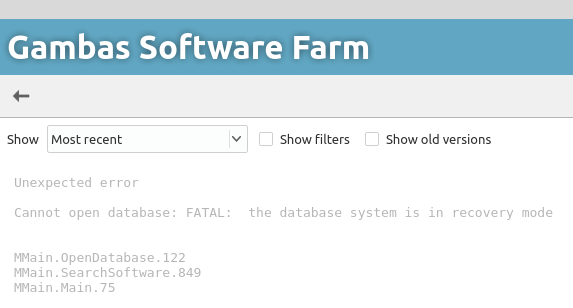
I'll update it on the Farm when it's working as all I get now (16:52 11/02/2021) is: -
<IMG src="https://www.cogier.com/gambas/Farm_Error.png">
 </IMG>
Posted
Enthusiast
Posted
Guru
Posted
Banned
cogier said
It's fixed now.
All i can find is 1.0.1 on farm
I have 1.0.2
cogier said
Thanks again Bruce. I am only going to test for Nautilus and Nemo (Ubuntu and Linux Mint) as I know what to expect. The rest will fall back to standard or 'sort it out yourself' mode.
Yeah , probably best to , xdg open is good enough.
Not sure how you'd test , multiple linux types and desktops is how i do it.
Been a bit busy but i mostly only have gnome and mate desktops to test it on and have done.
(btw your comment about nautilus being ubuntu and mint wasn't quite correct as i have both linux's and they both use caja because i use mate desktop. i think nautilus is gnome default not ubuntu or mint) (lol, sorry i feel i'm being picky now)
All the best
Bruce
Posted
Enthusiast
1 guest and 0 members have just viewed this.