





ImageSorter
Posted
#1
(In Topic #772)
Regular

This program will sort through all your JPG images and then create a copy (or if you wish a symbolic link) of the images and stored in a directory hierarchy based on the EXIF creation date. Thus if you took a photo on Christmas day last year and set the destination to be in your Pictures directory, it would place the photo in ~/Pictures/2020/12/25. The program can also cascade through a given source directory to find all photos with its sub directories.
You can find and download this project on my Github page: ImageSorter
The latest copy of the project can be downloaded by clicking on the green <COLOR color="green">Code</COLOR> button and then clicking on Download Zip.
<IMG src="https://raw.githubusercontent.com/PartierSP/ImageSorter/master/Images/Screenshot.jpg">
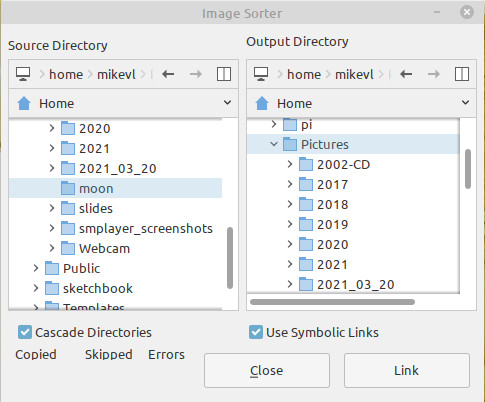 </IMG>


Posted

Guru


I have had a look at your code. You can make life easier by reducing the line below by using &/.
From: -
You are using Quit to close the Form. This is not recommended, see here.
As I have just commented in another post, the 'dark art' of expanding forms takes a bit of getting to grips with but have a look at your program with a fully resizeable form, attached.
Posted
Regular
That &/ is a cool tip. Thanks. When I uploaded the code I quickly scanned through it and I don't see why I didn't use a variable so I only have to construct that mess once and simply call the new variable. I forecast a revision in the near future.
I am an absolute noob when it comes to resizing forms. Back in my old VB days I used to have to move and resize everything manually within the program. I don't recall VB6 (the last VB I ever used) having any of the containers that would assist in this matter. I briefly looked at containers like this when I was looking at GLADE. But was having trouble with getting any code to work that I never got far with it at all. So for the time being I limited myself to writing staticly sized forms. I have since downloaded your EXIF program and had a quick peek and saw all the container use (BTW very nice program!
 ). It provides very good example of how they can be used.
1 guest and 0 members have just viewed this.