


Image Resize
Posted
#1
(In Topic #2042)

Expert


Using 'convert' from Image Magick from Gambas.
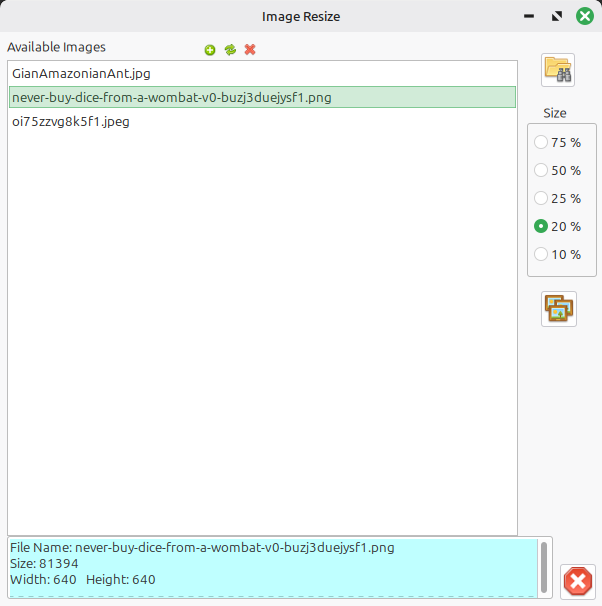
This is a Q&D (Quick & Dirty) application that uses the command line application convert from ImageMagick to resize images by percentage (%)I mainly use it to quickly reduce (camera) images to something that much smaller to send 'happy snaps' to family via email.
Not translated, so some folder names are hard coded in English - should be a quick and easy change.
If you right click on an image file, you can select to View the image in the app, Copy it to your Pictures folder, Delete or Open in your system default image application (Normally an image viewer ?)
Note# If you choose to display the image you can move it out of the way with a simple drag.
ImageResize.tar.gz
Cheers - Quin.
I code therefore I am
I code therefore I am


Posted

Guru


Code
sudo apt-get -y install nemo-image-converter

Posted
Expert
Told you it was (Quick & Dirty) - I've added the Me.Close to the cancel button click event. Attached for those interested.
ImageResizeV2.tar.gz
I've been using Mint for a very long time and have never heard of the nemo add-on. I'll check it out.
Without installing it yet, the only advantage to mine is that you can do bulk files, but that's only really useful for a few niche use cases.
Cheers - Quin.
I code therefore I am
I code therefore I am
Posted
Guru
Quincunxian said
..the only advantage to mine is that you can do bulk files…
The Nemo app can also deal with multiple files. I use it for posting holiday photos on my website. I reduce them from up to 6.0MB to 200kb.
1 guest and 0 members have just viewed this.