





Germinal - a terminal with some potential
Posted
#1
(In Topic #1226)
Banned
A gambas terminal application (bash)
Main Features..
* Bookmark folders and use the bookmarks to either cd the dir or input the text
* Customize look, Color, transparency, font
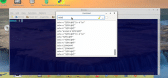
* Show bash history in a searchable list. (see snapshot)
* Edit current command line in a TextEditor
* Select/Delete current command line.
And the most recent addition and a very handy thing…
* Navigate the cursor using arrow keys while holding Ctrl (left and right move to next space, up and down move line)
Video clip of cursor movement https://youtu.be/QBhxohum3AQ
* Create custom commands to edit command line/selected text
Bruce Steers · GitLab
(Click to enlarge)


Posted
Banned
Basically do not resize the terminal when there is a long command line present.
It seems okay with short command lines but if there is a long command (more than one line) then resizing the terminal will make things go all weird.
also if you type say 'echo -n "Hello"' then there is no newline so the prompt is not on Column 0 , pressing up arrow to cycle through history will also go a bit odd for a moment. it seems the terminal sets the prompt to column 0 and renders the text at normal position but the TerminalView display does not correct for this for a couple of hits. (then it seems to adjust)
Posted
Banned
I have been using it for a long time and it's fully functional but the recent cursor movement addition was so awesome i had to upload it to the world right away. (i probably should have fully tested/debugged it first)
The custom command menu does not work and is still in development.
I'm slowly getting it ready. as a test i am firstly working on a function i want to add as a custom command…
Now you can press Ctrl+4 and it will either insert $() with the cursor between the brackets or if any text is selected it will put the selected text inside $() then put cursor back where it was.
I made a CommandLine.class that can get the current command line text and cursor position and then restore it,
I now use this for the cd menus/buttons. when you click a bookmark or cd button it clears the current command line, runs the cd command to change dir, then restores the command line/cursor position so a directory can be changed seamlessly and not affect your command.
Ctrl+A now selects the command line text only not all terminal text.
Ctrl+Shift+A selects the whole terminal text
latest commits will be here Bruce Steers / germinal · GitLab
I'll update the archive in the first post….
Posted
Banned
I've just ironed out some bugs in the new routines. : :roll:
I have made it so changing prompt line from showing full path to only folder also restores the command line.
V 1.0.4
Now to get working on the custom command feature

Current theory is to have the following…
Custom commands will be a sequence of events you can add of a particular type.
The types will be a choice of the following…
* directly insert the entered text.
* run as command/script and insert output.
* Key controls left, right, up, down, backspace, delete with a value and also home & end
The commands will be able to use placeholders
* $(Text) for All the command text
* $(SelectedOnly) for the selected text or nothing if nothing is selected
* $(Selected) for selected text or the whole command if no text is selected.
Posted

Enthusiast

you may should disable the selection of proportional fonts and just show monospaced … cause its very ugly ;-)
micha
Posted
Banned
PJBlack said
hai bruce,
you may should disable the selection of proportional fonts and just show monospaced … cause its very ugly ;-)
micha
Probably a good idea. Cheers
How do you like it though?
Used Ctrl to move the cursor yet? I'm loving that feature, it makes things like editing a paste of the gambas dependency lists sooooo much nicer
there's no other terminal like it

I've set "Fixed fonts only" now in the first posts archive
Posted
Enthusiast

Posted
Banned
It's a bit complex.
From the readme…
Making custom commands…
You can create commands to manipulate/edit the current command line.
Commands are made of sequences of either scripts or key commands.
Select the custom command editor from the menu to open the editor.
Press the Add button to add either a script or key sequence.
Add a Script:
Add a bash or gambas script. input the script into the editor.
Tokens can be used in the script for the following data..\
$(Text) = The whole command line (quoted)
$(Selected) = Selected text (or whole command line) (quoted)
$(SelectedOnly) = Selected text (or nothing) (quoted)
$(Cursor) = Cursor position
$(SelectStart) = Selected text position
There are 4 choices of what to do with your script output…
Ignore ; do nothing with the command output.
Insert at cursor position
Overwrite selected text ; replaces selected text
Overwrite command; replace the whole command line.
Add key sequence…
choose from the following selection of key commands.\
(all commands that take a value default to 1 if no value is given)
Delete=n ; Delete n chars to right (default is 1)
Backspace=n ; Delete n chars to left
Left=n, Right=n, Up=n, Down=n ; Move n spaces Left/right/up/down
Home ; Move Home
End ; Move End
Copy ; Copy selected text
Paste ; Paste clipboard
Cursor=n ; Position cursor
UnSelect ; Clear selection
RestoreCursor ; Put cursor back where it was
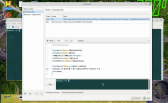
So as seen in the snapshot you can add commands using the list on the left.
After adding use the top right Add button to add either a command or a key sequence
use the Tokens button to see/insert the choices of tokens.
use the TextEditor to edit commands/key sequences
use the terminal below to test the commands.
(Click to enlarge)
Posted
Banned
[*] TrimLF option with scripts, ensures the command does not have a trailing LF and converts any other lf to ;
[*] handle root (i think) prompt detection did not work if root (ie, sudo su) , now it handles it.
How prompt detection works…
if not root the prompt line PS1 is set by the program.
when root it gets it from ~/.bashrc and i hope it works.
detecting the prompt is a bit of an issue and hard to do.
the best method i found is to use a Shell command that sets the PS1 (as i assume it), then cd's the detected dir, then echoes the prompt with echo "${PS1@P}"
PS. do not mess with PS1 it could cause issues.
added the ability to use command tokens and Eval the values in key sequences.
So now a valid key sequence text can be…
Right=If($(Cursor) > $(SelectStart), 3, 0)
Posted
Banned
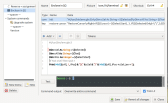
Custom command menu now supports sub-menus and pictures.
and a treeview to view/edit the order (drag-n-drop)
Picture of the custom command editor..
(Click to enlarge)
Posted
Banned
I was laziliy re-using a variable iPos2 for prompt detection that i thought was finished with in the code but it caused a recursion hang.
fixed now.
Posted
Banned
I was using Quit to close the program because if multiple tabs were open it would not close properly.
I tracked it down to me using Message() to ask the user to close all tabs. seems the hang was something about "a gtk modal window assertion" ?? so i put a Wait 0.1 after the Message() closes and that's fixed it.
Turns out using Quit is a BAD idea to exit ANY GUI application.
Posted
Guru


Thank you very much for this nice Terminal.
But I have a small problem. Although the programme integrates well into the start menu of KDE, I cannot start it from there.
Starting it under /home/.local/share/gambas3/bin/bonusware also fails.
Although there is a Germinal.gambas there.
Other programmes, including your GambasProcWatch.gambas, can be started in this way without any problems.
Can anyone confirm this?
Best regards, Poly
Posted
Banned
Poly said
Hello Bruce,
Thank you very much for this nice Terminal.
But I have a small problem. Although the programme integrates well into the start menu of KDE, I cannot start it from there.
Starting it under /home/.local/share/gambas3/bin/bonusware also fails.
Although there is a Germinal.gambas there.
Other programmes, including your GambasProcWatch.gambas, can be started in this way without any problems.
Can anyone confirm this?
Best regards, Poly
Hi , well i do not know what is wrong with the farm installer.
After installing from the farm on fedora I got no menu or icon.
I tried to run ~/.local/share/gambas3/bonusware/bin/Germinal.gambas but it did not run.
So I loaded the project into the IDE and compiled it and it made a new Germinal.gambas in the project folder. ~/.local/share/gambas3/bonusware/Germinal/
I then copied the new Germinal.gambas file to ~/.local/share/gambas3/bonusware/bin/ and it replaced a 160kb file with a 690kb one :-\
And that one works
Posted
Guru
Posted
Banned
Poly said
Many thanks for the very quick confirmation and for the suggested solution. Works like a charm
You're welcome
I found the bug in gambas farm installer too. it still uses the old gbc3 args -m and -p instead of the new args -f public-module -f public-control
Germinal has the project options "modules are public" and "Controls are public" set and this causes the farm installer to use -m and -p , and that causes the compiler to fail but it does not give an error value so it thinks it compiled okay.
The same will be said for ANY other farm project installed that has public modules or public controls set.
So I've fixed that too
Update Farm CSoftware.class, use public controls/modules properly (!356) · Merge requests · Gambas / gambas · GitLabBenoit will add that to stable pretty quickly as an obvious bug.
Posted
Guru
But it will probably be a while before I receive the update.
In the meantime, you have already shown a manual solution.
Many thanks for all your help.
Posted
Banned
I was using Quit if the -c (command) arg was used to run a command and exit
So I fixed that in 1.0.19
Then fixing that caused another problem :-\
so I fixed that too in 1.0.20
1 guest and 0 members have just viewed this.