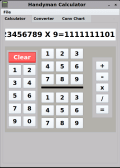
Fractions Caculator

Post

Posted
Rating:
#1 (In Topic #310)
Regular
cage is in the usergroup ‘Regular’
Here is the latest version of my fractions calculator.  I have changed the name to HandymanCalc with new features.  I have added a multi document interface which now includes a conversion utility, and a conversion chart.  Depending on your desktop and color scheme you may have to change the colors to your liking. I found that on Linux Lite if I added QT5 to the desktop the original colors worked fine.  Charlie I have tried to post this on the farm but it won't except my login and password.  If you could post it there I would greatly appreciate it. Also I finally found the divide by zero error and fixed it.

Attachment
Online now: No Back to the top

Post

Posted
Rating:
#2
Avatar
Guru
cogier is in the usergroup ‘Guru’
cogier is in the usergroup ‘GambOS Contributor’
Hi cage and welcome. I have had a look at your program and I have a few tips for you.
By grouping your buttons 0 to 9 I have managed to reduce 50 lines down to 3. See attached
There is no need to set Boolean values to False on starting your program as they are False by default.
You can declare the value of variables in one go. Variables of the same type can be declared in one line.

Code (gambas)

  1. IsWholeNum As Boolean = True
or

Code (gambas)

  1. Dim f, FirstFrac, SecondFrac As Float
  2.   Dim D2F, ValueToConvert, DecPont, WholeNum As String
  3.   Dim FindDecPoint, LengthOfVar As Integer
  4.   Dim Numerator3 As Float = Numerator1
  5.   Dim Numerator4 As Float = Numerator2
  6.   Dim Denominator3 As Float = Denominator1
  7.   Dim Denominator4 As Float = Denominator2
You can simplify: -

Code (gambas)

  1. TextBox1.Text = TextBox1.Text & KeyNum
To

Code (gambas)

  1. TextBox1.Text &= KeyNum
While I was trying to understand how to input things I crashed the program with the following key presses:
2 + [Inch] 2 =
I also changed the Form somewhat to make it expandable.
I hope it helps.
Attachment
Online now: No Back to the top

Post

Posted
Rating:
#3
Regular
cage is in the usergroup ‘Regular’
 Thank You for your suggestions I will give it a try.  As for crashing the program I should of put an error catch in the program.  You normally would enter the 2 then hit [Inch] and then click on [+].  I will put a catch statement into the program to catch the error.  I have been programming since 1982 which will tell you about how old I am.  Most of the programming I did was with data bases.  I am a self taught programmer.  At one point I was a programmer in the aerospace industry and was the first programmer to work as such without a degree.  Gambas is a great programming language how ever the lack of good documentation I think is what keeps it from being one of the top programming languages.  Hopefully this board will change all that.  I stumbled across this site and found it very useful so I joined up.  I hope to contribute as much as I can to this board.  Thank you for creating it.
Online now: No Back to the top

Post

Posted
Rating:
#4
Regular
cage is in the usergroup ‘Regular’
I fixed the crashing error and you can fix it as follows.

At the end of the btnEquals sub find:

Code (gambas)


Replace it with:

Code (gambas)

  1.     Message(Error.Text)

That will prevent the program from crashing when the numbers
are entered incorrectly.
Online now: No Back to the top

Post

Posted
Rating:
#5
Regular
cage is in the usergroup ‘Regular’
 With the advent of Gambas 3.14 the fractions calulator no longer works.  I am in the process of finding out why.
Online now: No Back to the top

Post

Posted
Rating:
#6
Avatar
Guru
cogier is in the usergroup ‘Guru’
cogier is in the usergroup ‘GambOS Contributor’
I have run the program in 3.14 and it seems OK to me. Is there a particular input that will crash the code?
Online now: No Back to the top

Post

Posted
Rating:
#7
Regular
cage is in the usergroup ‘Regular’
 For some reason it would only display the fractions after clicking on enter.  I have fixed the problem and now all I need to do is put together instructions on how to use it.  Should be posting the newer version in the next few days.  It may be a problem with the way Arch handles the Gambas programs don't know for sure.  I never ran these kind of problems while I was running Kubuntu 18.04.
Online now: No Back to the top

Post

Posted
Rating:
#8
Regular
cage is in the usergroup ‘Regular’
 I have reworked the Fractions Calculator and made it easier to use.  It uses a layout similar to the type of Fractions Calculator on a smart phone.  Enjoy.
Online now: No Back to the top

Post

Posted
Rating:
#9
Avatar
Guru
cogier is in the usergroup ‘Guru’
cogier is in the usergroup ‘GambOS Contributor’
Hi cage,

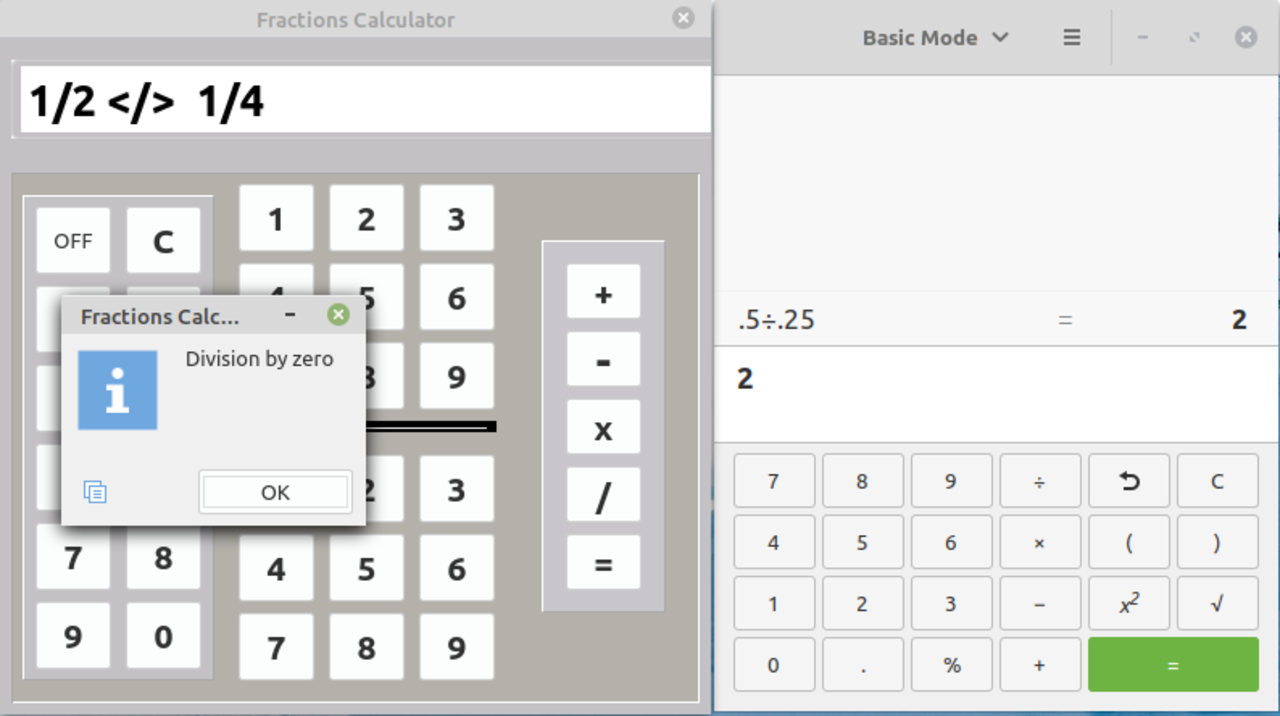
Sorry but I think I have found a bug here. I was trying to divide ½ by ¼ and got this: -
The error occurs at line 427.

<IMG src="https://www.cogier.com/gambas/CalcError.png"> </IMG>
Online now: No Back to the top

Post

Posted
Rating:
#10
Regular
cage is in the usergroup ‘Regular’
 It's not a bug in the calculator as far as I can find.  I will see what I can do to fix it.  The default calculator doesn't even like it with small decimals dividing by another decimal.  Example .50/.25 as you showed equals 2 and not .25.  So that answer is not correct either. How ever with the same default calculator dividing .50 /2 will give you the answer of .25. So the correct way to divide 1/2 by 1/4 would be to divide 1/2 / 2 which will give you the answer of 1/4.  Thanks for your input and trying out the calculator.
Online now: No Back to the top

Post

Posted
Rating:
#11
Avatar
Guru
cogier is in the usergroup ‘Guru’
cogier is in the usergroup ‘GambOS Contributor’
I have tried the new version but have run into a some issues.

1/. The menu items don't work. The code should be as below: -

Code (gambas)

  1. Public Sub mnuFracCalc_Click()
  2.  
  3.   'Load fractions calculator
  4.   'Workspace1.Add(FracCalc)
  5.   Workspace1.ActiveWindow = FracCalc
  6.  

2/. I tried 1/2 divided by 9/32. The program failed at FracCalc Line 426 (Sum = ValueToConvert). Sum is an Integer and ValToConvert is a String. The answer should be 1 & 7/9.
3/. I tried 1 divided by 8/16. The program failed at FracCalc Line 405 (FirstFrac = (WN1 + Numerator1 / Denominator1)) with a Divide by zero error. The answer should be 2.

Hope that helps.
Online now: No Back to the top

Post

Posted
Rating:
#12
Regular
cage is in the usergroup ‘Regular’
 Thanks Charlie for the input.  I will look into fixing it.  As for the menus I originally had them  there to load the different parts of the program.  I should of deleted them since the are all loaded at runtime.
Online now: No Back to the top

Post

Posted
Rating:
#13
Regular
cage is in the usergroup ‘Regular’
Found the problem but it was in a different location.   Now 1/2 / 9/32=1 25/32 instead of 1 7/9.  This because 7/9 is not a measurement in construction calculations, meaning the smallest number in in 64s.  Now 1 / 8/16=2 as you said.  I remove the unnecessary items from the menu.  The updated version is in the first post. I am always happy Charlie when you give your input.  I am a retired cabinet designer and builder and use this program in my design work.  Since there are no cabinet programs in Linux I now have to do the design work mostly by hand.  The errors are a result of staying up way to late to complete a project, so I end up over looking things. :oops:
Online now: No Back to the top

Post

Posted
Rating:
#14
Avatar
Guru
cogier is in the usergroup ‘Guru’
cogier is in the usergroup ‘GambOS Contributor’
Hi cage,

Your program seems to work as expected now. I took the liberty of remaking the 'ConvChart' complete with a search.

Hope it is of use.

Attachment
Online now: No Back to the top

Post

Posted
Rating:
#15
Regular
cage is in the usergroup ‘Regular’
Thanks Charlie, that actually makes the program perfect.  Don't know why I didn't think of that  :oops:
Online now: No Back to the top

Post

Posted
Rating:
#16
Avatar
Enthusiast
PJBlack is in the usergroup ‘Enthusiast’
manjaro xfce and gambas 3.15.90:

1/2 + 1/2 -> Type mismatch: wanted float got string instead : 2 +  3/3=3 is correct

pushing 9 left field -> 1

123456789 X 9=98765424 (never ever) galculator gives me 1111111101

so IF that thing IS calculating i need a second calculator to proof the result … nice
Online now: No Back to the top

Post

Posted
Rating:
#17
Regular
cage is in the usergroup ‘Regular’
1/2 + 1/2 -> Type mismatch: wanted float got string instead : 2 + 3/3=3 is correct

pushing 9 left field -> 1

123456789 X 9=98765424 (never ever) galculator gives me 1111111101

so IF that thing IS calculating i need a second calculator to proof the result … nice

Sorry to say I can not duplicate your problem with 1/2+1/2 as it comes out as 1 in Arch Linux.   This program was never meant to be use as a standard calculator although it can for normal usage.  Taking something like 123456789 X 9 is just a Lucretius example to prove that the calculator is no good.  If galculator serves you well then you have no need for this program, then don't use it.  Others may find it useful and use it. How ever I did find one small overlooked problem and fixed it.   By the way 3/3 is not a normal fraction used in construction.  Construction fractions are based in 64ths.  Look at the conversion chart and you will see what I mean. Personally I don't mind people finding things amiss with the program, but constructively.  Besides I only meant that Charlies mod to my program made the conversion chart perfect and not the whole program. The fix will be in the first post for those who want it.
Online now: No Back to the top

Post

Posted
Rating:
#18
Avatar
Guru
cogier is in the usergroup ‘Guru’
cogier is in the usergroup ‘GambOS Contributor’
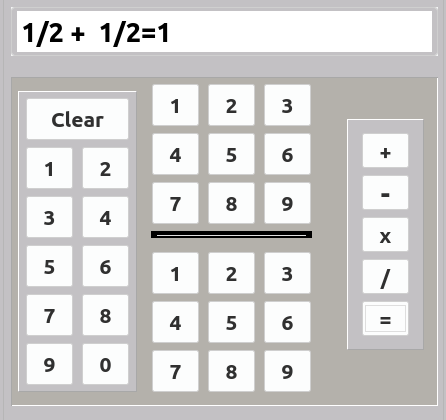
I tried ½ + ½ and got 1 as well.

<IMG src="https://www.cogier.com/gambas/half.png"> </IMG>
Online now: No Back to the top

Post

Posted
Rating:
#19
Regular
cage is in the usergroup ‘Regular’
On my version of Gambas which is 3.15.2 latest stable version, I tried 123456789 X 9 and I got the same answer as his calculator program.  

Code (gambas)

  1.  

Image

(Click to enlarge)

Online now: No Back to the top
1 guest and 0 members have just viewed this.