





FlareRenamer - program to rename files
Posted
#1
(In Topic #811)

Trainee

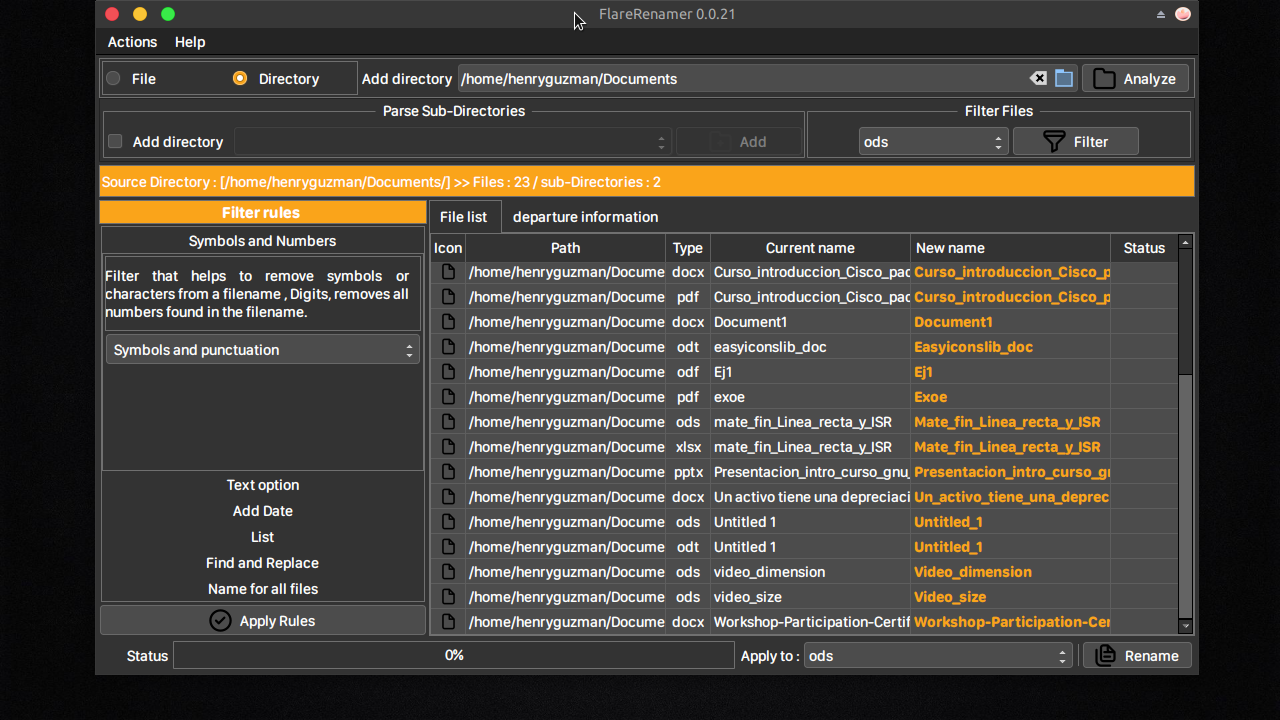
* File name in Lower Case, Upper Case, Capitalize .
* Find and replace word.
* Number the files .
* Add date .
* Add a name for all files(The numbering is enabled to avoid collisions).
* Different languages available.
* File filtering by extension.
The program has the RPM and DEB packages . also an OBS repository is available for openSUSE distributions where projects will be uploaded much faster . without further ado I leave you the address of the blog I made so you know about it . many thanks, suggestions to improve the program can be made at the following address.
henry151ea@yandex.com
<IMG src="https://blogger.googleusercontent.com/img/a/AVvXsEh5xnpV4jkxBWzySmf5BggM3LmT11lS2Bgh-0x6Kw_ELKwfvdkRJ6qd2i47z2u_zxwJWoCgVJmdYJqk0oXzl33GFXrpjCPHcjtjHltPbbuHaNxijTeKevWlvGPTVaKI0TdSgHWEoAkpLwlWzBNFLb-r6HREkVggTZUGdDQ9RIW4XVkE8S2NR5DP__YH=s1280">
 </IMG>
as well in the blog or in this publication.
project link
https://sourceforge.net/projects/flarerenamer/
blog in Spanish about the program https://areadevsoft.blogspot.com/


Posted

Guru


<IMG src="https://www.cogier.com/gambas/FlareRenamer.png">
 </IMG>
Posted
Trainee
I attach the necessary libraries and the path where it should go .
/home/henryguzman/.local/share/gambas3/lib/areadev
create folder "areadev" if not exists and change "henryguzman" by your username.
this will help me to know if the problem is when copying the libraries, again I appreciate your response in the forum.
unzip the libs file.zip in the following path
home/henryguzman/.local/share/gambas3/lib/areadev
Posted
Banned
You should be able to accomplish all the easy icons lib does with gb.desktop
Desktop.GetFileIcon(sFilePath, iSize)
DesktopMime.FromFile(sFilePath).GetIcon(iSize)
Various other means
Why exactly do yo use the easy icons lib and not gambas routines?
Posted
Banned
(I use this class in my apps and call SearchIcons() it works for things like gambas.desktop where the icon and exe name set have no path set, just 'gambas3')
Code (gambas)
Posted
Trainee
Posted

Enthusiast

(Click to enlarge)
second time i try … second version that did not work …
Posted
Banned
It checks if a file is a .desktop file and uses it's Icon= field anf if not it uses methods to get defaults.
Maybe it will help.
(Ps, the AppIcon class is the class i posted in the previous posts)
Code (gambas)
- df = Null
- ic = Null
- sDirs.Add(sVar)
- Case "desktop"
- sFiles.Add(sVar)
- sFiles.Add(sVar)
- mt = DesktopMime.FromFile($sPath &/ sVar)
- sFiles.Add(sVar)
- ' add the icon picture to the collection under it's file name
- icA.Add(ic, sVar)
- ' create icons either naturally or dir's first
- AddToGrid(mf)
- AddToGrid(mf)
- AddToGrid(mf)
- $hView.Refresh
- $hView.Scroll(iScroll[0], iScroll[1])
- Raise Loaded
Posted
Trainee
Posted
Banned
henry15ea said
i've been reviewing and trying to maintain the icon library, but as you say I'm going to remove the libraries and I'm going to check if I can load the icons with the example I put here, the versions in sourceforge remove them until all the modifications are complete . thank you for taking the time to test .
Honestly dude forget about libraries , nothing but headaches and lots of time trying to explain to people how to install them.
Here's a present for ya..
I just made a simple app that has a FileChooser object , just click a file and it loads it's icon at the bottom.
It has a function LoadIcon(Path As String)
It's basically the code i sent before but all cleaned up
It finds the icon and loads it into PictureBox1
You can see the difference in the picturebox and the filechooser icons, FileChooser just uses Desktop.GetFileIcon() i think.
My function checks .desktop files and loads their icons and also loads image icons as previews.
for a faster app just use a set (existing) icon size like 32 and change all the
Picture["icon:/128/iconname"].Image.Stretch($iIconSize, $iIconSize).Picture
statements to just…
Picture["icon:/32/iconname"]
My application can use any icon size so it loads an existing 128px icon and shrinks it
Posted
Trainee
Posted
Trainee
 </IMG>
well I have implemented the code that you have placed and this is the result, it works very well

Posted
Banned
henry15ea said
yes, as you say the libraries in Gambas are costing me a lot of work, yesterday I was doing tests with the code that you put and I have managed to load the icons very easily, now with the code that just shared I will study it to include it, if you give me permission truth .
Yes of course,
To be honest it is not the fastest of functions. I thought you would probably just want to load the loaded file to be renamed icon.
Just using Desktop.GetFileIcon(sPath, iSize, bPreview) may be much faster (but not as thorough) to load a whole dirs icons.
You're welcome

Posted
Trainee
1 guest and 0 members have just viewed this.