





ColorInfo
Posted
#1
(In Topic #790)
Regular

This environment is new to me so any suggestions are appreciated. This does what I want for my present needs, just don’t know if there may be a better way to do it. Thanks for the Forum, RodG.
<IMG src="https://i.ibb.co/1ZJRsvC/Color-Info-DT.png">
 </IMG>

Posted

Guru


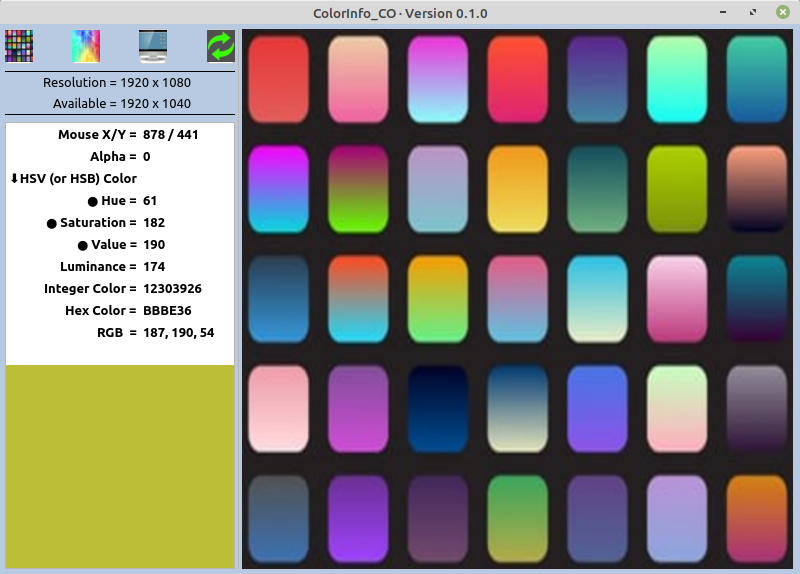
I have made some changes that include: -
<LIST>
- <LI>Form is now fully expandable
There is a Splitter incorporated. You can now resize the left and right sides of the Form
The TextArea has been replaced with a Gridview
I got rid of the 'Scroll' feature and 4 timers
There is now a special cursor when inside the PictureBox which replaces the 'pcbAlt', the colour is now displayed in the GridView</LI>
I hope you find it of some help.
<IMG src="https://www.cogier.com/gambas/ColorInfo.png">
 </IMG>
Posted
Regular
I have to say that I still struggle with the expanding forms a bit. I basically see how you are doing it when I look at your examples but when I’m doing it on my own I have difficulties starting with the proper foundation or fully grasping the nuances of the properties of the control being used. I’ll eventually get there, it’ll just be a while before I get full voltage to that light bulb.
Thanks again for taking a look at this, RodG.
Posted
Banned
Diverod said
Thanks Cogier, that’s a nice present for the holidays.
I have to say that I still struggle with the expanding forms a bit. I basically see how you are doing it when I look at your examples but when I’m doing it on my own I have difficulties starting with the proper foundation or fully grasping the nuances of the properties of the control being used. I’ll eventually get there, it’ll just be a while before I get full voltage to that light bulb.
Thanks again for taking a look at this, RodG.
You'll get used to it fella, i was rubbish at layouts when i first came here.
It comes with experience, just keep playing/experimenting with the Panel, HBox, VBox, Spliiter etc containers and creative use of the Arrangement properties for the containers and using either Expand or AutoResize on some of the controls.
Handy things to know..
When experimenting with layouts you can right click an object then select "Place into container" then right click the new container and select "Change into" to make it what you need.
a HBox control in a vertically arranged panel will by default expand horizontally but not vertically and objects inside set to expand will only expand horizontally (and the opposite for a VBox)
AutoResize can be weird on some containers especially scrollviews (scrollviews can be a real headache lol)
Have fun

Posted
Regular
BruceSteers said
Handy things to know..
When experimenting with layouts you can right click an object then select "Place into container" then right click the new container and select "Change into" to make it what you need.
Oh, now that's handy info!
I had figured out the first part of that but couldn't understand why there wasn't an option for the type of container to put it into. Thanks much for that tidbit!
1 guest and 0 members have just viewed this.