





Blockski+ , like Klotski but with a board editor.
Posted
Banned
V 1.1.0
Now the boards are zlib compressed archives and the program uses gb.compress to open/save them
Added an online updater than can either be used manually or auto-check on start or auto-check once per day.
If there is an update you can either auto-update or download a zip of the new version.
Note:
I have found that currently this program cannot be used outside of the project folder. :-/
I'm working on that now, fixing paths/file access so it can be run as a standalone .gambas executable not in the project folder.


Posted
Banned
BruceSteers said
Update…
V 1.1.0
Now the boards are zlib compressed archives and the program uses gb.compress to open/save them
Added an online updater than can either be used manually or auto-check on start or auto-check once per day.
If there is an update you can either auto-update or download a zip of the new version.
Note:
I have found that currently this program cannot be used outside of the project folder. :-/
I'm working on that now, fixing paths/file access so it can be run as a standalone .gambas executable not in the project folder.
Last update for today here..
I've altered the key names used when the highscores are saved as was using the boards file path, that was a bad idea especially when running standalone as the path changes. (don't worry if you've got some scores saved, it will convert to new format)
Also I have fixed the updater if running standalone.
So if updating and the program is standalone (Ie. an executable.gambas file not in it's project folder) then the update is downloaded and compiled in a temp dir then the executable gets overwritten with the new version.
if not standalone and in the project folder then the whole project folder is updated then recompiled.
I'm pretty sure it's all okay now after modifying to work standalone.
Posted
Banned
I had to stop using the traditional Mouse.X - Mouse.StartX style to move as i'm pretty sure the problem was if another button gets hit during the move the StartX position changed and messed up how the code works! . so now it notes StartX and StartY on left button mousedown and uses those coords till left mouseup occurs. that fixed it

I also changed it from using normal temp dir to using faster memory temp dir /run/user/1000 to unpack board files.
I then modded the TextLabel.class to support ReportBrush as background. so now can set Brush gradient backgrounds in the IDE

(Check out the TextLabel.class, not much code, I just imported ReportBrush.class and used the ReportBrush as a new TextLabel.Brush property, a similar method should be usable for most controls/containers)
Changed the game highscore/winner popups to now be only one popup.
Made the highscore panel and game Win TextLabels fancy with the reportbrush.
The fancy TextLabel highscore board
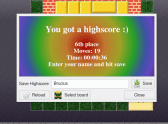
(Click to enlarge)
The new fancy TextLabel winner popup
Posted

Guru


<IMG src="https://www.cogier.com/gambas/Blockski3.png">
 </IMG>
Posted
Banned
cogier said
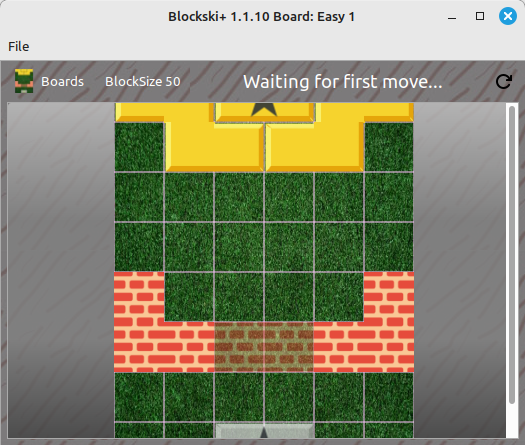
Hi Bruce, I think you need to resize the FMain form to about .H = 600 and .W = 550. If you delete your Blockski+.conf file and run the program I think you will see what I mean.
<IMG src="https://www.cogier.com/gambas/Blockski3.png">
Ahh yes i see the initial load before it saves it's window size is a bit small.
I made it adjust to the initial board size first.
Me.Resize(Board1.Width * 2, Board1.H * 1.5)
Settings.Read(Me)
Version 1.1.11 has it now
Cheers
Posted
Banned
I know it's possible and have even watched this a few times https://stavanger-guide.no/klotski.htm
But nope… haha super tricky that one
Posted
Banned
* Many a tweak, visual improvements, window placements,
* A few bug fixes in the editor. (i started making some boards instead of making the program and found a few)
* A few bug fixes in setup/first time things. (i installed on gf's laptop and found a few)
* A long game can now be saved mid way and reloaded and resumed later if you need to.
* Option to save/restore board size changes made on main play board.
I plan to keep this V 1.1.xx until i think it's out of beta stage and most of the bugs are squished then i'll goto 1.2
Let me know if you find problems.
Enjoy
Posted
Banned
Have done mostly all i think I will to the editor. (for now)
V 1.1.38 still lacks being able to multi-select blocks for move/delete but i'm not sure it's really a requirement.
Have added things like…
* being able to change block type (movable or wall)
* being able to change image.
* Added a few boards
* Changing Prize or Goal size/shape changes the other too.
* Various other tweaks / improvements / developments.
Close to complete now i think.
Still Todo… (I will do for sure)
* go through all the code and make all texts translatable.
Possible ToDo's… (I may or may not do)
* Multi-select blocks for move/delete/copy-paste
* Undo feature
A download is in the first post or use the online updater if you already have it.
Have fun
Posted
Banned
Crosses , because it's lots of crosses. trickier than it looks
I've done that one in 22 movesGaps , because you have to find/make gaps using the ghost walls , i've done in 183 moves
Catchy because the Z shaped blocks like to get caught on others so they cannot move
, 120 moves for me so far.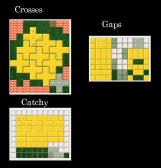
(Click to enlarge)
Posted
Banned
I've added GoThrough blocks. These are movable blocks that can go through ghost walls and the Prize block but cannot go through normal blocks or walls and normal blocks and the prize block cannot go through them.
Allowing boards like in the picture that have a block in the middle you need to move with the outer block
Have made all (i think) strings translatable.
V 1.1.40
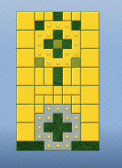
(Click to enlarge)
Posted
Banned
Added a bunch of new wall images and different colored block images.
Improved default wall image
A lego image

you can now right click a block in the editor and change all blocks of that image to another image in one go.
there was a block rendering glitch if the block size was not a multiple of 3 because of how the image is split 3x3 into 9 squares so now blocksize is forced to be a multiple of 3
Player names are saved to a selectable pop up list for quick change
Thumbnail generation improvement
It can now get an image of a board without loading it into view first so on first load from an empty thumbnail dir it makes all thumbnails. So now they are all visible in the board chooser before you click them. <EMOJI seq="1f60e" tseq="1f60e">😎</EMOJI>
(I recommend opening the settings page and hitting the kill thumbnails button to refresh them all.)
Enjoy
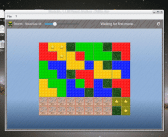
(Click to enlarge)
Posted
Banned
Now the block images (normal and lego) are just 2 greyscale pictures and the blocks are colored using Image.Colorize
So that opened up a few options..
In the editor
* popup menu to change single block color to any color mask you want.
* popup menu to change all blocks of the selected type to a color
* popup menu to randomly color all blocks of the selected type.
* I've removed all the no longer needed BlockRed.png/BlockGreen.png/etc image files.
On the play board
* make multicolor or remove coloring
Posted
Banned
Undo/Redo now exists in the board editor
Thumbnail dir can be set, either
$HOME/.config
/run/user/1000
or /tmp/gambas.1000
fixed a foolish bug in save games. i stupidly saved the block positions in pixel x,y and not dividing by block size to get relative positions, so if restoring on a different sized board it went horribly wrong

made a little side game where you can select any image file and it makes a square sliding puzzle.
fixed force modal window popup placement function and added options to settings
fixed a qt5 specific layout bug.
Set version to 1.2 as nearly complete and out of initial testing stages.
my gf has been playing it and reporting problems to me
And requesting updates :-/ so now there's an option to see the scoreboard on the main window and also opening prefs/board selector does not reset the running game but pauses it.
Posted
Banned
Because of a couple of rather huge and complicated updates is why.
such an update it deserved a version number change.
Now 1.3
Upgrade 1.
I finally added multi-selection to the board editor
And after doing that I then had to completely debug and modify all the functions using undo to support multiple objects. (what a headache that was)
There's still a couple of little bugs i think, nothing major.
You can multi-select blocks by either holding Ctrl and clicking them or holding control and dragging the mouse.
When selecting with control you do not have to place the mouse in a blank board area, it will give the selection rectangle even if on a block.
If pressing Ctrl the previously selected blocks remain selected.
Or if you drag the mouse from a blank board area not pressing control a new selection begins.
Upgrade 2
Another big and noticeable upgrade (especially when playing) is in the board view and how blocks were painted.
Previously each block image was painted every time with their Paint method in a board refresh.
This constructed and painted each block image with each board refresh and on larger boards i noticed a bit of a lag.
Now when a block is initially created or modified in the editor it creates the Image of itself and with each board refresh it simply paints the ready made image. massively decreasing lag.
Upgrade 3
I have changed how the board selector works.
Previously the preview of the board was an actual Board.class that loaded the game.
This has turned out to be slow especially with the big boards my gf created.
Now the thumbnail generation process makes a larger image and the preview shows this image instead of loading the board each time.
Downside is the thumbnail dir needs renewing. (it should detect and do it automatically)
If you have set the thumbnail dir to be in $HOME then it will work the fastest at first. (but not the very first ever run)
if set to XDG (memory) or Gambas (/tmp/Gambas.1000) it will generate thumbs that died with the last reboot when first run, and they will survive till next reboot.
Other upgrades include…
If the Updater is set to development branch it checks if the file "./.public/LastCompile.txt" matches the online copy as version numbers will likely be the same.
Posted
Banned
Some fixes in the editor. (editor is still a bit buggy but the play board is stable.
Now there is Vanishing walls (as seen on the right hand of the first pic) they disappear when the prize block goes over them.
My gf has made some huge boards based on the window$ Klotski game she liked.
Look at this monster…
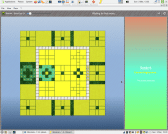
(Click to enlarge)
What a nightmare. the Prize block can only be moved 2 spaces at a time because of the annoying block inside it!
And just getting it out of the center piece takes a lot of moves. (i have yet to do it, lol, it's really tricky)
She estimates she can do it in about 2,900 moves :-\
This one is pretty tough too.
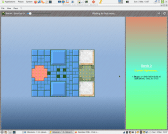
(Click to enlarge)
 Last edit: by BruceSteers
Posted
Banned
Made a number of fixes since adding the multi-select. :-/
Some internal stuff…
I added a String[][] array to the board that's a grid reference to all the blocks, each String is a list of blocks occupying that space.
This speeds thing up slightly as now i am only referencing simple strings not complete block objects.
Checking if a block exists is now all done via the map array.
This allowed for a trick that i have used for the Tetris board. the board paint method can just paint a single block tile if a string exists at any grid part, ignoring blocks on the board.
So after a block has fallen and settled it is removed without removing the reference from the grid map.
so there is only ever one block on the board , the falling one. and when a line is filled i can simply delete the String[][] array line and add a new one to the top. The block on the board match the array.
Well it's been a fun adventure.
I have not used the klotski board editor much but it's getting there slowly with regards to the mess i made when adding multi-selection.
use it carefully, (mostly just don't rely on the undo feature yet)
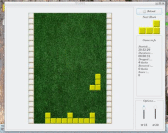
(Click to enlarge)
Posted

Regular

Posted
Banned
Technopeasant said
Nice work Bruce.
Thank you kind sir. <EMOJI seq="1f60e" tseq="1f60e">😎</EMOJI>
It's getting there bit by bit <EMOJI seq="263a" tseq="263a">☺️</EMOJI>
Posted
Banned
Mostly the problems were caused by 2 things i think…
1. The BlockOverlap(hBlock, X, Y) method was returning the hBlock where it should have only returned other blocks that hBlock overlapped.
2. If the mouse went beyond the board limits something silently went wrong and caused errors in the layout.
So now BlockOverlap is fixed and the mouse can no longer go beyond the board limits during a drag event. (not sure if that'll work on wayland)
Save/ restore was also not working as expected.
It used to just save all the block names and their positions. then on restore it loaded the board and moved all the blocks. this turned out to be buggy. i think maybe some blocks loaded with different names.
So now it saves every blocks complete config (type, shape, size, color, etc) and on restore it clears the board of blocks and then creates new ones for each saved item. This seems to be working fine now. The bad side is previously saved games can no longer be restored. (sorry about that)
Added features in version 1.3.27 …
* AutoSave in the editor ,set how many seconds to check if the board has changed and auto-save the changes.
* Shape editor now resizes. size can be changed in the shape editor and if an outer row/column is blank the block size is automatically reduced to fit.
* My GF was 2000+ moves into a game when her laptop gave a critical battery warning and before she plugged in the laptop died and she lost her game. so I added a battery checker/warning, you can set the battery percentage to warn at.
Posted
Banned
I found a few issues that were mostly related to blocks going outside the board area causing errors.
So now you cannot move blocks outside the board and you cannot create or paste blocks outside the board (they will be automatically moved within the board)
The swap buttons that swap width and height values now work better, if a block has a shape it is rotated like a tetris block.
the board cannot shrink below any block positions now either by swapping dimensions or manually setting.
The shape editor now can change width and height and will auto-trim any blank edges.
There has been many a tweak/fix.
Current status (known bugs)
Almost finished.
The play board is pretty darn stable and working well.
There is only one bug i know of, a "vanishing wall" can disappear when the prize block is just "next to it" and has not actually crossed it. (i'll get around to fixing that sometime)
The editor possibly has a bug or 2 still. mostly i think with undo/redo feature
but it is very usable now. I'm not sure it needs any more features, for now i will just be keeping an eye out for bugs.
V 1.3.35
Gambas One - Gambas ONE
Posted
Banned
Blocks can now be flipped horizontally or vertically
A new paint mode for Wall blocks PaintErase. if paint mode is set to Erase it does not draw the wall but it erases the map beneath it giving invisible edges.
(see the attached snapshot that has large Erase walls on each corner)
Added some more boards made by my girlfriend who is complaining much less about bugs now
lol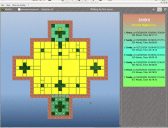
(Click to enlarge)
Posted
Banned
I discovered it looked terrible if using a system dark theme (see lower picture) :shock:
So i have now fixed that.
Benoit advised that using Picture["filepath"] to load pictures inverts them if using a dark theme and to use Picture.Load("filepath") instead.
had to do it for the block images/ background image/ everything that was not a gambas gui image basically. sigh.
i hope i got them all
Last edit: by BruceSteers
Posted
Banned
ScoreShare
When you open the ScoreShare window and hit LogOn it uploads your scores to the webserver and they are visible to other users while you're logged in.
you can see scores from any other users that are currently logged on.
the web server is a simple gambas gb.web cgi tool that uploads your score file when you log in and removes it when you log out. while you are logged in the file is accessible to all.
(EDIT: now default is to not remove your score from the server when logging out but leave them there for 24 hours)
(Ps. logging in does not require account or password, it just uses the name you select (or User.Name) and your host name)
You can merge either a single boards scores or all of their boards.
So if you and your friends/partners/whoever both run the game and log on the the ScoreShare at the same time you will be able to see each others scores and merge them into your own.
Merging is Read only.
Ie. only their scores import to yours, for them to get your scores they must merge yours from their program.
This is currently working on the development branch but i want to do more testing/error handling before adding it to main branch.
git clone Bruce Steers / Blockski+ · GitLab –branch=development
(see picture)
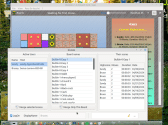
(Click to enlarge)
Posted
Banned
Have added a way to add an user icon.
and made it load icons for each board.
So now when it connects/logs on it sends a settings file containing your scores and your icon image (converted to text)
You can import/merge scores from a single board from any user or all their boards at once.
Merging simply joins 2 scoreboards and "Sorts" the scores, omitting any duplicates and then trims the excess.
Let me know if you have any problems with it, thanks
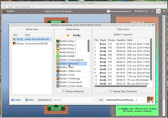
(Click to enlarge)
Posted
Guru
1 guest and 0 members have just viewed this.