





Blockski+ , like Klotski but with a board editor.
Posted
#1
(In Topic #1183)
Banned
Much like the game Klotski
Move blocks around a board in order to get the Prize block to the Goal block in as few moves as possible.
I've made this because my girlfriend likes to play Klotski but the windows/python version she has does not play well on a laptop screen and she does not like the gnome version levels. so i made a version that she can make her own levels on

(should hopefully keep her quiet for a while
 )
)Current status: a working game with a number of boards and features.
Features… (edited for the more recent version)
Editor:
* Create and edit new boards.
* Create blocks, edit shapes.
* Use custom board pictures.
* Use custom block/wall images
* Set block colors
* Undo/Redo
* cut/copy/paste/delete
* Click away and see
Game:
* Adjust block size of the loaded board to make it fit screen/window
* Remember block size change on next load.
* Save high scores
* Make blocks multicolor
Also:
* Online updater
* change look of board
* set a preferred default block color
* Online score sharing so you can merge other peoples scoreboards.
* various other options
Still needs fully testing.
The editor has a bug or 2 still but the play window is pretty stable.
Snapshots…
The main window…
The Board Editor…
Note: the following link is the latest updated version. long after this initial post.
Bruce Steers / Blockski+ · GitLab
 Last edit: by BruceSteers


Posted

Guru


Posted
Banned
cogier said
Could you add some help? I haven't a clue what I am expected to do!
Do you mean game play or board building?
Gameplay is simply slide blocks about to get the prize block (one with the star) to the goal block (grey one with star) in as few moves and as little time as possible.
Blocks can only move to free space and if the way is not blocked by other blocks.
Only the prize block can move through the ghost walls.
The editor is fairly self explanatory.
You can move, add, remove blocks.
You can set block size and shape.
Like I say it's very WIP at mo.
Consider them s a preview of the finished game that will have boards and docs <EMOJI seq="1f60e" tseq="1f60e">😎</EMOJI>
Posted
Banned
Posted

Regular

The winner popup is strange when run with "current desktop". Its titlebar needs to be clicked to get it to fully show. Works fine on qt5.
Occasionally the blocks get stuck, frequently when the target clock is in the ghost wall, but also sometimes happens when moving a normal block. The only clue I can see is that it happens when they are next to or near a wall.
Haven't tried the builder yet.
b
Posted
Regular
The timer is w a y out! And I got an overflow in Board1_Win() at the DateDiff. I don't think the timer should start until the player tries to move the first tile. It was counting while I was adjusting the tile size.
I can't get the editor to save my new layout. But the game is started with it???
I appreciate that it is a WIP, just noting some things you may not have seen.
b
Posted
Banned
thatbruce said
Thus far, this works much better under qt5.
The timer is w a y out! And I got an overflow in Board1_Win() at the DateDiff. I don't think the timer should start until the player tries to move the first tile. It was counting while I was adjusting the tile size.
I can't get the editor to save my new layout. But the game is started with it???
I appreciate that it is a WIP, just noting some things you may not have seen.
b
Thank you Mr B all reports are welcome
I think there was a problem with the timer not being stopped when going from game to board editor.
It "should" start with the Board1_Started event and stop with the Board1_Win, i added some timer stopping code now so hopefully fixed most of those issues.
Also the Win event did not count the last move so fixed that.
I also now have added a Board.Frozen property that stops the board doing anything after a Win event until reloaded as you could still move blocks after a win and that would restart the timer..
And sorry yes there was a lack of code that refreshed the board menus/layout after saving a board so although it saved it did not show till closed/re-opened. have fixed that too
I also added a way in the editor to shift all board blocks up/down/left/right with ctrl-up, ctrl-down, etc
attached is v 0.0.3
Thanks again for trying/testing
Posted
Banned
I'm working on it.
You are right Mr B it is when the mouse is being dragged over a wall.
The next update will have movement fixed
Posted
Banned
if the pointer moves too far away from the block the X or Y position will stick while the other moves.
It regains grip if you move closer to the block.
I may have to completely redo the mouse movement routine a different way to get this right

Posted
Banned
Bruce Steers / Blockski+ · GitLab
I just uploaded an update that now has copy/paste blocks in the editor and tiled paint mode now supports the configured shape as well as build mode. Plus a fix that now properly enables the delete button on the settings custom wall image list.
(I'll attach it to the first post anyway)
Just to briefly explain the paint modes..
Stretch will stretch the block image to fit the whole block rectangle (shapes are not possible with stretch mode only square/rectangle)
Tiled will paint the block image for each part of the block shape.
Build splits the image into 9 little squares (3x3) so there are 4 corner images, 4 side images and a center image then uses the parts to build the block shape.
Some modes will work better for different things.
Ie,
Tiled works better for walls as Build breaks up the brick pattern too much.
But tiled is no good for the default movable block as the image has a transparent margin so a 2x2 block will just look like 4 individual blocks! so Build is better.
Almost ready to wind down the coding and start making some boards now
Then will commeth the beta Version 1.0

(goto first post for archive)
Posted
Banned
Just a little bug i've noticed where a block can move diagonally 1 space but it shouldn't really because block corners are in the way.
Plus i just tried the new Medium 2 board and i think it's impossible to do :-\
EDIT: i just fixed medium 2 board before going to work.
and added a check before saving a board that is not in edit mode and may have been moved around for testing.
Posted
Banned
I have also improved movement (the direction getting stuck) it used to just NOT move a direction if the mouse was more than one block away. Now it tries to move 1 space in that direction not stay where it is so this has improved it a lot.
Todo:
* Removable walls (walls that can be destroyed somehow)
* To be able to select multiple blocks for copy/move/delete.
* Highscores
* And make many many new boards.
Posted
Banned
Archive is in the first post Blockski+ , like Klotski but with a board editor. - Gambas ONE
The editor still needs some upgrades but is pretty functional now.
Added thing like…
* New board button now opens a form to set path/dimensions instead of just an InputBox for name.
* Settings window, Change "Default background image" makes background for all boards that have no image set use this image.
* made a clone of the gnome Klotski Daisy board.
Enjoy
Last edit: by BruceSteers
Posted
Guru
Posted
Banned
cogier said
Have a look at Boards>Hard>Hard 2. It's very easy!
haha yes sorry the latest board was an unfinished half build :-/
How did you find Hard 1 ?
I'm just about to upload V1.0.1 as there's been some changes
havent played Hard 2 yet but i think it's okay for now
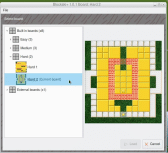
I have added a new board selector that previews the boards and generates a thumbnail image in ~/.config/Blockski+/ that makes it look much better.
I just have to add code to update the thumbnail when a board is edited/saved
(EDIT: I have done that now)
(Click to enlarge)
Posted
Guru
How did you find Hard 1 ?
Hard! :? . I haven't completed it. Will try again…..
Posted
Banned
cogier said
How did you find Hard 1 ?
Hard! :? . I haven't completed it. Will try again…..
Cool , then the game challenge is good
I can do it in 2:30
70 moves
Posted
Guru
<IMG src="https://www.cogier.com/gambas/Blockski1.png">
 </IMG>
Posted
Banned
cogier said
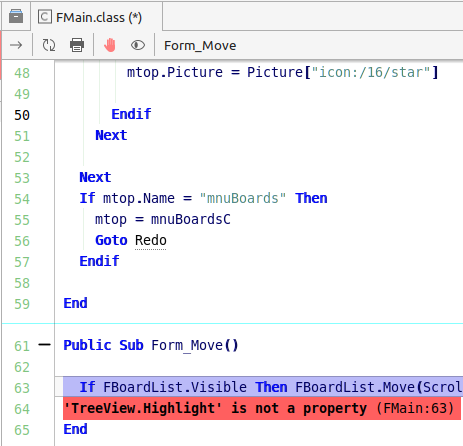
I can't run the latest version 1.0.1.
Aah cherers , must be a new property .
i've removed setting from the IDE designer and used code with Try to stop error on previous gambas versions.
V1.0.2
Last edit: by BruceSteers
Posted
Banned
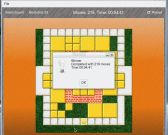
lol219 moves , nearly 5 minutes
(Click to enlarge)
Posted
Banned
I added loads of tooltips and also a ShowTooltips option in the preferences
also an override for board showgrid settings so you can use the board settings or override to show or not show grid on all boards.
link in the first post Blockski+ , like Klotski but with a board editor. - Gambas ONE
Posted
Guru
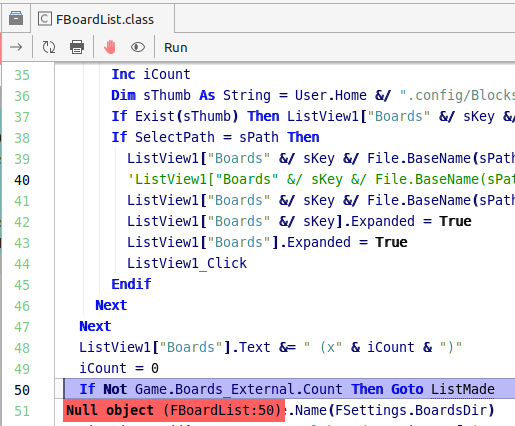
.I was showing the wife how to play it then clicked on Boards and….
<IMG src="https://www.cogier.com/gambas/Blockski2.png">
 </IMG>
I'm using Gambas 3.18.4
Posted
Banned
cogier said
I managed to do the hard one as provided by Version 1.0.5 on start up
I was showing the wife how to play it then clicked on Boards and….
I'm using Gambas 3.18.4
Oops , appologies for that.
I think because i removed the old menu creation routines that initialized the board lists, it should be fixed now
Thanks for letting me know
Last edit: by BruceSteers
Posted
Banned
Fixed in 1.0.7
EDIT: actually it was not fixed, fixed in version 1.1.8
Am currently starting to add some kind of highscore system
Posted
Banned
Each board has it's own highscore list
The number of remembered scores can be set
1.0.9 has a bugfix where the score settings (settings key made from the file paths) were different if run through the IDE or running the executable. so essentially 2 sets of scores depending on how run. now it should show the same either way.
1 guest and 0 members have just viewed this.