





a Gambas recent files Lister (TrayIcon)
Posted
#1
(In Topic #710)
Banned
I call it GLaunch
I have put in in my startup applications so it starts with my desktop. (Note: i HAD to put a 2 second delay on MATE)
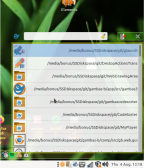
It makes a tray icon and populates a list by reading the gambas recent files save file.
It gets the icons (for the projects) and displays them in either the right click popup menu or the left click gridview Form.
Pop menu offers project can be launched/folder opened.
Left click an item and it loads the IDE with the project.
If system tray is not supported it makes a psuedo icon (small borderless window) you can move/lock
Option to set GUI mode like gb.gtk / gb.qt
(Click to enlarge)


Posted

Enthusiast

the arrangement of your desktop icons is … "$%§&$/(&)/=(?)(TURESRXGCHJV
ok just took my psychotropic drugs … now he is quiet :-)
again a very nice idea from you
Posted
Enthusiast
MakeIcon 15
Code (gambas)
MakeIcon 36
Code (gambas)
- dtf = "/home/" & u & "/Desktop/" & n & ".desktop"
Code (gambas)
- dtf = "/home/" & u & "/Schreibtisch/" & n & ".desktop"
Posted
Banned
The make launcher command is looking for FMain.Icon.
Easily fixed.
Thanks Mike <EMOJI seq="1f60e" tseq="1f60e">😎</EMOJI>
And that there Is what we call the desktop of a developer <EMOJI seq="1f609" tseq="1f609">😉</EMOJI><EMOJI seq="1f923" tseq="1f923">🤣</EMOJI>
Makeicon 15,
Why did you remove that line?
My command will use your user name even if run as root if asked to..
You broke it <EMOJI seq="1f632" tseq="1f632">😲</EMOJI>
Re. Desktop…
Darn it why can't you Germans just speak English? <EMOJI seq="1f923" tseq="1f923">🤣</EMOJI><EMOJI seq="1f923" tseq="1f923">🤣</EMOJI>
I'll use the gb.desktop command instead.
Cheers again
Posted
Enthusiast
BruceSteers said
Thanks Mike <EMOJI seq="1f60e" tseq="1f60e">😎</EMOJI>
micha or pj would be quite sufficient … but mike is still ok
BruceSteers said
Makeicon 15,
Why did you remove that line?
My command will use your user name even if run as root if asked to..
You broke it <EMOJI seq="1f632" tseq="1f632">😲</EMOJI>
yeah … thats what i can do best … did you tried with a username longer than eight chars?
BruceSteers said
Darn it why can't you Germans just speak English? <EMOJI seq="1f923" tseq="1f923">🤣</EMOJI><EMOJI seq="1f923" tseq="1f923">🤣</EMOJI>
i do speak english but it seems that xfce like german more
 <EMOJI seq="1f923" tseq="1f923">🤣</EMOJI>
Posted
Banned
PJBlack said
MakeIcon 36Code (gambas)
Code (gambas)
You (or rather "I") should use this.. (as it has the gb.desktop component)
Code (gambas)
I've updated the above archive
 cheers again Micha
 About the username with more than 8 chars..
Here is the function that gets the name.. i cannot see how a difference in number of chars will affect anything?
Posted
Enthusiast
BruceSteers said
About the username with more than 8 chars..
Here is the function that gets the name.. i cannot see how a difference in number of chars will affect anything?
User.Name = "mnaltrogge"
Me.UserName = "mnaltrog" because
Code
w -hCode
mnaltrog tty7      07:29   11:40  36.84 s  0.99 s xfce4-session
mnaltrog pts/0     07:40    0.00 s  0.06 s  0.00 s w -h
Posted
Banned
Had a few updates/tweaks/fixes
(see first post)
Posted

Guru


I noticed that the 'Show toolbar' option still says 'Show toolbar' when the toolbar is showing!
There is an unused variable $List (Line 12 fList.class)
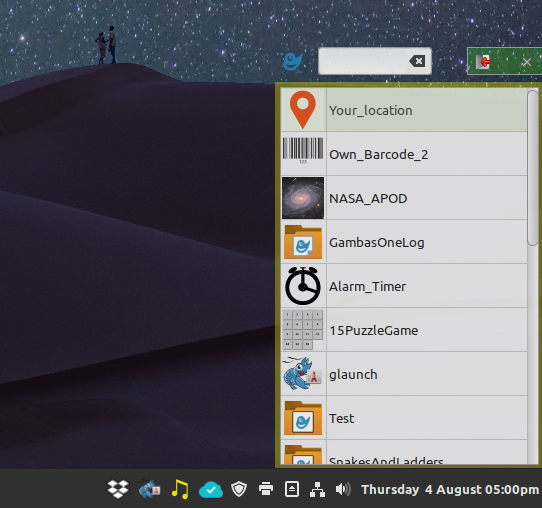
I found the listings with '/here/there/and_down_here/somewhere/etc/' a bit overpowering, so a possible option could be added to simplify this. I have changed the following lines: -
Code (gambas)
- GridView1.Columns[0].Width = -1
- 'GridView1[GridView1.Rows.Max, 1].Text = m.Text
- 'GridView1[GridView1.Rows.Max, 1].Alignment = Align.Right
- sDates.Add(m.Tag)
The result is, but it doesn't work any more, will check on this later..: -
<IMG src="https://www.cogier.com/gambas/GLaunch2.png">
 </IMG>
Posted
Banned
cogier said
I like this little program. It is now installed it on my Linux Mint Cinnamon system without issue.
I noticed that the 'Show toolbar' option still says 'Show toolbar' when the toolbar is showing!
There is an unused variable $List (Line 12 fList.class)
I found the listings with '/here/there/and_down_here/somewhere/etc/' a bit overpowering, so a possible option could be added to simplify this. I have changed the following lines: -Code (gambas)
The result is, but it doesn't work any more, will check on this later..: -
Cheers Charlie, glad you like it.
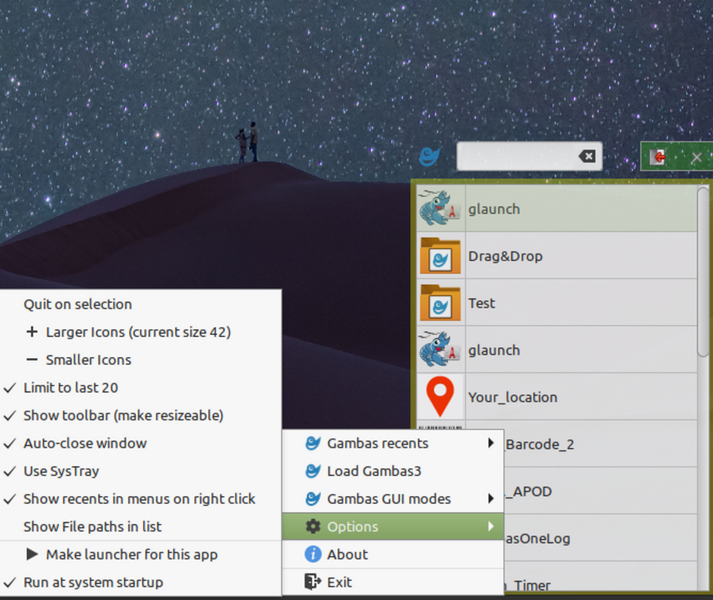
Does the Showtoolbar checkbox show correctly? it should be a toggle menu so the text does not change just the checkbox state.
I have now added the option to use filepaths or not.
The gridview.text was checked later in the prog for operation so removing the path broke things for you.
I set the path that gets read later to the Tag property not the text so .Text can be anything now
Posted
Guru
Code
[Desktop Entry]
Type=Application
Exec=/home/charlie/Dropbox/gambas/glaunch/glaunch.gambas
Hidden=false
Name=glaunch
X-MATE-Autostart-enabled=true
X-MATE-Autostart-Delay=3
X-GNOME-Autostart-Delay=3
Does the Showtoolbar checkbox show correctly? it should be a toggle menu so the text does not change just the checkbox state.
I still think there is an issue here.
<IMG src="https://www.cogier.com/gambas/glaunch3.png">
 </IMG>
Thanks, Bruce, I will advise if I find any other issues.

Posted
Banned
cogier said
Yes, that works well. I use Linux Mint Cinnamon and discovered that the autostart feature needs a delay or else the GLaunch icon appears on the desktop and not in the system tray. My glaunch.gambas.desktop file now looks like this: -Code
[Desktop Entry]
Type=Application
Exec=/home/charlie/Dropbox/gambas/glaunch/glaunch.gambas
Hidden=false
Name=glaunch
X-MATE-Autostart-enabled=true
X-MATE-Autostart-Delay=3
X-GNOME-Autostart-Delay=3
Yes, i was suprised to see the tray icon worked on your cinnamon desktop while i only ever got the icon, then i found i had to add the SystemTray app to the panel.
I had the same issue as you and found in my cinamon desktop menu i had the Startup Applications (cinnamon) application and just like in MATE i was able to set the delay there.
I have now added the X-GNOME-Autostart-Delay=3 the the autostart option
Thank you
cogier said
Does the Showtoolbar checkbox show correctly? it should be a toggle menu so the text does not change just the checkbox state.
I still think there is an issue here.
<IMG src="https://www.cogier.com/gambas/glaunch3.png">
Thanks, Bruce, I will advise if I find any other issues.
That's odd, it works as expected here? i'll see if i can find a bug..
Cheers
Posted
Banned
BruceSteers said
That's odd, it works as expected here? i'll see if i can find a bug..
Cheers
Scratch that, this seems to be a cinnamon only bug for me. and not just the showtoolbar menu , ANY toggle set just stays the same although the functions are operating, on gnome and mate it works just as expected.
Posted
Guru
<IMG src="https://www.cogier.com/gambas/GambasRecent.png">
 </IMG>
Posted
Banned
cogier said
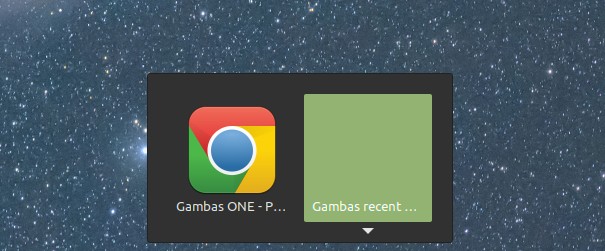
Is there a way to hide the program showing on the task changer?
Yes sorry (had to investigate that)
seems setting the forms NoTabFocus to true fixes that
Updated the archive in first post.
Cheers
Posted
Guru
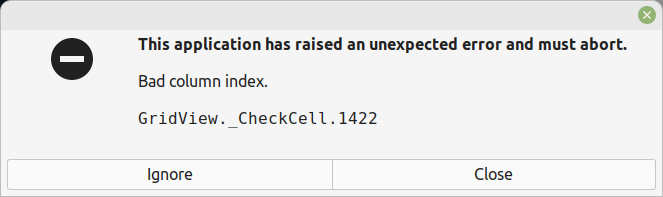
Yes, that has fixed the [Alt]+
 </IMG>
Posted
Banned
cogier said
Hi Bruce,
Yes, that has fixed the [Alt]+
Doh!! lol
Cheers again Charlie.
Yep a silly error
If m.Picture Then GridView1[GridView1.Rows.Max, 0].Picture = m.Picture
Needed to be…
If m.Picture Then
GridView1[GridView1.Rows.Max, 0].Picture = m.Picture
Endif
i forget about that right hand evaluation thing sometimes
Sorry about that (updated archive)
I also reported the toggle menu and cinnamon issue on the bugtracker, will soon have it fixed…
Posted
Banned
I've modified the application to not use the popup menu if on cinnamon tray icon. (not uploaded it yet)
But I found it is ONLY on the tray icon menu you get this error.
The same menu pops up if you left click the tray icon then right click in the list window (outside of the GridView)
That menu works just fine and is the same menu.
It's a cinnamon TrayIcon popup menu only specific bug.
Posted
Banned
BruceSteers said
I also reported the toggle menu and cinnamon issue on the bugtracker, will soon have it fixed…
Looks like it's now fixed
Raise the 'LayoutUpdated' D-Bus signal when the current desktop is 'Cinnamon',... (f9207cb5) · Commits · Gambas / gambas · GitLab
Thank you Benoit
Posted
Guru
It may have fixed another issue with my desktop when 2 TrayIcons are showing.
<IMG src="https://www.cogier.com/gambas/TrayIcon1.png">
 </IMG>
Then with my AlarmTimer running: -
<IMG src="https://www.cogier.com/gambas/TrayIcon2.png">
 </IMG>
Posted
Banned
Added an opacity setting option
There was a glitch or 2 in the new search box, it now refreshes grid properly and only uses filenames not paths in the search
Also now window can be resized and moved without the title bar visible by clicking bottom right to resize and between the search box and close buttons for move.
(updated archive in first post)
For some reason on my system after moving/resizing it seems to loose the height of a title bar on next open, cant stop it doing that

Otherwise it's cool
Posted
Banned
"Mostly" the startup delay worked okay but occasionally it would fail and load the pseudo icon and not open in the systray.
I have added a fix for this.
A new option "Wait for SysTray" forces the app to wait for up to 60 seconds if no systray is loaded and checks every second.
If the program had to wait then it tells you so on the About dialog and as a tooltip. (just for curiosity)
Updated the archive on the first post.
Posted
Banned
including…
it no longer has option to show/hide window titlebar for resizing as resizing works by grabbing any edge now.
it has a directory lister. it makes a note of the most commonly used folder for the projects in your gambas recents list and has an option to list ALL the projects in that dir.
option to open on single or double click
option to re-compile projects.
option to kill running tasks matching the name of your project (uses pgrep -f, can be useful for programs that have hung)
it has an updater option. checks it's gitlab repo for updates and if yes it downloads and re-compiles the new source.
Respects
BruceS
Posted
Banned
Changes of note…
new options form , the menu was getting too large.
re-designed the list position saving as was glitching sometimes forgetting it's position.
You can just scroll the mouse wheel on the trayicon to select items and then clicking the tray icon will open the project.
Right click an item to get the following options…
* Execute the projects .gambas file (this option is hidden if no exe exists)
* Execute the project with gbx (use gbx3 to run the project directory, no exe required)
* Open the project directory
* Re-compile and make exe (use gbc3 and gba3 to quickly re-compile the project and make the executable)
* Kill Tasks (Kill all found instances of the task name, hidden if none are found and for glaunch itself) This is useful if you have problems with an active hung program.
Launcher icon actions.
Set the glaunch.desktop icon that will add the selected number of gambas recents to the Actions list. (Actions are right click icon options)
Many launchers do not update the icons very often but the list will be refreshed at each boot.
I've just been messing around here trying to get a crude recents lists option like ms-windows does when you right click an icon.
It works but could probably do with more development. the icon can be dragged onto the buttonbox if you don't know it's location.
Also now when the gambas recent list is read it makes a note of the most used project parent directory,
then it populates another list via Task.class with ALL the projects found in that folder
Main window
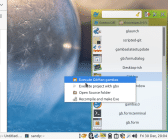
(Click to enlarge)
Posted
Banned
plus i added a load of info to the readme.
1 guest and 0 members have just viewed this.