


Upgraded from Ubuntu 22.04 to 24.04
Posted
#1
(In Topic #1971)
Regular

OS issues
Hi All,I have just upgraded to Ubuntu 24.04 and my Gambas code comes with the error:
gb.gui.qt: error: 'gb.qt6' component not found, unable to find any GUI replacement component
The software is use to take a sreen shots of the desktop and save the image as BMP file, is there a way to get this working again? if not I will reinstall Ubuntu 22.04 as I do not want to rewrite this code all over agin if possible.
The examample code I am using is called ScreenShot 1.0.0.
Screenshot of issue.png
 Last edit: by GrantXTV


Posted

Administrator



1. What version of Gambas where you running on Ubuntu 22.04?
2. What was the source of your Gambas on Ubuntu 22.04, was it from official Unbuntu repositories, from Gambas Team PPA or from Gambas OSB repository?
3. What version of Gambas are you running now, on Ubuntu 24.04?
4. What is the source of your Gambas on Ubuntu 22.04, was it from official Unbuntu repositories, from Gambas Team PPA or from Gambas OSB repository?
To know the source open Synaptic Package Manager in your Administartion menu and click menu Settings -> Repository and post a screenshot from your sources, so I can see.
The error seems to indicate that you are still on Ubuntu 22.04 gambas version and hence missing qt6 component as it is not available on 22.04. How did you upgrade your Ubuntu 22.04 to 24.04?
Answers to above could help track your problem.

gbWilly
- Gambas Dutch translator
- Gambas wiki content contributor
- Gambas debian/ubuntu package recipe contributor
- GambOS, a distro for learning Gambas and more…
- Gambas3 Debian/Ubuntu repositories
… there is always a Catch if things go wrong!
- Gambas Dutch translator
- Gambas wiki content contributor
- Gambas debian/ubuntu package recipe contributor
- GambOS, a distro for learning Gambas and more…
- Gambas3 Debian/Ubuntu repositories
… there is always a Catch if things go wrong!
Posted

Guru


Posted
Administrator
It has nothing to do with your application Charlie, but using the latest version can't harmcogier said
I'm fairly certain that you are using an old version of my ScreenShot program. Version 3.0.1 is on the Gambas Farm with a lot of updates and bug fixes. I use it all the time on Linux Mint 22.1 which is based on Ubuntu 24.04. Can I suggest you try that version.
From “Post #13,520”, December 15th 2025, 6:03 AM
 .
.I think he's running 22.04 gambas repo on 24.04 because of this "gb.gui.qt: error: 'gb.qt6' component not found, unable to find any GUI replacement component"
22.04 has no qt6 gambas packages, 24.04 does have qt6 gambas packages and since qt6 gambas packages can not be found he is NOT on a Gambas 24.04 repository.
It's the same problem that has been posted in another topic where someone upgraded 22.04 to 24.04 and run into trouble
Ubuntu only upgrades official repositories, any repositories you added (like OSB) yourself are NOT taking into account with the Ubuntu distro upgrade.
Before doing the ubuntu distro upgrade you need to change all your self added repositories to point to 24.04 to have a complete distro update, now it is only partialy upgraded.
To solve:
In folder /etc/apt/sources.list.d there should be a .list file for Gambas pointing to jammy instead of noble.
Change jammy to noble (with elevated rights) next update and upgrade and the problem should be fixed.
gbWilly
- Gambas Dutch translator
- Gambas wiki content contributor
- Gambas debian/ubuntu package recipe contributor
- GambOS, a distro for learning Gambas and more…
- Gambas3 Debian/Ubuntu repositories
… there is always a Catch if things go wrong!
- Gambas Dutch translator
- Gambas wiki content contributor
- Gambas debian/ubuntu package recipe contributor
- GambOS, a distro for learning Gambas and more…
- Gambas3 Debian/Ubuntu repositories
… there is always a Catch if things go wrong!
Posted
Regular
More details, ScreenShot to capture image frames, this is done at 12.5 frames per-second, this worked well with Ubuntu 20.04 and 22.04, running this a gambas application in 24.04, the frame rate fell down 1 per-second. The issue is ScreenShots end up being copied into the Pictures folder, which is a major issue which I am trying to stop this from happening. The way the software works is there is a timer running at 80mS to get a screenshot, which saves into string as a bmp file uncompressed. Then I am running my own compression and sending the video over UDP to the video decoder software (which still works fine).
Here is the link to the software:
https://github.com/GrantXTV/NBTV-Project
I simply do not have time to rewrite this video encoder all over again, as this project has taken a good five years to get all these parts working well.
Posted
Regular
Update
"In folder /etc/apt/sources.list.d there should be a .list file for Gambas pointing to jammy instead of noble.
Change jammy to noble (with elevated rights) next update and upgrade and the problem should be fixed.", I do not have this file, so how would I install gb.qt6?
Posted
Administrator
There are no .list files in that folder at all?GrantXTV said
Hi all,
Update
"In folder /etc/apt/sources.list.d there should be a .list file for Gambas pointing to jammy instead of noble.
Change jammy to noble (with elevated rights) next update and upgrade and the problem should be fixed.", I do not have this file, so how would I install gb.qt6?
From “Post #13,727”, January 3rd 2026, 2:26 PM
1. What does opening Synaptic Package Manager and going to menu Settings -> Repositories show for sources?
Trying to figure out what your source you use for getting Gambas3, as Ubuntu packaged Gambas is not that great.
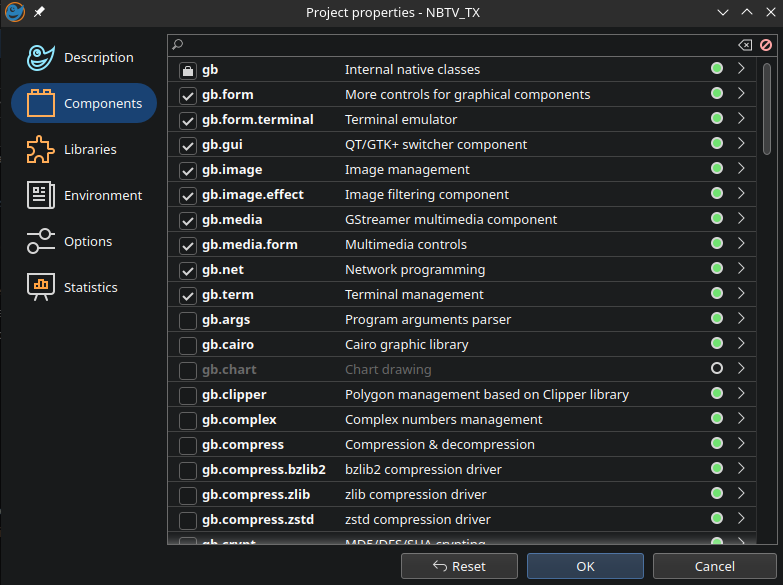
2. In Gambas IDE, if you open the project what are all component you are using (screenshot maybe?)
Since you, I presume, use gb.desktop, you might get trouble there in combination with the environment you are running for example. Your underlying desktop could be the cause
3. Gambas details menu ? -> system information in Gambas IDE.
Some changes in a component in a newer Gambas version that works different could cause trouble, or an underlying library, etc
Many possible causes and too little relevant details.
What exactly your application is doing is not that relevant since it worked fine.
It is probably an environmental problem, so those details are way more intersting to start investigating.
gbWilly
- Gambas Dutch translator
- Gambas wiki content contributor
- Gambas debian/ubuntu package recipe contributor
- GambOS, a distro for learning Gambas and more…
- Gambas3 Debian/Ubuntu repositories
… there is always a Catch if things go wrong!
- Gambas Dutch translator
- Gambas wiki content contributor
- Gambas debian/ubuntu package recipe contributor
- GambOS, a distro for learning Gambas and more…
- Gambas3 Debian/Ubuntu repositories
… there is always a Catch if things go wrong!
Posted
Regular
Sorry, another update, here was the last working configuration:
Ubuntu 22.04
Gambas version 3.19.5
Here are the properties, I had used for that setup. The issue seems to be with taking screenshots, this no longer works the same in Ubuntu 24.04 and Gambas version 3.20.4.
Posted
Administrator
I see no gb.desktop component?GrantXTV said
Here are the properties, I had used for that setup. The issue seems to be with taking screenshots, this no longer works the same in Ubuntu 24.04 and Gambas version 3.20.4.
From “Post #13,729”, January 3rd 2026, 3:15 PM
And this was on your previous system 22.04, gambas 3.19,5 to my understanding.
Have you tried adding following code to your project and make sure it is run (like on form open),not sure if it will help but it will not harm either (for sure).
gbWilly
- Gambas Dutch translator
- Gambas wiki content contributor
- Gambas debian/ubuntu package recipe contributor
- GambOS, a distro for learning Gambas and more…
- Gambas3 Debian/Ubuntu repositories
… there is always a Catch if things go wrong!
- Gambas Dutch translator
- Gambas wiki content contributor
- Gambas debian/ubuntu package recipe contributor
- GambOS, a distro for learning Gambas and more…
- Gambas3 Debian/Ubuntu repositories
… there is always a Catch if things go wrong!
Posted
Regular
"And this was on your previous system 22.04, gambas 3.19,5 to my understanding." yes and had no issues before.
Posted
Administrator
Synaptic output, compont overview on the failing system and Gambas system infomation is what I mean
gbWilly
- Gambas Dutch translator
- Gambas wiki content contributor
- Gambas debian/ubuntu package recipe contributor
- GambOS, a distro for learning Gambas and more…
- Gambas3 Debian/Ubuntu repositories
… there is always a Catch if things go wrong!
- Gambas Dutch translator
- Gambas wiki content contributor
- Gambas debian/ubuntu package recipe contributor
- GambOS, a distro for learning Gambas and more…
- Gambas3 Debian/Ubuntu repositories
… there is always a Catch if things go wrong!
Posted
Regular
"Gambas details menu ? -> system information in Gambas IDE.
Some changes in a component in a newer Gambas version that works different could cause trouble, or an underlying library, etc", I need more details.
I got the screenshots working again, but I am back to where I have started, the issue is screenshots end up being copied into the Pictures folder, which is a major issue which I am trying to stop this from happening. What should happen the way the software works has a timer running at 80mS to get a screenshot, which saves into string as a bmp file uncompressed. Something has changed in the ways sreenshots are been taken in the current version of Gambas.
Posted
Administrator
Who said anything about gambas needing to be in there? I want to know what is in there, that will also tell me what is not in there.GrantXTV said
"What does opening Synaptic Package Manager and going to menu Settings -> Repositories show for sources?", there nothing there for Gambas.
If you run gambas from official repo, there will be NO gambas repo there, as it is pulled from Ubuntu repo and your are then running a badly packaged gambas, that might be the cause of all your trouble.
If running Gambas from Gambas repositories on OSB, you will also see NO gambas repo there. What you will have is a .list file in the /etc/apt/sources.list.d folder (see screen, this one is for master so names may differ). You will NOT be pulling Gambas from Ubuntu repo in that case, but a version packaged by Gambas themselves. Big difference
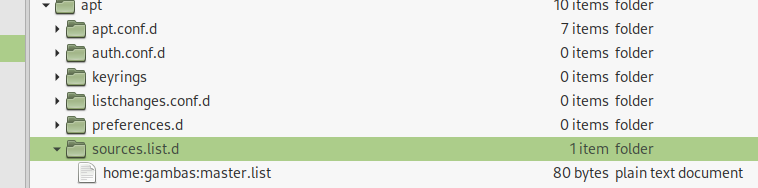
All starts with knowing:
1. the exact source of your gambas
2.your system info as produced by the Gambas IDE, posted here (ALL the info that is)
3.a screenshot of the project components in the Gambas version used on the system with trouble (and not from a previous working version on another system).
Then, troubleshooting can start, no sooner.
What details, just open your project go in IDE to menu ? -> System Information and copy/paste that info here (see screenshot). It will give us something to look at, like the libaries used on your system, that are used by the components.GrantXTV said
"Gambas details menu ? -> system information in Gambas IDE.
Some changes in a component in a newer Gambas version that works different could cause trouble, or an underlying library, etc", I need more details.
From “Post #13,733”, January 3rd 2026, 4:11 PM
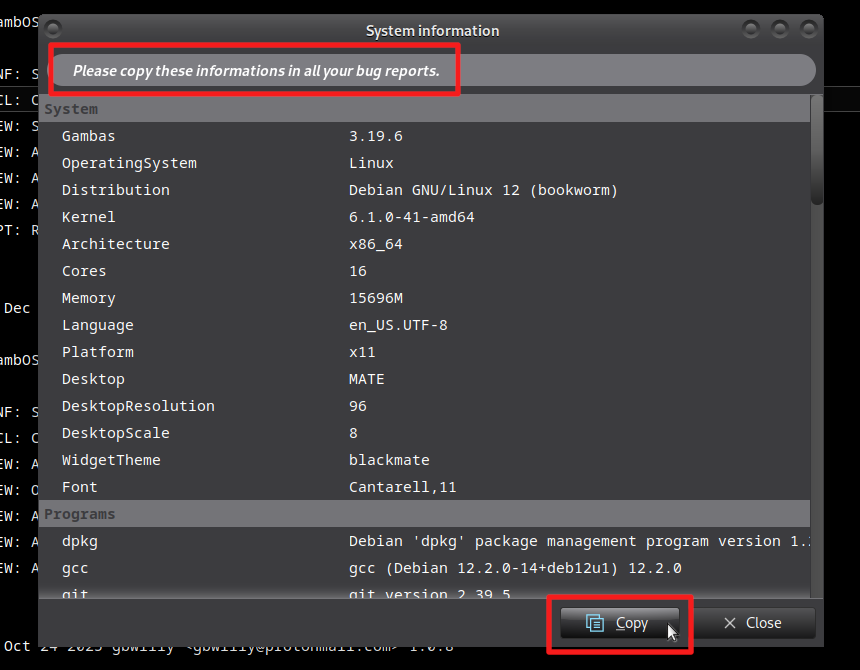
And while at it, post a screenshot of all selected components of the projects (as explained above), so we know what players are involved.
Untill then, I'm in the dark, and can only throw some guesses, like I did before with the UsePortal.
It's quite useless trying to solve a mystery without any input required to start the solving.
If code worked and doesn't on a new system, biggest candidates are
1. environment
2. changes in a component or underlying library
Above info will help start creating a baseline with exactly that info. Understand?
Then we can look, what changed in the component since previous version.
If newer libraries (non gambas) that are used by the components are newer with different function.
Most probable candidate is gb.desktop. But it will take requested data and some research.
Last edit: by gbWilly
gbWilly
- Gambas Dutch translator
- Gambas wiki content contributor
- Gambas debian/ubuntu package recipe contributor
- GambOS, a distro for learning Gambas and more…
- Gambas3 Debian/Ubuntu repositories
… there is always a Catch if things go wrong!
- Gambas Dutch translator
- Gambas wiki content contributor
- Gambas debian/ubuntu package recipe contributor
- GambOS, a distro for learning Gambas and more…
- Gambas3 Debian/Ubuntu repositories
… there is always a Catch if things go wrong!

Regular
IDE.txt
Posted
Administrator
GrantXTV said
Here is the information you requested.
From “Post #13,735”, January 3rd 2026, 8:24 PM
Part of the information, but enough for following conclusions:
- First of all you are on Ubuntu develop, or resolute and not 24.04 as topic suggest. Are you aware you are on a develop release? Trouble occurs more often there
- Second you are using Gambas from the official Ubuntu repo, a bad packaged version, but might work.
- Third, you are running Wayland see here for Gambas and Wayland. Read the part on "Taking a screenshot and desktop portals" real well, but read the rest too, as it matters when you are on Waybackland.
That's all I have for you, I hope it helps
gbWilly
- Gambas Dutch translator
- Gambas wiki content contributor
- Gambas debian/ubuntu package recipe contributor
- GambOS, a distro for learning Gambas and more…
- Gambas3 Debian/Ubuntu repositories
… there is always a Catch if things go wrong!
- Gambas Dutch translator
- Gambas wiki content contributor
- Gambas debian/ubuntu package recipe contributor
- GambOS, a distro for learning Gambas and more…
- Gambas3 Debian/Ubuntu repositories
… there is always a Catch if things go wrong!
Posted
Regular
Posted

Enthusiast
 GrantXTV
There's no problem compiling or installing Gambas from binaries on Ubuntu 24.04.
First, you need to delete the Gambas installed from the Ubuntu repositories (it doesn't work). Open a terminal and run this command as superuser:
Code
sudo apt purge gambas*Compilare Gambas - Gambas-it.org - Wikipedia
But to save you a headache, I'm listing the terminal commands here, one at a time, to compile the latest stable version of Gambas3 (3.22.2):
Note: You must first update Ubuntu, and the first command is very long, copy it all! :
Code
			sudo apt-get install -y build-essential g++ automake autoconf libtool libbz2-dev libzstd-dev libmysqlclient-dev unixodbc-dev libpq-dev libsqlite3-dev libglib2.0-dev libgtk2.0-dev libcurl4-gnutls-dev libgtkglext1-dev libpcre3-dev libsdl-sound1.2-dev libsdl-mixer1.2-dev libsdl-image1.2-dev libxml2-dev libxslt1-dev librsvg2-dev libpoppler-dev libpoppler-private-dev libpoppler-glib-dev libpoppler-cpp-dev libasound2-dev libxtst-dev libffi-dev libglew-dev libimlib2-dev libv4l-dev libsdl-ttf2.0-dev libgdk-pixbuf2.0-dev linux-libc-dev libgstreamer1.0-dev libgstreamer-plugins-base1.0-dev libcairo2-dev libgsl-dev libncurses-dev libgmime-3.0-dev llvm-dev llvm libalure-dev libgmp-dev libgtk-3-dev libsdl2-dev libsdl2-mixer-dev libsdl2-ttf-dev libsdl2-image-dev sane-utils libdumb1-dev libssl-dev libqt5opengl5-dev libqt5svg5-dev libqt5webkit5-dev libqt5x11extras5-dev qtbase5-dev qtwebengine5-dev libwebkit2gtk-4.1-dev git qt6-svg-dev qt6-base-dev qt6-webengine-dev libmongoc-dev

git clone --branch stable --depth=1 https://gitlab.com/gambas/gambas.git gambas-stable

cd gambas-stable

./reconf-all

GAMBAS_CONFIG_FAILURE=1 ./configure -C --disable-keyring --disable-qt4 --disable-sqlite2

make -j$(nproc)

sudo make install
/doc/packages - Gambas Documentation
The advantage of installing from binaries is that you can point the packager to this repository, just like you did with the PPA. It also works on other GNU/Linux systems, not just Ubuntu. For a demonstration, see this tutorial on the Italian wiki:
Installazione di Gambas3 dai pacchetti binari - Gambas-it.org - Wikipedia
Good luck!
Last edit: by Gianluigi
Posted
Regular
Posted
Administrator
You should NEVER use Gambas from official Debian NOR Ubuntu (is the same Debian Gambas3 recipe for Ubuntu).cage said
Are you running Linux Mint Debian version by any chance. If so Debian has removed QT5 from it's repositories saying that it is no longer being developed. I had the exact problem with Gambas and Mints Debian. There is no work around for it as far as I could find out.
From “Post #13,767”, January 10th 2026, 12:54 PM
All qt5 libraries ARE AVAILABLE on Debian, as I package Gambas3 for qt5 and qt6 and gtk and gtk3, Debian does qt6 and gtk3, that's all.
Not because packaging the other is impossible (GambOS repo has it and OSB repo has it) or because there is no qt5 libraries, but just because they decided to package only that, completly disregarding how Gambas should be packaged according to the Gambas Developers and their instructions on the Gambas wiki. Other distro's might be the same, more or less, I do not know as I've limited myself to the Debian/Ubuntu environment in know how and work on Debian myself. Debian packager team for Gambas just decided to only package for qt6. They make more stupid decisions, limiting your choice and pushing you into one direction. And they are NO PART of Gambas project but part of the Debian project, just so you know.
It creates an incompatibilty is distributing application packages created in the Gambas IDE for distribution. A gambas application .deb made in IDE on Debian/Ubuntu official Gambas will run on OSB or my repo's (GambOS) because, I ensured in the recipe that creates OSB repo, that these incopatibilities are captured and dealt with in a proper manner so all works. Other way around, creating gambas application .deb on IDE installed from OSB or GambOS repo's will fail to install on a system using Debian/Ubuntu official. So, the Debian/Ubuntu packagers , by NOT following Gambas package instructions create incompatibilities and problems.
My contacts with Debian package team on this matter, and pointing out the problem, have led to nothing at all, they just keep doing what they do. That is why I ALWAYS advise against using official Debian/Ubuntu installed Gambas!!
And, on a side note, you should always prefer installing from binaries over compiling yourself as self compiling makes you distro package management system blind for the existence of an installed Gambas on your system. It is simply NOT AWARE of self compiled software.
My 2 cents as, creator of the GambOS repository with Gambas 3.19.6 with some backports from later editions, even master, available for Debian11 and 12, Ubuntu 20.04, 22.04 and 24.04 (GambOS repository). No need for Debian nor Ubuntu's version of Gambas3 as they suck big time.
If on LDME 6 you can use (GambOS repository) or (OSB Debian 12 stable if on LDME 6).
If on LDME 7 use OSB repo for a decent version with qt5 and qt6 (Pick Debian 13 stable if on LDME 7)
You will have a much more complete Gambas3 installed on your system.
NOTE: Only pick master if you want daily updated Gambas3 and like living on the edge, and don´t come complaining on the forum but go to the Gambas3 mailing list for that kind of trouble or do an official bug report as you have made yourself a Beta tester by installing the master version
 . Just so you know
Last edit: by gbWilly
gbWilly
- Gambas Dutch translator
- Gambas wiki content contributor
- Gambas debian/ubuntu package recipe contributor
- GambOS, a distro for learning Gambas and more…
- Gambas3 Debian/Ubuntu repositories
… there is always a Catch if things go wrong!
- Gambas Dutch translator
- Gambas wiki content contributor
- Gambas debian/ubuntu package recipe contributor
- GambOS, a distro for learning Gambas and more…
- Gambas3 Debian/Ubuntu repositories
… there is always a Catch if things go wrong!
Posted
Guru
Code
sudo curl -fsSL https://download.opensuse.org/repositories/home:gambas:stable/xUbuntu_24.04/Release.key | gpg --dearmor | sudo tee /etc/apt/trusted.gpg.d/home_gambas_stable.gpg > /dev/null && sudo apt -y update && sudo apt -y install gambas3
Job done!
Enthusiast
Gambas Upgrade Commands
and now gambas will not run at
I have tried to remove everything and am now completly lost
when I try gambas3 I get this error
Command 'gambas3' not found, but can be installed with:
sudo apt install gambas3-ide
Please ignore … is tried one more time and this time it worked :)
Last edit: by GrayGhost
Enthusiast
GrantXTV
Here's a link to a video that installs from the GambOS repositories:
https://paste.c-net.org/BaptismShrine
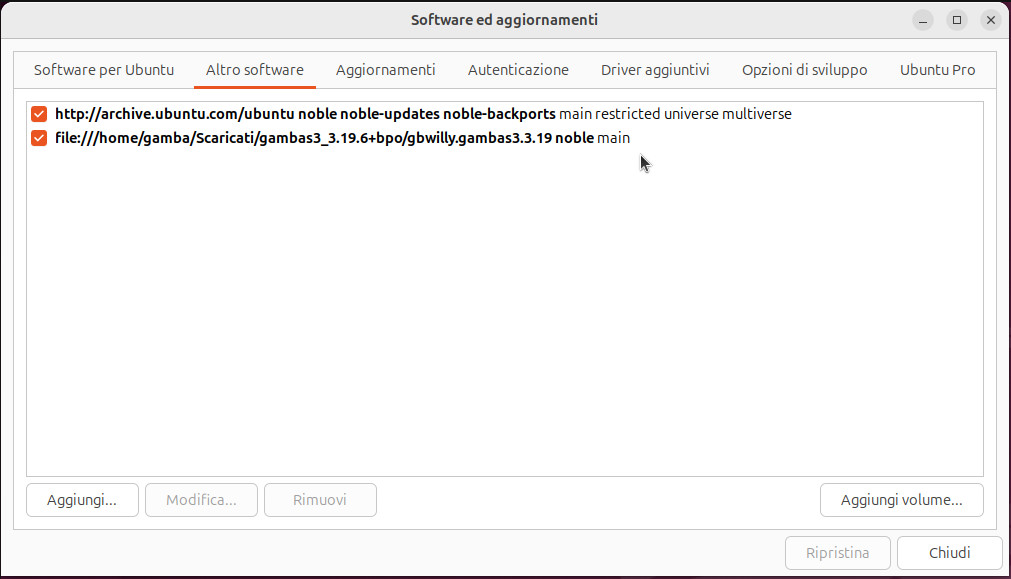
In the video, I install version 3.19 and the corresponding repository (internal path, see attached image) by running the script from the folder where I downloaded the tarball file as per the instructions (sudo ./install-3.19-noble.sh), but the procedure would be similar for version 3.20.4 (sudo ./installdepend-noble.sh).
Everything is explained well on GitLab:
W. Raets / Gambas3 Debian and Ubuntu Repositories · GitLab

Posted
Administrator
Gianluigi said
Hi
In the video, I install version 3.19 and the corresponding repository (internal path, see attached image) by running the script from the folder where I downloaded the tarball file as per the instructions (sudo ./install-3.19-noble.sh), but the procedure would be similar for version 3.20.4 (sudo ./installdepend-noble.sh).
Everything is explained well on GitLab:
W. Raets / Gambas3 Debian and Ubuntu Repositories · GitLab
From “Post #13,772”, January 12th 2026, 10:30 AM
You did not install GambOS repository, you installed one of my local file repositories, but you have a decent version of Gambas now, properly packaged and with some backports from later Gambas versions (even master).
It is the exact same version as is used in GambOS repository, but GambOS is an online repository (you installed a local file repository) and the online repo also includes the GambOS software, that's the only difference.
The online repository is found here (download scriptfile and run is all it takes)
As you have experienced, these file repositories are really easy to install using the scripts.

Thanks for using my file repositories, first feedback I got on someone using it ever, with even a video included.
gbWilly
- Gambas Dutch translator
- Gambas wiki content contributor
- Gambas debian/ubuntu package recipe contributor
- GambOS, a distro for learning Gambas and more…
- Gambas3 Debian/Ubuntu repositories
… there is always a Catch if things go wrong!
- Gambas Dutch translator
- Gambas wiki content contributor
- Gambas debian/ubuntu package recipe contributor
- GambOS, a distro for learning Gambas and more…
- Gambas3 Debian/Ubuntu repositories
… there is always a Catch if things go wrong!
Posted
Regular
I have not had time to reinstall Ubuntu 24.04 as of yet, what other versions of Linux are out there that do not use Wayland? As I need to provide a list of Linux operating systems that I can use my NBTV software on.
Posted
Enthusiast
System:
Kernel: 6.12.63+deb13-amd64 arch: x86_64 bits: 64 compiler: gcc v: 14.2.0 clocksource: tsc
Desktop: Cinnamon v: 6.6.5 tk: GTK v: 3.24.49 wm: Muffin v: 6.6.2 vt: 7 dm: LightDM v: 1.32.0
Distro: LMDE 7 Gigi base: Debian 13.0 trixie
1 guest and 0 members have just viewed this.