




Stuck with gridview and Combo aligments
Posted
#1
(In Topic #1995)
Enthusiast

I hope someone on here can help me as I am stuck and NOT sure where to turn next.
SO here is what I a trying to do
I want to load a CSV file that has been sent by my Supplier and import it into my product database. I can get the Feild names from my producttable table and I have stored them in a Combo list box.
I can load the first 2 lines of the csv file into memory and display it on screen (as you can see in the image below)
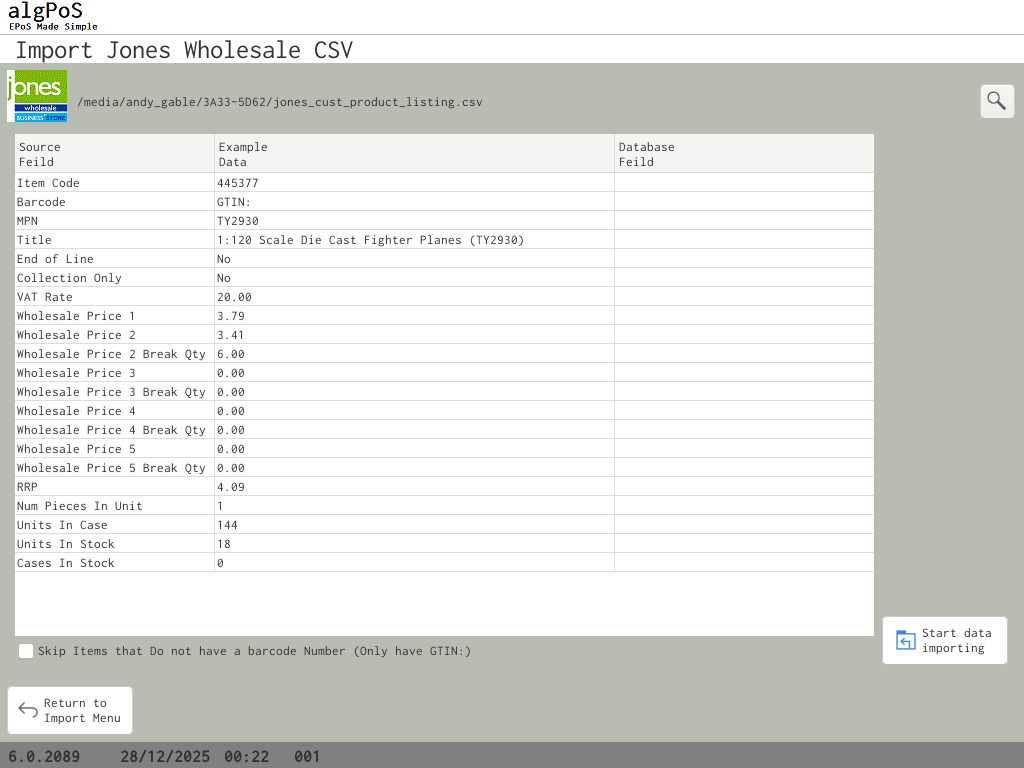 but What I would like to do next is click on the empty feild and have a combo list show so my user can select the feild the data from the left should be inserted into
and then when they click "Import" have it import the data as how the map shows
This is the code I have come up with for the Click on the GridView
Code
Public Sub GridView1_Click()

  Dim row As Integer = GridView1.Row
  Dim col As Integer = GridView1.Column

  If col = 2 Then  ' Database Field column
    ' Move ComboBox over the cell (calculate X,Y manually)
    Dim x As Integer, y As Integer
    x = 0
    For i As Integer = 0 To col - 1
      x += GridView1.Columns[i].Width
    Next
    y = row * GridView1.Row.Height

    ComboBox1.Move(GridView1.Left + x, GridView1.Top + y)
    ComboBox1.Width = GridView1.Columns[col].Width
    ComboBox1.Height = GridView1.Row.Height
    ComboBox1.Visible = True
    ComboBox1.SetFocus
  Else
    ComboBox1.Visible = False
  End If
End
Kind Regards
Andy




Enthusiast
 AndyGable
I'm referring you to this Italian wiki page, where the code you're interested in should be:
Inserire un oggetto in una cella di una GridView - Gambas-it.org - Wikipedia
If I were you, I'd prefer to use a checkbox…

Posted
Enthusiast
Gianluigi said
Hi,
I'm referring you to this Italian wiki page, where the code you're interested in should be:
Inserire un oggetto in una cella di una GridView - Gambas-it.org - Wikipedia
If I were you, I'd prefer to use a checkbox…
From “Post #13,683”, December 28th 2025, 7:49 AM
Thank-you for that Link Gianluigi I shall have a look at it.
Posted

Expert


The summary is that you get data from a vendor that you need to align to fields in your database.
Some thoughts #
Do all fields need to be filled to be valid?
How do you ensure that the user has not misallocated a variable? [ ie: set a string value to a float]
Is the format received from the wholesaler going to be the same every time - so you should store the conversion mapping for future use/automation?
Personally, I would use the GridView row click to popup a list box with a list of the fields and their types.
Problem with a combo is that it won't show all the available fields for allocation at the same time.
Selecting an item from the list box then allocates that field name to your GridView and removes it from the listbox.( so you can't allocate it again by mistake)
Once the mapping is complete, test an insert into a temp table with the same format as you master table - you can create this on the fly for this purpose.
CREATE TABLE MainTable_Copy AS SELECT * FROM MainTable WHERE 0
Test the input into the MainTable_Copy as validation
Once all fields have been allocated, you need to store the mapping into a table so it can be reused.
As the input file is a CSV, I'd use the numerical field number of the CSV rather than the name id, as I suspect that it would be less subject to change.
Load Table data into a list box: Note, this assumes that you have a valid connection to your DB - the code below uses Local$Con
Public Sub LoadTableListBox(InTable As String, ByRef InListBox As Listbox)
Dim TmpTable As Table
Dim TmpField As Field
Dim TmpLine As String
InListBox.Clear
If Not IsNull(Local$Con) Then ' …a Database connection has already been made.
TmpTable = Local$Con.Tables[InTable]
For Each TmpField In TmpTable
TmpLine = TmpField.Name & " | "
TmpLine &= GetFieldType(Local$Con.Type, True, TmpField.Type)
Next
Endif
Finally
InListBox.Enabled = (InListBox.Count > 0)
Catch
Message.Error(Error.Text)
End
Public Function GetFieldType(InDBType As String, Readable As Boolean, InFieldType As Integer) As String
Dim ReadableStr As String = "Unknown Type"
Dim SQLiteStr As String = ""
Dim MySQLStr As String = ""
Select Case InFieldType
Case -1 ' Not in the gambas standard types.
ReadableStr = "Blob"
If InDBType = "sqlite" Then SQLiteStr = "BLOB"
If InDBType = "mysql" Then MySQLStr = "BLOB"
Case -2 ' not in the Gambas standard types
ReadableStr = "Serial"
If InDBType = "sqlite" Then SQLiteStr = "SERIAL"
If InDBType = "mysql" Then MySQLStr = "SERIAL"
Case GB.Boolean
ReadableStr = "Boolean"
If InDBType = "sqlite" Then SQLiteStr = "BOOLEAN"
If InDBType = "mysql" Then MySQLStr = "BOOLEAN"
Case GB.Date
ReadableStr = "Date"
If InDBType = "sqlite" Then SQLiteStr = "DATE"
If InDBType = "mysql" Then MySQLStr = "DATE"
Case GB.Float
ReadableStr = "Float"
If InDBType = "sqlite" Then SQLiteStr = "FLOAT"
If InDBType = "mysql" Then MySQLStr = "DECIMAL(19,4)" ' Standard account practice for $ amounts to stop rounding errors
Case GB.Integer
ReadableStr = "Integer"
If InDBType = "sqlite" Then SQLiteStr = "INTEGER"
If InDBType = "mysql" Then MySQLStr = "INT"
Case GB.Long
ReadableStr = "Long"
If InDBType = "sqlite" Then SQLiteStr = "LONG"
If InDBType = "mysql" Then MySQLStr = "BIGINT"
Case GB.String
ReadableStr = "String"
If InDBType = "sqlite" Then SQLiteStr = "VARCHAR"
If InDBType = "mysql" Then MySQLStr = "VARCHAR"
Case Else
Message(InFieldType)
End Select
If Readable Then
Return ReadableStr
Else
If InDBType = "sqlite" Then Return SQLiteStr
If InDBType = "mysql" Then Return MySQLStr
Endif
End
Cheers - Quin.
I code therefore I am
I code therefore I am
Posted
Enthusiast
You're welcome,AndyGable said
Thank-you for that Link Gianluigi I shall have a look at it.
you could also use a TableView, something like this; see the attached test.
P.S. Quinqunxian's recommendations seem sensible to me.
TableViewTest-0.0.1.tar.gz
 Last edit: by Gianluigi
1 guest and 0 members have just viewed this.