



paint.font problem
Posted
#1
(In Topic #2010)
Regular

Public Sub Form_Open()
Paint.Begin(hDwa) 'drawing area
Paint.Font = Font["Ubuntu Sans, 16"]
Paint.RichText("Title", 10, 10, 50)
Paint.Stroke
Paint.Font = Font["Sans Serif, 12"]
Paint.RichText("Info", 10, 100, 50)
Paint.Stroke
Paint.End
End
Produces:- this doesn't look right at all.

Any advice appreciated


Posted

Administrator



gbWilly
- Gambas Dutch translator
- Gambas wiki content contributor
- Gambas debian/ubuntu package recipe contributor
- GambOS, a distro for learning Gambas and more…
- Gambas3 Debian/Ubuntu repositories
… there is always a Catch if things go wrong!
- Gambas Dutch translator
- Gambas wiki content contributor
- Gambas debian/ubuntu package recipe contributor
- GambOS, a distro for learning Gambas and more…
- Gambas3 Debian/Ubuntu repositories
… there is always a Catch if things go wrong!
Posted
Regular
This what Courier 10 Pitch looks like
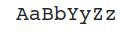
This what I'm getting


Enthusiast

 bill-lancaster
I'm not sure I understand the problem, but if you use stroke, you draw the outline; if you use fill, you fill the drawing.
If you're looking for a fill, consider Paint.DrawRichText.
If you only want to draw the outline with small characters, the result won't be good.
You can try playing with linewidth, which accepts a float…

Posted
Regular
All is well now.
1 guest and 0 members have just viewed this.