




gtk3.webview problem
Posted
#1
(In Topic #1506)
Regular



Posted

Administrator



There is a lot of influence apart from the Toolkit (gtk or qt) you use. X11 is one, the window manager used, the dekstop used, the theme installed, font types installed (or not).rj71 said
I have been trying to use gb.gtk3.webview in a project and all I am getting is a black screen when trying to load a URL. I have used gtk3.webview quite a bit in previous projects on Debian 11 and on another Debian 12 machine with no problems. I'm pretty sure I have the required components installed otherwise gambas would complain. I have tried the QT webview too but same result plus I'd rather use gtk3 since anything QT seems to change too much of my app. I'm going to go test on another Deb 12 machine but any input would be appreciated. As of right now, it is occurring on 2 Debian 12 machines both using x11 and NOT wayland.
But first, maybe a simple example of a webview on a form, showing an URL, that goes black on your systems? Nothing fancy needed.
Then we can see if it is a you or a your system problem and figure it out…
BTW, What Gambas version are you using?
gbWilly
- Gambas Dutch translator
- Gambas wiki content contributor
- Gambas debian/ubuntu package recipe contributor
- GambOS, a distro for learning Gambas and more…
- Gambas3 Debian/Ubuntu repositories
… there is always a Catch if things go wrong!
- Gambas Dutch translator
- Gambas wiki content contributor
- Gambas debian/ubuntu package recipe contributor
- GambOS, a distro for learning Gambas and more…
- Gambas3 Debian/Ubuntu repositories
… there is always a Catch if things go wrong!

Posted
Administrator
A simple FMain with a Webview1 placed on it with URL this topic.
It's a gtk3 project and it does what it needs to do on my system (Debian 12, Mate, x11 and using some dark theme).
Let me know if it works for you?
gbWilly
- Gambas Dutch translator
- Gambas wiki content contributor
- Gambas debian/ubuntu package recipe contributor
- GambOS, a distro for learning Gambas and more…
- Gambas3 Debian/Ubuntu repositories
… there is always a Catch if things go wrong!
- Gambas Dutch translator
- Gambas wiki content contributor
- Gambas debian/ubuntu package recipe contributor
- GambOS, a distro for learning Gambas and more…
- Gambas3 Debian/Ubuntu repositories
… there is always a Catch if things go wrong!
Posted
Regular
gbWilly said
Try the project below.
A simple FMain with a Webview1 placed on it with URL this topic.
It's a gtk3 project and it does what it needs to do on my system (Debian 12, Mate, x11 and using some dark theme).
WebviewTest.png
Let me know if it works for you?
Same black screen for your project.
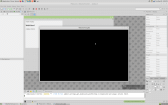
(Click to enlarge)
I make most of my apps on Debian 12 so Gambas 3.18. I'm on an old iMac so I use either LXQT or Mate…usually LXQT since I try to squeeze as much as I can out of this old iMac. I tried your project on both Mate and LXQT…same black screen.The other Debian 12 is an old first gen mac mini running Openbox because I set it up like an appliance running my movies/streaming app like my own home built Firestick. It's 100% dedicated to running that app and nothing else other than the OS. I recently saw your posts about upgrading Gambas on Debian 12 with the repos but since Trixie is coming out next month (I think), I'll wait before I go try upgrading on Deb 12.
I'm going to test on another machine when I get some time…might not be until tomorrow or day after.
Posted

Administrator
Code
			[System]
Gambas=3.18
OperatingSystem=Linux
Kernel=6.1.0-31-amd64
Architecture=x86_64
Distribution=debian trixie/sid
Desktop=KDE
Font=Noto Sans,10
Scale=7
Theme=proxy
Language=en_US.UTF-8
Memory=15934M

[Programs]
gcc=gcc (Debian 12.3.0-3) 12.3.0
git=git version 2.40.1

[Libraries]
Cairo=libcairo.so.2.11600.0
Curl=libcurl.so.4.8.0
DBus=libdbus-1.so.3.32.4
GDK2=libgdk-x11-2.0.so.0.2400.33
GDK3=libgdk-3.so.0.2406.32
GStreamer=libgstreamer-1.0.so.0.2203.0
GTK+2=libgtk-x11-2.0.so.0.2400.33
GTK+3=libgtk-3.so.0.2406.32
OpenGL=libGL.so.1.7.0
Poppler=libpoppler.so.126.0.0
Poppler=libpoppler.so.82.0.0
QT5=libQt5Core.so.5.15.8
RSvg=librsvg-2.so.2.48.0
SDL=libSDL-1.2.so.0.11.4
SQLite=libsqlite3.so.0.8.6

[Environment]
CLUTTER_IM_MODULE=ibus
DBUS_SESSION_BUS_ADDRESS=unix:path=/run/user/1000/bus
DESKTOP_SESSION=plasma
DISPLAY=:0
GB_GUI=gb.qt5
GPG_AGENT_INFO=/run/user/1000/gnupg/S.gpg-agent:0:1
GTK2_RC_FILES=/etc/gtk-2.0/gtkrc:<home>/.gtkrc-2.0:<home>/.config/gtkrc-2.0
GTK_IM_MODULE=ibus
GTK_MODULES=gail:atk-bridge
GTK_RC_FILES=/etc/gtk/gtkrc:<home>/.gtkrc:<home>/.config/gtkrc
HOME=<home>
IM_CONFIG_PHASE=1
INVOCATION_ID=3bcadfdac7a2493a9e6319d42e6ec957
JOURNAL_STREAM=8:25977
KDE_APPLICATIONS_AS_SCOPE=1
KDE_FULL_SESSION=true
KDE_SESSION_UID=1000
KDE_SESSION_VERSION=5
LANG=en_US.UTF-8
LANGUAGE=en_US.UTF-8
LC_ALL=en_US.UTF-8
LOGNAME=<user>
MANAGERPID=1924
PATH=/usr/local/bin:/usr/bin:/bin:/usr/local/games:/usr/games:/snap/bin
PWD=<home>
QTWEBENGINE_DICTIONARIES_PATH=/usr/share/hunspell-bdic/
QT_AUTO_SCREEN_SCALE_FACTOR=0
QT_IM_MODULE=ibus
QT_LOGGING_RULES=*.debug=false
QT_SCREEN_SCALE_FACTORS=DVI-I-0=1;VGA-0=1;DVI-I-1=1;HDMI-0=1;
SESSION_MANAGER=local/<hostname>:@/tmp/.ICE-unix/2274,unix/<hostname>:/tmp/.ICE-unix/2274
SHELL=/bin/bash
SHLVL=0
SSH_AGENT_PID=2110
SSH_AUTH_SOCK=/tmp/ssh-nxblc9NB7jio/agent.2007
SYSTEMD_EXEC_PID=2298
TZ=:/etc/localtime
USER=<user>
XAUTHORITY=<home>/.Xauthority
XCURSOR_SIZE=36
XCURSOR_THEME=Mocu-White-Right
XDG_CONFIG_DIRS=<home>/.config/kdedefaults:/etc/xdg:/usr/share/desktop-base/kf5-settings
XDG_CURRENT_DESKTOP=KDE
XDG_DATA_DIRS=<home>/.local/share/flatpak/exports/share:/var/lib/flatpak/exports/share:/usr/local/share:/usr/share:/var/lib/snapd/desktop
XDG_RUNTIME_DIR=/run/user/1000
XDG_SEAT=seat0
XDG_SEAT_PATH=/org/freedesktop/DisplayManager/Seat0
XDG_SESSION_CLASS=user
XDG_SESSION_DESKTOP=KDE
XDG_SESSION_ID=1
XDG_SESSION_PATH=/org/freedesktop/DisplayManager/Session0
XDG_SESSION_TYPE=x11
XDG_VTNR=7
XMODIFIERS=@im=ibus
_=/usr/bin/dbus-update-activation-environment
force_s3tc_enable=true
sholzy
Gambas One Site Director
To help make creating posts and using the forum a little easier:
Tutorials - Website and forum and Playground
To report bugs in the Gambas IDE:
Official Gambas Bug Tracker
Gambas One Site Director
To help make creating posts and using the forum a little easier:
Tutorials - Website and forum and Playground
To report bugs in the Gambas IDE:
Official Gambas Bug Tracker
Posted
Administrator
Tip number 1: DO NOT USE Debian Official repositories, they package gambas the wrong way and are always way behind. Trixie will have a wrongly packaged Gambas 3.20.2 with several components not even available.Trixie will stay on Gambas 3.20.2 for the rest of it's life time.rj71 said
Same black screen for your project.
I make most of my apps on Debian 12 so Gambas 3.18. I'm on an old iMac so I use either LXQT or Mate…usually LXQT since I try to squeeze as much as I can out of this old iMac. I tried your project on both Mate and LXQT…same black screen.The other Debian 12 is an old first gen mac mini running Openbox because I set it up like an appliance running my movies/streaming app like my own home built Firestick. It's 100% dedicated to running that app and nothing else other than the OS. I recently saw your posts about upgrading Gambas on Debian 12 with the repos but since Trixie is coming out next month (I think), I'll wait before I go try upgrading on Deb 12.
2 options:
- If you want latest stable (currently 3.20.4) -> check out OSB as a source for Gambas3
Code
$ sudo apt-get purge gambas3
$ sudo apt-get autoremove
$ echo 'deb http://download.opensuse.org/repositories/home:/gambas:/stable/Debian_12/ /' | tee /etc/apt/sources.list.d/home:gambas:stable.list
$ curl -fsSL https://download.opensuse.org/repositories/home:gambas:stable/Debian_12/Release.key | gpg --dearmor | tee /etc/apt/trusted.gpg.d/home_gambas_stable.gpg > /dev/null
$ apt-get update
$ apt-get upgrade
$ apt-get install gambas3
- If you want to stick to a fixed version that doesn't get updated for a longer while -> check out my FileRepo's (https://gitlab.com/gbW…ntent/docs/gambas-arch.md)
It's a matter of downloading the archive of the version you desire and extracting it, run a script that will be provided to literally do all the rest. Here is a how to install (https://gitlab.com/gbW….content/howto/install.md)
Be sure to first remove the current Gambas and pick a version higher than 3.18.0:
Code
$ sudo apt-get purge gambas3
$ sudo apt-get autoremove
apt pulls from local disk repo instead of a web repo, all the rest is exactly the same.
Both methods are a matter of less than 5 minutes to have a decent working Gambas3.
Both repositories are based on my recipes and Benoit's input/additions on how he wanted Gambas to be packaged.
So, both repositories provide packages as the should be.
Edit:
P.S. My Gambas 3.20.3 file repository archive will be replaced with a 3.20.4 archive in upcoming days.
gbWilly
- Gambas Dutch translator
- Gambas wiki content contributor
- Gambas debian/ubuntu package recipe contributor
- GambOS, a distro for learning Gambas and more…
- Gambas3 Debian/Ubuntu repositories
… there is always a Catch if things go wrong!
- Gambas Dutch translator
- Gambas wiki content contributor
- Gambas debian/ubuntu package recipe contributor
- GambOS, a distro for learning Gambas and more…
- Gambas3 Debian/Ubuntu repositories
… there is always a Catch if things go wrong!
Posted
Administrator
gbWilly said
Tip number 1: DO NOT USE Debian Official repositories, they package gambas the wrong way and are always way behind. Trixie will have a wrongly packaged Gambas 3.20.2 with several components not even available.Trixie will stay on Gambas 3.20.2 for the rest of it's life time.
This is the biggest thing I miss about using OpenSuSE. They were always keeping Gambas updated to the latest. Sadly, OpenSuSE took a turn in a direction I didn't like or want to be a part of.
sholzy
Gambas One Site Director
To help make creating posts and using the forum a little easier:
Tutorials - Website and forum and Playground
To report bugs in the Gambas IDE:
Official Gambas Bug Tracker
Gambas One Site Director
To help make creating posts and using the forum a little easier:
Tutorials - Website and forum and Playground
To report bugs in the Gambas IDE:
Official Gambas Bug Tracker
Posted
Administrator
There is NO reason whatsoever to run behind on Debian nowadays, as there are better alternatives than official repo's have to offer for both Debian and Ubuntu.sholzy said
They were always keeping Gambas updated to the latest. Sadly, OpenSuSE took a turn in a direction I didn't like or want to be a part of.
I left Ubuntu many moons ago, for the same reason. Was on Mint for a while but Ubuntu sips through too much to my liking, so Debian is my best friend now, but I was already using it a very long time on servers.
gbWilly
- Gambas Dutch translator
- Gambas wiki content contributor
- Gambas debian/ubuntu package recipe contributor
- GambOS, a distro for learning Gambas and more…
- Gambas3 Debian/Ubuntu repositories
… there is always a Catch if things go wrong!
- Gambas Dutch translator
- Gambas wiki content contributor
- Gambas debian/ubuntu package recipe contributor
- GambOS, a distro for learning Gambas and more…
- Gambas3 Debian/Ubuntu repositories
… there is always a Catch if things go wrong!
Posted
Administrator
gbWilly said
There is NO reason whatsoever to run behind on Debian nowadays, as there are better alternatives than official repo's have to offer for both Debian and Ubuntu.sholzy said
They were always keeping Gambas updated to the latest. Sadly, OpenSuSE took a turn in a direction I didn't like or want to be a part of.
I left Ubuntu many moons ago, for the same reason. Was on Mint for a while but Ubuntu sips through too much to my liking, so Debian is my best friend now, but I was already using it a very long time on servers.
I switched to Debian 7-8 years ago. I also used Debian on servers for many years prior to using it on my desktop.
After I get this other project completed, I'll work on using your repo's to get Gambas updated.
sholzy
Gambas One Site Director
To help make creating posts and using the forum a little easier:
Tutorials - Website and forum and Playground
To report bugs in the Gambas IDE:
Official Gambas Bug Tracker
Gambas One Site Director
To help make creating posts and using the forum a little easier:
Tutorials - Website and forum and Playground
To report bugs in the Gambas IDE:
Official Gambas Bug Tracker
Posted
Regular
Posted
Administrator
rj71 said
Thanks guys. gbWilly, I will try the OSB on a spare laptop running Deb 12 and report back how it went. Probably later today.. BTW, what is GambOS that you're working on??
This will get you started…
https://forum.gambas.one/viewtopic.php?t=2011
sholzy
Gambas One Site Director
To help make creating posts and using the forum a little easier:
Tutorials - Website and forum and Playground
To report bugs in the Gambas IDE:
Official Gambas Bug Tracker
Gambas One Site Director
To help make creating posts and using the forum a little easier:
Tutorials - Website and forum and Playground
To report bugs in the Gambas IDE:
Official Gambas Bug Tracker
Posted
Regular
Posted
Regular
sholzy said
rj71 said
Thanks guys. gbWilly, I will try the OSB on a spare laptop running Deb 12 and report back how it went. Probably later today.. BTW, what is GambOS that you're working on??
This will get you started…
https://forum.gambas.one/viewtopic.php?t=2011
This sounds really cool! Not sure how I missed that on this site but I will definitely be following the progress of this from now on.
Posted
Regular

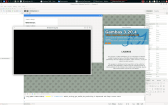
(Click to enlarge)
Posted
Administrator
Well, that's a startrj71 said
I just upgraded Gambas on the spare laptop using the opensuse repo and webview works just fine in your attached project. I will go do the upgrade on the old iMac I usually use. Hopefully no problems there.

As I wrote before a lot is involved in showing graphical content, so it can be anything.rj71 said
I just upgraded Gambas on the old iMac using the opensuse repo. I'm still getting a black screen. Could it somehow be this old iMac? It's a 2008 or 2009. It's old but I love it because of it's big gorgeous screen. The spare laptop I just tested is old too…maybe roughly the same age as the iMac and webview works just fine on it. I have not tried on the Deb 12 running openbox yet. I'm nervous about messing with that one
You could go into the Gambas IDE on both systems and go to menu ? -> System Information and copy it here, so we can compare them and see what is different. A lot of the info will be of no importance, bit some of it might indicate what might be the reason.
gbWilly
- Gambas Dutch translator
- Gambas wiki content contributor
- Gambas debian/ubuntu package recipe contributor
- GambOS, a distro for learning Gambas and more…
- Gambas3 Debian/Ubuntu repositories
… there is always a Catch if things go wrong!
- Gambas Dutch translator
- Gambas wiki content contributor
- Gambas debian/ubuntu package recipe contributor
- GambOS, a distro for learning Gambas and more…
- Gambas3 Debian/Ubuntu repositories
… there is always a Catch if things go wrong!
Posted
Regular
gbWilly said
Well, that's a startrj71 said
I just upgraded Gambas on the spare laptop using the opensuse repo and webview works just fine in your attached project. I will go do the upgrade on the old iMac I usually use. Hopefully no problems there.
As I wrote before a lot is involved in showing graphical content, so it can be anything.rj71 said
I just upgraded Gambas on the old iMac using the opensuse repo. I'm still getting a black screen. Could it somehow be this old iMac? It's a 2008 or 2009. It's old but I love it because of it's big gorgeous screen. The spare laptop I just tested is old too…maybe roughly the same age as the iMac and webview works just fine on it. I have not tried on the Deb 12 running openbox yet. I'm nervous about messing with that one
You could go into the Gambas IDE on both systems and go to menu ? -> System Information and copy it here, so we can compare them and see what is different. A lot of the info will be of no importance, bit some of it might indicate what might be the reason.
I sure can. Give me a minute and I'll post the info for the iMac and the laptop. I'm also upgrading the mac mini with openbox…I'll post the info on that when it's done.
Posted
Regular
iMac:
Code (gambas)
- Gambas=3.20.4 ab0099a (master)
- OperatingSystem=Linux
- Distribution=Debian GNU/Linux 12 (bookworm)
- Kernel=6.1.0-35-amd64
- Architecture=x86_64
- Cores=2
- Memory=3912M
- Language=en_US.UTF-8
- Platform=x11
- Desktop=LXQT
- DesktopResolution=96
- DesktopScale=7
- WidgetTheme=adwaita
- DarkTheme=False
- [Programs]
- dpkg=Debian 'dpkg' package management program version 1.21.22 (amd64).
- gcc=gcc (Debian 12.2.0-14+deb12u1) 12.2.0
- git=git version 2.39.5
- msgmerge=msgmerge (GNU gettext-tools) 0.21
- rpmbuild=RPM version 4.18.0
- [Libraries]
- Cairo=libcairo.so.2.11600.0
- Curl=libcurl.so.4.8.0
- DBus=libdbus-1.so.3.32.4
- GDK2=libgdk-x11-2.0.so.0.2400.33
- GDK3=libgdk-3.so.0.2406.32
- GStreamer=libgstreamer-1.0.so.0.2200.0
- GTK+2=libgtk-x11-2.0.so.0.2400.33
- GTK+3=libgtk-3.so.0.2406.32
- OpenGL=libGL.so.1.7.0
- Poppler=libpoppler.so.126.0.0
- QT5=libQt5Core.so.5.15.8
- QT6=libQt6Core.so.6.4.2
- RSvg=librsvg-2.so.2.48.0
- SDL=libSDL2-2.0.so.0.2600.5
- SQLite3=libsqlite3.so.0.8.6
- [Environment]
- BROWSER=firefox
- DESKTOP_SESSION=lxqt
- DISPLAY=:0
- GB_GUI=gb.gtk3
- GDMSESSION=lxqt
- GTK_CSD=0
- GTK_MODULES=gail:atk-bridge
- GTK_OVERLAY_SCROLLING=0
- HOME=<home>
- LANG=en_US.UTF-8
- LANGUAGE=en_US.UTF-8
- LOGNAME=<user>
- LXQT_SESSION_CONFIG=session
- PWD=<home>
- QT_ACCESSIBILITY=1
- QT_PLATFORM_PLUGIN=lxqt
- QT_QPA_PLATFORMTHEME=lxqt
- SSH_AGENT_PID=2708
- SSH_AUTH_SOCK=/tmp/ssh-tHG7nT4vGFy4/agent.2635
- TERM=qterminal
- TZ=:/etc/localtime
- XAUTHORITY=<home>/.Xauthority
- XDG_CACHE_HOME=<home>/.cache
- XDG_CONFIG_DIRS=/etc:/etc/xdg:/usr/share
- XDG_CONFIG_HOME=<home>/.config
- XDG_CURRENT_DESKTOP=LXQt
- XDG_DATA_DIRS=<home>/.local/share:/usr/local/share:/usr/share
- XDG_DATA_HOME=<home>/.local/share
- XDG_GREETER_DATA_DIR=/var/lib/lightdm/data/<user>
- XDG_MENU_PREFIX=lxqt-
- XDG_SEAT=seat0
- XDG_SEAT_PATH=/org/freedesktop/DisplayManager/Seat0
- XDG_SESSION_CLASS=user
- XDG_SESSION_DESKTOP=lxqt
- XDG_SESSION_ID=2
- XDG_SESSION_PATH=/org/freedesktop/DisplayManager/Session0
- XDG_SESSION_TYPE=x11
- XDG_VTNR=7
Old Toshiba laptop (webview works)
Code (gambas)
- Gambas=3.20.4 ab0099a (master)
- OperatingSystem=Linux
- Distribution=Debian GNU/Linux 12 (bookworm)
- Kernel=6.1.0-34-amd64
- Architecture=x86_64
- Cores=2
- Memory=3785M
- Language=en_US.UTF-8
- Platform=x11
- Desktop=LXQT
- DesktopResolution=96
- DesktopScale=7
- WidgetTheme=adwaita
- DarkTheme=False
- [Programs]
- dpkg=Debian 'dpkg' package management program version 1.21.22 (amd64).
- gcc=gcc (Debian 12.2.0-14+deb12u1) 12.2.0
- msgmerge=msgmerge (GNU gettext-tools) 0.21
- rpmbuild=RPM version 4.18.0
- [Libraries]
- Cairo=libcairo.so.2.11600.0
- Curl=libcurl.so.4.8.0
- DBus=libdbus-1.so.3.32.4
- GDK2=libgdk-x11-2.0.so.0.2400.33
- GDK3=libgdk-3.so.0.2406.32
- GStreamer=libgstreamer-1.0.so.0.2200.0
- GTK+2=libgtk-x11-2.0.so.0.2400.33
- GTK+3=libgtk-3.so.0.2406.32
- OpenGL=libGL.so.1.7.0
- Poppler=libpoppler.so.126.0.0
- QT5=libQt5Core.so.5.15.8
- QT6=libQt6Core.so.6.4.2
- RSvg=librsvg-2.so.2.48.0
- SDL=libSDL2-2.0.so.0.2600.5
- SQLite3=libsqlite3.so.0.8.6
- [Environment]
- BROWSER=firefox
- DESKTOP_SESSION=lxqt
- DISPLAY=:0
- GB_GUI=gb.gtk3
- GDMSESSION=lxqt
- GTK3_MODULES=xapp-gtk3-module
- GTK_CSD=0
- GTK_MODULES=gail:atk-bridge
- GTK_OVERLAY_SCROLLING=0
- HOME=<home>
- LANG=en_US.UTF-8
- LANGUAGE=en_US.UTF-8
- LOGNAME=<user>
- LXQT_SESSION_CONFIG=session
- PWD=<home>
- QT_ACCESSIBILITY=1
- QT_PLATFORM_PLUGIN=lxqt
- QT_QPA_PLATFORMTHEME=lxqt
- SSH_AGENT_PID=2112
- SSH_AUTH_SOCK=/tmp/ssh-ckpipm2fj0I1/agent.2064
- TERM=qterminal
- TZ=:/etc/localtime
- XAUTHORITY=<home>/.Xauthority
- XDG_CACHE_HOME=<home>/.cache
- XDG_CONFIG_DIRS=/etc:/etc/xdg:/usr/share
- XDG_CONFIG_HOME=<home>/.config
- XDG_CURRENT_DESKTOP=LXQt
- XDG_DATA_DIRS=<home>/.local/share:/usr/local/share:/usr/share
- XDG_DATA_HOME=<home>/.local/share
- XDG_GREETER_DATA_DIR=/var/lib/lightdm/data/<user>
- XDG_MENU_PREFIX=lxqt-
- XDG_SEAT=seat0
- XDG_SEAT_PATH=/org/freedesktop/DisplayManager/Seat0
- XDG_SESSION_CLASS=user
- XDG_SESSION_DESKTOP=lxqt
- XDG_SESSION_ID=2
- XDG_SESSION_PATH=/org/freedesktop/DisplayManager/Session0
- XDG_SESSION_TYPE=x11
- XDG_VTNR=7
Posted
Administrator
Like Toshiba has been installed before last kernel update (I think last night or today) and iMac had update (not the issue)
iMac has git installed (not the issue).
Only difference I see that is GUI related (GTK3 specifically is in below image of difference). Left is iMac, right is Toshiba.
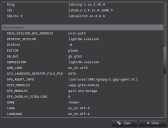
(Click to enlarge)
Edit
My system has the xapp-gtk3-module and gtk3.webview works, as does your Toshiba system. Maybe you are missing something, somehow?
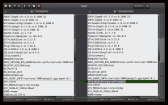
(Click to enlarge)
gbWilly
- Gambas Dutch translator
- Gambas wiki content contributor
- Gambas debian/ubuntu package recipe contributor
- GambOS, a distro for learning Gambas and more…
- Gambas3 Debian/Ubuntu repositories
… there is always a Catch if things go wrong!
- Gambas Dutch translator
- Gambas wiki content contributor
- Gambas debian/ubuntu package recipe contributor
- GambOS, a distro for learning Gambas and more…
- Gambas3 Debian/Ubuntu repositories
… there is always a Catch if things go wrong!
Posted
Administrator
Did you first remove offical gambas as I explained before?rj71 said
So the mac mini running openbox upgrade didn't go well. Gambas will not launch. I will address that later. Here's the sys info for the laptop and iMac:
If not, open Synaptic Package Manager, search for gambas3 and sort by installed and version installed.
See if all is latest version, post screen of wrong version ones if any present. You might need to do some tricks, if you didn't remove official first.
I've been there testing it all when making the recipes as compatible as possible with official (remember they package gambas wrong and have packages that do not exist in our eco system
 ). So, you might have a partly upgraded gambas.
gbWilly
- Gambas Dutch translator
- Gambas wiki content contributor
- Gambas debian/ubuntu package recipe contributor
- GambOS, a distro for learning Gambas and more…
- Gambas3 Debian/Ubuntu repositories
… there is always a Catch if things go wrong!
- Gambas Dutch translator
- Gambas wiki content contributor
- Gambas debian/ubuntu package recipe contributor
- GambOS, a distro for learning Gambas and more…
- Gambas3 Debian/Ubuntu repositories
… there is always a Catch if things go wrong!
Posted
Regular
gbWilly said
Did you first remove offical gambas as I explained before?rj71 said
So the mac mini running openbox upgrade didn't go well. Gambas will not launch. I will address that later. Here's the sys info for the laptop and iMac:
If not, open Synaptic Package Manager, search for gambas3 and sort by installed and version installed.
See if all is latest version, post screen of wrong version ones if any present. You might need to do some tricks, if you didn't remove official first.
I've been there testing it all when making the recipes as compatible as possible with official (remember they package gambas wrong and have packages that do not exist in our eco system
I followed your directions exactly on all 3 machines:
Code (gambas)
- sudo apt-get purge gambas3
- sudo apt-get autoremove
- echo 'deb http://download.opensuse.org/repositories/home:/gambas:/stable/Debian_12/ /' | tee /etc/apt/sources.list.d/home:gambas:stable.list
- apt-get update
- apt-get upgrade
- apt-get install gambas3
Update: The mac mini is having problems loading my apps but adjusted something then launch it again. Same result…black screen with the webview test.
All 3 machines are now Gambas 3.20.4 but the old Toshiba is the only one not having webview problems. Maybe some fresh installs are in order? The iMac really isn't that old of an install though. Fresh install on it a month ago…month and a half maybe. The Mac mini has been an experiment box and may be broken although no problems with gamabas other than the webview black screen
Posted
Regular
Posted
Regular
rj71 said
I got machine number 4 booting up. If I remember correctly, it's a Deb 12 that was a fresh install just last month for some testing I was going to do. Will report back on that one.
I forgot I broke something on this pc. Doing fresh Deb 12 install right now.
Posted
Regular
After the install I ran my movies/stream app which has a gtk3 webview on a form and looks good…no black screen!!
Here's machine #4 install summary:
Code (gambas)
- Older Dell optiplex 790 SFF, core duo 4g RAM
- fresh install
- kernel: 6.1.0-35-amd64
- apt update - this was a net install so no updates
- followed gbWilly instructions on how to install newer Gambas on Debian 12:
- echo 'deb http://download.opensuse.org/repositories/home:/gambas:/stable/Debian_12/ /' | tee /etc/apt/sources.list.d/home:gambas:stable.list
- apt-get update
- apt-get upgrade
- apt-get install gambas3
- installed webmin
- this will be a test appliance just like the mac mini so installed the below:
- installed xorg, slim and openbox
- installed xcompmgr and unclutter
and here's Gambas sys info:
Code (gambas)
- Gambas=3.20.4 ab0099a (master)
- OperatingSystem=Linux
- Distribution=Debian GNU/Linux 12 (bookworm)
- Kernel=6.1.0-35-amd64
- Architecture=x86_64
- Cores=4
- Memory=3793M
- Language=en_US.UTF-8
- Platform=x11
- Desktop=UNKNOWN
- DesktopResolution=96
- DesktopScale=7
- WidgetTheme=adwaita
- DarkTheme=False
- [Programs]
- dpkg=Debian 'dpkg' package management program version 1.21.22 (amd64).
- gcc=gcc (Debian 12.2.0-14+deb12u1) 12.2.0
- msgmerge=msgmerge (GNU gettext-tools) 0.21
- rpmbuild=RPM version 4.18.0
- [Libraries]
- Cairo=libcairo.so.2.11600.0
- Curl=libcurl.so.4.8.0
- DBus=libdbus-1.so.3.32.4
- GDK2=libgdk-x11-2.0.so.0.2400.33
- GDK3=libgdk-3.so.0.2406.32
- GStreamer=libgstreamer-1.0.so.0.2200.0
- GTK+2=libgtk-x11-2.0.so.0.2400.33
- GTK+3=libgtk-3.so.0.2406.32
- OpenGL=libGL.so.1.7.0
- Poppler=libpoppler.so.126.0.0
- QT5=libQt5Core.so.5.15.8
- QT6=libQt6Core.so.6.4.2
- RSvg=librsvg-2.so.2.48.0
- SDL=libSDL2-2.0.so.0.2600.5
- SQLite3=libsqlite3.so.0.8.6
- [Environment]
- DISPLAY=localhost:10.0
- GB_GUI=gb.gtk3
- HOME=<home>
- LANG=en_US.UTF-8
- LANGUAGE=en_US.UTF-8
- LIBGL_ALWAYS_SOFTWARE=1
- LOGNAME=<user>
- LS_COLORS=rs=0:di=01;34:ln=01;36:mh=00:pi=40;33:so=01;35:do=01;35:bd=40;33;01:cd=40;33;01:or=40;31;01:mi=00:su=37;41:sg=30;43:ca=00:tw=30;42:ow=34;42:st=37;44:ex=01;32:*.tar=01;31:*.tgz=01;31:*.arc=01;31:*.arj=01;31:*.taz=01;31:*.lha=01;31:*.lz4=01;31:*.lzh=01;31:*.lzma=01;31:*.tlz=01;31:*.txz=01;31:*.tzo=01;31:*.t7z=01;31:*.zip=01;31:*.z=01;31:*.dz=01;31:*.gz=01;31:*.lrz=01;31:*.lz=01;31:*.lzo=01;31:*.xz=01;31:*.zst=01;31:*.tzst=01;31:*.bz2=01;31:*.bz=01;31:*.tbz=01;31:*.tbz2=01;31:*.tz=01;31:*.deb=01;31:*.rpm=01;31:*.jar=01;31:*.war=01;31:*.ear=01;31:*.sar=01;31:*.rar=01;31:*.alz=01;31:*.ace=01;31:*.zoo=01;31:*.cpio=01;31:*.7z=01;31:*.rz=01;31:*.cab=01;31:*.wim=01;31:*.swm=01;31:*.dwm=01;31:*.esd=01;31:*.avif=01;35:*.jpg=01;35:*.jpeg=01;35:*.mjpg=01;35:*.mjpeg=01;35:*.gif=01;35:*.bmp=01;35:*.pbm=01;35:*.pgm=01;35:*.ppm=01;35:*.tga=01;35:*.xbm=01;35:*.xpm=01;35:*.tif=01;35:*.tiff=01;35:*.png=01;35:*.svg=01;35:*.svgz=01;35:*.mng=01;35:*.pcx=01;35:*.mov=01;35:*.mpg=01;35:*.mpeg=01;35:*.m2v=01;35:*.mkv=01;35:*.webm=01;35:*.webp=01;35:*.ogm=01;35:*.mp4=01;35:*.m4v=01;35:*.mp4v=01;35:*.vob=01;35:*.qt=01;35:*.nuv=01;35:*.wmv=01;35:*.asf=01;35:*.rm=01;35:*.rmvb=01;35:*.flc=01;35:*.avi=01;35:*.fli=01;35:*.flv=01;35:*.gl=01;35:*.dl=01;35:*.xcf=01;35:*.xwd=01;35:*.yuv=01;35:*.cgm=01;35:*.emf=01;35:*.ogv=01;35:*.ogx=01;35:*.aac=00;36:*.au=00;36:*.flac=00;36:*.m4a=00;36:*.mid=00;36:*.midi=00;36:*.mka=00;36:*.mp3=00;36:*.mpc=00;36:*.ogg=00;36:*.ra=00;36:*.wav=00;36:*.oga=00;36:*.opus=00;36:*.spx=00;36:*.xspf=00;36:*~=00;90:*#=00;90:*.bak=00;90:*.old=00;90:*.orig=00;90:*.part=00;90:*.rej=00;90:*.swp=00;90:*.tmp=00;90:*.dpkg-dist=00;90:*.dpkg-old=00;90:*.ucf-dist=00;90:*.ucf-new=00;90:*.ucf-old=00;90:*.rpmnew=00;90:*.rpmorig=00;90:*.rpmsave=00;90:
- MOTD_SHOWN=pam
- PWD=<home>
- SHLVL=1
- SSH_CLIENT=192.168.1.170 46198 22
- SSH_CONNECTION=192.168.1.170 46198 192.168.1.165 22
- SSH_TTY=/dev/pts/0
- TERM=xterm-256color
- TZ=:/etc/localtime
- XDG_SESSION_CLASS=user
- XDG_SESSION_ID=3
- XDG_SESSION_TYPE=tty
Posted
Regular
I will start analyzing this one in a few hours…got some stuff to do.
Posted
Administrator
I have no clue what might be causing it as on your last system there is no xapp-gtk3-module like on the Toshiba (or my system), but it seems to work. So that is apparently not related to your Webview problem. I'm clueless.
One thing, just out of curiosity, what happens if you use qt5 webview on the iMacs? Do you still get a black screen?
gbWilly
- Gambas Dutch translator
- Gambas wiki content contributor
- Gambas debian/ubuntu package recipe contributor
- GambOS, a distro for learning Gambas and more…
- Gambas3 Debian/Ubuntu repositories
… there is always a Catch if things go wrong!
- Gambas Dutch translator
- Gambas wiki content contributor
- Gambas debian/ubuntu package recipe contributor
- GambOS, a distro for learning Gambas and more…
- Gambas3 Debian/Ubuntu repositories
… there is always a Catch if things go wrong!
1 guest and 0 members have just viewed this.