



GDK message error 71
Posted
#1
(In Topic #1473)
Regular

I'm not sure if it's a bug, at least not from Gambas.
I have a project that opens normally, but when I type code that calls the help pop-up (CInt for example), the IDE closes completely.
Running the terminal I could see the error message:
"Gdk-Message: 18:28:15.552: Error 71 (Protocol error) dispatching to Wayland display."
I'm using Fedora 41 Gnome on a notebook with Intel and NVidia graphics (hybrid)
Thanks for any help


Posted
Banned
or use an X desktop not a wayland one, wayland has issues.
Posted
Banned
bugs are not fixed in old gambas versions, if it is a bug and it gets fixed you'll need the latest version.
you have to compile for fedora as there are no binary packages made for fedora yet.
here is how..
<HIGHLIGHT highlight="shell">
dnf install -y git libtool libtool-ltdl-devel gcc make autoconf gawk dumb-devel gmime-devel gmime30-devel libffi-devel mariadb-devel postgresql-devel unixODBC-devel sqlite2-devel libsqlite3x-devel libxslt-devel libv4l-devel glew-devel poppler-devel poppler-glib-devel poppler-cpp-devel qt-devel qt5-qtbase-devel qt5-qtbase-private-devel qt5-qtwebengine-devel qt5-qtx11extras-devel qt5-qtsvg-devel SDL_ttf-devel SDL_mixer-devel SDL-devel SDL2_ttf-devel SDL2_mixer-devel SDL2_image-devel SDL2-devel cairo-devel gtk2-devel gtk3-devel imlib2-devel librsvg2-devel qt-webkit-devel qt5-qtwebkit qt5-qtwebkit-devel openal-soft-devel libjpeg-turbo-devel gtkglext-devel gmp-devel libxml2-devel libXtst-devel gsl-devel pcre-devel dbus-devel libcurl-devel alure-devel gstreamermm-devel libgnome-keyring-devel bzip2-devel libzstd-devel webkit2gtk3-devel ncurses-devel qt6-qtbase-devel qt6-qtwebengine-devel qt6-qtsvg-devel mongo-c-driver-devel
cd ~
git clone –branch stable –depth=1 Gambas / gambas · GitLab gambas-stable
cd gambas-stable
./reconf-all
./configure -C –disable-pdf
make -j$(nproc)
dnf remove gambas3* # remove old gambas
sudo make install # install new gambas
</HIGHLIGHT>
replace the word stable for master if you want latest development version like this…
cd ~
git clone –branch master –depth=1 Gambas / gambas · GitLab gambas-master
cd gambas-master
Posted
Regular
I will upgrade Fedora and then update Gambas (I am using 3.19).
Posted
Regular
(Click to enlarge)
Posted
Regular
There is an error in the compilation when running make command:
Code
			In file included from gbx_exec.h:28,
                 from gbx_jit.c:30:
gbx_jit.c: In function ‘JIT_call_unknown’:
gb_error.h:139:35: error: assignment to ‘void (*)(void)’ from incompatible pointer type ‘void (*)(JIT_call_unknown_ERROR *)’ [-Wincompatible-pointer-types]
  139 |                 __handler.handler = (_handler); \
      |                                   ^
gb_error.h:146:9: note: in expansion of macro ‘ON_ERROR’
  146 |         ON_ERROR(_handler) \
      |         ^~~~~~~~
gbx_jit.c:433:9: note: in expansion of macro ‘ON_ERROR_1’
  433 |         ON_ERROR_1(error_JIT_call_unknown, &save)
      |         ^~~~~~~~~~
gbx_jit.c:414:13: note: ‘error_JIT_call_unknown’ declared here
  414 | static void error_JIT_call_unknown(JIT_call_unknown_ERROR *save)
      |             ^~~~~~~~~~~~~~~~~~~~~~
make[4]: *** [Makefile:1188: gbx3-gbx_jit.o] Error 1
Posted

Administrator



It seems to me Wayland is causing trouble heremonteiro said
Running the terminal I could see the error message:
"Gdk-Message: 18:28:15.552: Error 71 (Protocol error) dispatching to Wayland display."
I'm using Fedora 41 Gnome on a notebook with Intel and NVidia graphics (hybrid)
Thanks for any help
Avoid Wayland and use X-based desktops, as Bruce said and probably your trouble is gone.
The other option is update to Fedora 40 or higher and you will be in Gambas 3.20 series.
Compile and install gambas3 should never be the first solution, rather the last resort, to solve something.
gbWilly
- Gambas Dutch translator
- Gambas wiki content contributor
- Gambas debian/ubuntu package recipe contributor
- GambOS, a distro for learning Gambas and more…
- Gambas3 Debian/Ubuntu repositories
… there is always a Catch if things go wrong!
- Gambas Dutch translator
- Gambas wiki content contributor
- Gambas debian/ubuntu package recipe contributor
- GambOS, a distro for learning Gambas and more…
- Gambas3 Debian/Ubuntu repositories
… there is always a Catch if things go wrong!
Posted
Regular
Any other means available?
Posted

Enthusiast


Posted
Regular
I saved the compilation log to a file and sent it to the Gambas bugtrack-help email.
I'm currently waiting for a response, but it seems to me like a declaration error, where an array was expected and a string was declared.
This should affect other distros.
Posted
Enthusiast
Posted
Banned
monteiro said
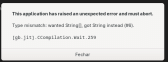
Unfortunately, after following all the steps to update Gambas, when trying to open the IDE, the error message whose image I attached appears.
those JIT errors are just because you need to reboot after upgrading gambas to clear the JIT cache.
Seems like there is still a wayland problem though, sorry.
Maybe Benoit can fix it if it's reported on the bugtracker.
Personally I would use an X desktop instead though. Gambas is just better using X.
Wayland seriously lacks some features
/doc/wayland - Gambas Documentation
Posted
Administrator
Did you try compile master version and if so, does it give the same error?grayghost4 said
I am have updated to fedora 42 , using Wayland, and have the compiled version of Gambas and get the same error message when starting Gambas …. I will be watching for your FIX .
gbWilly
- Gambas Dutch translator
- Gambas wiki content contributor
- Gambas debian/ubuntu package recipe contributor
- GambOS, a distro for learning Gambas and more…
- Gambas3 Debian/Ubuntu repositories
… there is always a Catch if things go wrong!
- Gambas Dutch translator
- Gambas wiki content contributor
- Gambas debian/ubuntu package recipe contributor
- GambOS, a distro for learning Gambas and more…
- Gambas3 Debian/Ubuntu repositories
… there is always a Catch if things go wrong!
Posted
Regular
BruceSteers said
monteiro said
Unfortunately, after following all the steps to update Gambas, when trying to open the IDE, the error message whose image I attached appears.
those JIT errors are just because you need to reboot after upgrading gambas to clear the JIT cache.
Seems like there is still a wayland problem though, sorry.
Maybe Benoit can fix it if it's reported on the bugtracker.
Personally I would use an X desktop instead though. Gambas is just better using X.
Wayland seriously lacks some features
/doc/wayland - Gambas Documentation
Posted
Banned
It basically does the following…
First it compiles and installs the "main" source folder.
that installs the new version of the interpreter/compiler gbx3/gba3/etc
Then the new compiler is used to compile the rest of the source.
(conflics here can cause all manor of issues)
Try the following from a fresh reboot…
ensure no packager gambas is installed…
sudo dnf remove gambas3*
remove any gambas executables…
sudo rm -f /usr/bin/gb*3 /usr/bin/gambas*
re-compile all steps…
cd ~/gambas-stable
./reconf-all
./configure -C -q –disable-pdf
make -j$(nproc)
sudo make install
Notes:
look out for error messages after ./configure
It should say "all components will be compiled"
it might say something about gb.pdf disabled but that's okay as it is supposed to be.
Note any other error messages.
Also note once you have compiled and installed gambas you must not use the dnf packager version any more as it will cause conflicts. as far as the packager (dnf/zypper) knows you do not have gambas installed (because it's installed manually and not from a repository).
I have downloaded fedora42 and am making a VM to test but my laptop is pretty slow.
Posted
Banned
BruceSteers said
I have downloaded fedora42 and am making a VM to test but my laptop is pretty slow.
So i did the following in a new Fedora42.
Used the software installer application to install gambas3.
that did not work at all. It did not install all the required packages.
"Unable to load component gb.hash"
So i opened a terminal and typed the following..
sudo dnf install gambas3*
that installed 159 new packages.
Then I get the same JIT error message as you.
seems to be a big glitch in JIT
I compiled and installed the latest version and the bug is still there

Only one last option then…
JIT can be turned off by running the IDE like this..
env GB_NO_JIT=true gambas3
success at last, gambas IDE is working.
I'll report the bug.
Posted
Enthusiast
env GB_NO_JIT=true gambas3
Gambas3.20.99
Posted
Banned
rm ~/.local/share/applications/org.gambas*
The IDE is creating a temporary .desktop file but because it crashes it does not remove it.
so there is a file called something like ~/.local/share/applications/org.gambas.23232.desktop for every time the IDE did not load because of the JIT error.
Posted
Banned
monteiro said
But since I have already compiled and installed it, now I can't remove it using 'dnf remove gambas3*'
Any other means available?
You remove the compiled version like this…
<HIGHLIGHT highlight="shell">cd ~/gambas-stable # or where ever you installed it from
sudo make uninstall </HIGHLIGHT>
But bare with it.
I should think this bug will soon be fixed then you'll want the latest version installed as on fedora compiling is the only way.
Posted
Banned
You must keep in mind installing by dnf or compiling are different.
You must remove one way before using the other.
Only use dnf if Gambas is installed by dnf.
Otherwise use make uninstall

Posted
Banned
So the fix is in the "master" branch now and will be in the next stable release
Posted
Regular
I saw that you posted this bug and that Benoit promptly fixed it.
I tested the Master version and I confirm that the problem has been resolved.
1 guest and 0 members have just viewed this.