

GAMBAS form that read a libreoffice calc file?
Posted
#1
(In Topic #1488)
Trainee

OS: Linux 20.04
Gambas3 ver: 3.19.5
Main problem: I want to create a form where I can search a libreoffice calc file.
How do I create the communication. The file is local on the PC and it contains 1828 lines.
In the GAMBAS form I want to have a text box where I enter a text. If possible; while I am typing, a function should search an 'ods.calc.column' for text that matches and display it row by row in another text box (ListBox).
I should then be able to select a 'selection' in a row, in the 'ListBox' and then two other data from two other columns (from the same row) should be displayed in separate text boxes.
Are there any examples of this?
Or is there any kind person who can describe for a slow-thinking person close to 70 years old but with very good programming experience (but that was a while ago…)
Best regards
If the language is strange, it's Google Translate's fault.


Posted

Expert


I've looked into creating/opening libreoffice documents generally and it is a daunting task.
If you open a calc (.ods) document by right clicking - Open with - Other application - Text Editor: you get something similar to this.
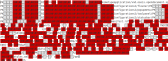
(Click to enlarge)
Note # If anyone is aware of some API to make the process of interacting with open/libre office documents easier then please post about it.
My advice is to save the calc document as a Text CSV (.csv) file.
You can then create a Gambas project to read it in line by line as any text file.
If you've never done this before then the cells in each line will be split by a common delimiter such as a comma or semi-colon.
String values will have double quotes ie: "string data" and numerical values will be as they appear in the calc document.
Split the read line into an string array and then convert the values to the correct types for whatever process you require.
Remember. The first line read may contain column headings and should be ignored or at least treated differently in your process.
Code (gambas)
- Line Input #CalcFile, TxtLine
- FirstLine = False
- 'Do your processing of the data here ie:
Cheers - Quin.
I code therefore I am
I code therefore I am
Posted

Administrator


They have a file named content.xml that 'guess what' holds the content.
I have used Gambas in the past to open Libre Office Writer files. I used them as templates for contracts and the likes at work (don't work there anymore).
I opened a copy of .odt file with archive manager, replaced (with a very simple existing function) certain fields I added in the documents (like @{firstname}@, @{name}@ etc) with data from database fields in the unpacked content.xml and next re-added the modified content.xml to the .odt archive, all using Gambas code.
The end result opened in Libre Writer with all replacements done. Worked as a charm.
.ods file are the same. I bet with xml component, the needed data is easily retrieved from the unpacked content.xml.
Once you have that, rest shouldn't be to hard, to get to, modify if needed and re-add to the .ods archive.
The sky is the limit, once you know how to get there…
gbWilly
- Gambas Dutch translator
- Gambas wiki content contributor
- Gambas debian/ubuntu package recipe contributor
- GambOS, a distro for learning Gambas and more…
- Gambas3 Debian/Ubuntu repositories
… there is always a Catch if things go wrong!
- Gambas Dutch translator
- Gambas wiki content contributor
- Gambas debian/ubuntu package recipe contributor
- GambOS, a distro for learning Gambas and more…
- Gambas3 Debian/Ubuntu repositories
… there is always a Catch if things go wrong!
Posted

Guru


The first thing to do is make sure there are no commas in your .ODS file as they will be seen as field delimiters.
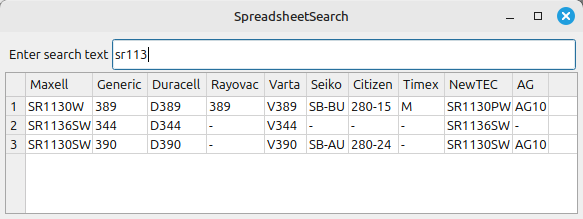
LibreOffice has a command line tool to convert a file from .ODS to .CSV which you can see in the attached program.
The small attached program takes a .ODS file converts it to a .CSV file and stores the .CSV file in the /tmp/ folder. The program takes each line of data and puts it into an array, each line can then be treated as a separate array for display purposes. The program assumes that the first line of data is the Column names
I have included a small file that compares the names of button batteries by their manufacturer.
I hope it helps.
<IMG src="https://www.cogier.com/gambas/SpreadsheetSearch.png">
 </IMG>
1 guest and 0 members have just viewed this.