





enumerating an collection
Posted
#1
(In Topic #207)

Enthusiast

Dim Dict As New Collection
Dim Element As String
Dict["Blue"] = 3
Dict["Red"] = 1
Dict["Green"] = 2
For Each Element In Dict
Print Element;
Next
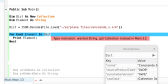
but if I substutite a json.Decode …. I get the results in the attachment
(Click to enlarge)


Posted

Guru


Can you tell us what it is you are trying to achieve and please upload the 'conssendo_s.srm' file so we can see what you see.
Posted
Enthusiast
I want to load the file from the disk, make modifications to it and then write it back to the disk. I can accomplish that without enumerating the file but when I write it back with Json.encode, the file is compressed without tabs and linefeeds. If I enumerate it to a string, or string[] then I can add tabs and line feeds where I want them, and write the string back to a file.
Also, I am learning the language and want to understand the commands and understand why that one does not work. It seems like that is a useful command to know.
I believe I found the problem … the file I am working with has two collections within it.
So the first element is a collection and the second element is a string. So it will generate a type mismatch no matter what you try to assign it to.

Posted
Guru
I have taken your file opened it and split it by line, then created a new array without all the indentation. You can edit the data then replace the old data with the new. This leaves the indentation as it was.
I hope it helps.
1 guest and 0 members have just viewed this.