







Draw a curved line, arcs always produce a "pie"
Posted
#1
(In Topic #2222)

Trainee

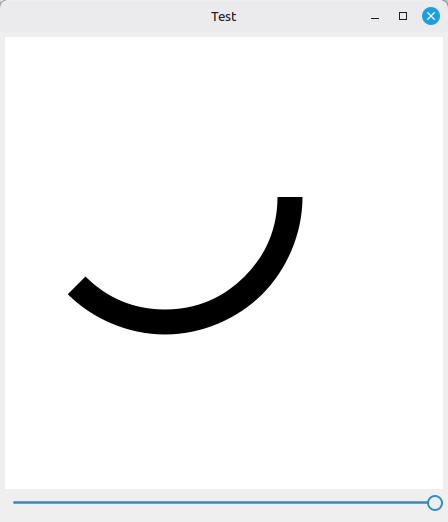
I want to draw a curved line without the two lines to the center with Draw.Arc
I have this small problem, that I surely could solve by other means, but I wonder, if I do not see some way to do that right.There is this very small project, a radio room clock. These are the clock on the radio room of every ship and the first problem I have is to get this outside ring going. There are a lines of red circling the clock face, four seconds red, one second white and that all around the face. It was a way to call for SOS, means to alarm all operators. You send this for a minute and some circuits on board of other ships would automatically ring the OPs from their bunks by a loud bell going off and they will be running to their station and then comes your SOS.
That is the reason why these lines are plotted around.
I am drawing that clock face by program now, because I want to and I do not want to have a pic doing that for me. Now. Basic idea I had was a thick line and a circle, and of course there was the Draw.Arc function, but that function also plots lines to the center and with that is plotting a kind of pie. I only want the outside line.
Have I overlooked something here? Is there somewhere a hidden flag, that I have to set, so that I can supress that? Or do I have to live with this and in effect first plot the red ring, and then overwrite all those ugly center lines with a clean filled circle? That is of course a solution, but it is so ugly, I have to draw so much more than needed…
Have I overlooked something here? Sure I must have…



Guru


Test-0.1.tar.gz
Posted
Trainee
RadioClock.png

(Click to enlarge)

Trainee
RadioClock.png

(Click to enlarge)
The clockface was a lot more work, than I originally expected. There are so many little details to look after, it is insane. As you can see, the colors of the red and green are shine-through like on the original clock, so they are laquor on top of the background. I have not put any grain on it, because the original is burned in emaille. So it is very smooth. And did I mention expensive? Clockmakers cash in a whole lot of money for these, because boat owner have it. Radio amateurs have it not, still we want and need these clocks, haha!
They always run on UTC, the green sector is the Silent Period for telephony, spoken radio to listen for emergency calls, between 0 and 4 minute and 30 and 34 minute of every hour, the red are for listening for telegraphy signals and nothing else will be sent during those periods. The seconds have a think one on every five and the broken red line around the face is to activate the auto-alarm. So if your autoalarm is broken and you have an emergency, you start pushing the Morse key down on the beginning of a red sector, do a one second pause, and repeat that for one minute. After that every radio operator has been ringed out of his bunk and should be at his station. This is when you start sending your distress call as usual.
Today on commercial shipping this is all gone except the telephony silent phase and everything is done by GMDSS by satellite, but let's assume some powers to be start a space war, then two hours later only scrap is in orbit and nothing up there will be working anymore. Which is why we still have these clocks, we still have shortwave radio and we still know how to operate them, even if this is not an official position on ships. The amateurs and the yacht captains are holding fast to it, because shortwave comes with no costs attached, no infrastruture needed and you can send your signal even if everything else is broken. Because a signal that can be heared over thousands of kilometers can be powered by nothing but a 9V batteryblock from your next supermarket. Or a handcranked battery in one of those el-cheapo Chinese emergency flashlights.
Telegraphy was 500 kHz, Telephony is still 2182 kHz USB.
My plan is not only to give the user a little gadget for the desktop, but if you click on it, the current time will be in your clipboard, and this thing, if I get everything working, will be able to create the original autoalarm if started, so the one minute 4 sec/1 sec signal, will react to the same thing and will be able to create and react to the 5-tone Emergency for SSB. Including to play an automatic emergency signal in telegraphy or a generated voice message like a black box. You can call me stupid, but I think that is a good idea, because devices like that are beyond affordable for yacht captains or the average radio amateur.
The green phase was added to the clock somewhere after the war, do not remember when. Hard to find, but it was somewhere near after the war, when SSB started to be used on ships, I assume between 1950 and 1960. Found it, it was the ITU conference 1948.
Telegraphy is still about 100 times stronger compared with the best commercial telephony (SSB) if we do not count in the digital modes, which are slightly better than SSB but come with other problems. So, a Watt of power is enough to get your signal around the globe on the right time of day and if the sun is cooperative and no sun storm or CME is ruining the propagation. And no, we have nothing better. Easier to operate by program, yes, but nothing better.
Gambas is amazing and a lot of fun to work with.
 Last edit: by silizium
1 guest and 0 members have just viewed this.