Decode Bit-coded

Post

Posted
Rating:
#1 (In Topic #496)
Avatar
Regular
tincho is in the usergroup ‘Regular’
 Hello everyone.
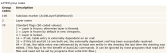
I have a collection of numbers that according to the manual of the file I am trying to decode are bit-coded they should be 1, 2, 4, 16, 32, 64 but I get from the file:
1008, 992, 1017.
How do I decode the numbers in the second group to make them look like something in the first?
See index 70 for the list.
Image

(Click to enlarge)

Online now: No Back to the top

Post

Posted
Rating:
#2
Regular
vuott is in the usergroup ‘Regular’

Europaeus sum !

<COLOR color="#FF8000">Amare memorentes atque deflentes ad mortem silenter labimur.</COLOR>
Online now: No Back to the top

Post

Posted
Rating:
#3
Avatar
Guru
cogier is in the usergroup ‘Guru’
cogier is in the usergroup ‘GambOS Contributor’
Is this what you are looking for?

Code (gambas)

  1. TextBoxIn As TextBox
  2. GridViewDisplay As GridView
  3.  
  4. Public Sub TextBoxIn_Change()
  5.  
  6.   Dim iLoop As Integer
  7.   Dim sBin As String
  8.  
  9.   GridViewDisplay.Clear
  10.  
  11.   If Len(Trim(TextBoxIn.Text)) > 3 Then TextBoxIn.Text = Left(TextBoxIn.Text, -1)
  12.  
  13.   Try sBin = Bin(TextBoxIn.Text, 7)
  14.     If Trim(TextBoxIn.Text) = "" Then Return
  15.  
  16.     TextBoxIn.Text = Left(TextBoxIn.Text, -1)
  17.  
  18.   If Val(TextBoxIn.Text) > 127 Then
  19.     TextBoxIn.Clear
  20.     Return
  21.   End If
  22.  
  23.   For iLoop = 0 To 6
  24.     GridViewDisplay[0, iLoop].Text = sBin[iLoop]
  25.   Next
  26.  
  27.  
  28. Public Sub Form_Open()
  29.  
  30.   Dim iLoop As Integer
  31.   Dim sHeader As String[] = ["AutoCad\n64", "Resolved\n32", "Table entry\n16", "8", "Locked\n4", "Frozen\n2", "Frozen\n1"]
  32.  
  33.   With Me
  34.     .H = 150
  35.     .W = 500
  36.     .Padding = 5
  37.     .Arrangement = Arrange.Vertical
  38.  
  39.   With TextBoxIn = New TextBox(Me) As "TextBoxIn"
  40.     .H = 28
  41.     .PlaceHolder = "Enter an integer upto 127"
  42.  
  43.   With GridViewDisplay = New GridView(Me) As "GridViewDisplay"
  44.     .Columns.Count = 7
  45.     .Rows.Count = 1
  46.     .Expand = True
  47.     .Header = GridView.Horizontal
  48.  
  49.   For iLoop = 0 To 6
  50.     GridViewDisplay.Columns[iLoop].Title = sHeader[iLoop]
  51.     GridViewDisplay.Columns[iLoop].Alignment = Align.Center
  52.   Next
  53.  
Online now: No Back to the top

Post

Posted
Rating:
#4
Avatar
Regular
tincho is in the usergroup ‘Regular’
Yes !!! exactly.
Before see your code i made this with the help of tercoide.

Code (gambas)

  1. Public Function DWGFlag(iFlag As Integer, iPos As Integer) As Byte
  2.   Dim b As Byte
  3.   t = Bin(iFlag, 8)
  4.   b = CByte(Mid(t, 9 - iPos, 1))
  5.   Return b
  6.  
Regards.
Martin.
Online now: No Back to the top
1 guest and 0 members have just viewed this.