DateTime Error

Post

Posted
Rating:
#1 (In Topic #239)
Avatar
Expert
Quincunxian is in the usergroup ‘Expert’
Quincunxian is in the usergroup ‘Blogger’
I had this error and want to confirm that its not just me.
Can someone else please try this with a DateTime box; if it is a real bug, I'll log it formally.

Code (gambas)

  1. DateTimeBox.Value = CDate("01/01/2019")
Returns an error even though both are date Types.
Error returned is : "Type mismatch: Wanted Date , got string instead."

Gambas=3.12.90
OperatingSystem=Linux
Kernel=4.15.0-46-generic
Architecture=x86_64
Distribution=Ubuntu 18.04.2 LTS
Desktop=UBUNTU:GNOME
Theme=Gtk
Language=en_AU.UTF-8

Cheers - Quin.
I code therefore I am
Online now: No Back to the top

Post

Posted
Rating:
#2
Avatar
Administrator
sholzy is in the usergroup ‘unknown’
 Where are you getting a DateTime box? The only thing I can find is a ValueBox with the type set to DateTime. Maybe I'm missing a component that has that?

sholzy
Gambas One Site Director

To report bugs in the Gambas IDE:
Official Gambas Bug Tracker
Online now: No Back to the top

Post

Posted
Rating:
#3
Avatar
Expert
Quincunxian is in the usergroup ‘Expert’
Quincunxian is in the usergroup ‘Blogger’
 Hey Sholzy,
Got actual control name wrong…..

DateBox (gb.form)
This control allows to edit a date value. It provides a little button that displays a calendar popup.

Edit: in the 'Chooser' tab.

Cheers - Quin.
I code therefore I am
Online now: No Back to the top

Post

Posted
Rating:
#4
Avatar
Trainee
gambix is in the usergroup ‘Trainee’
 You must to share more code to allow us to understand your error. Tested here without problem.

Also the date must be in us style mm/dd/yyyy. in other case it return the message you have

I can just say the pb is around your use of CDate

:-P
Online now: No Back to the top

Post

Posted
Rating:
#5
Avatar
Regular
stevedee is in the usergroup ‘Regular’

Quincunxian said

I had this error and want to confirm that its not just me.
Can someone else please try this with a DateTime box; if it is a real bug, I'll log it formally…

No, it seems to work as expected for me on 3.12.90 (…and on 3.12.2).

The error message: "Type mismatch: Wanted Date , got string instead."
…is a funny one, because I often see this when the error is unrelated to this description (its almost like a fall-back error).


Edit: I'm running 3.12.90 on Lubuntu 18.10 with that new LXQt desktop
Online now: No Back to the top

Post

Posted
Rating:
#6
Avatar
Regular
Cedron is in the usergroup ‘Regular’
I did this in a Form_Open():

Code (gambas)

  1.         Dim d As DateBox
  2.        
  3.         d = New DateBox(Me)
  4.  
  5.         d.Value = CDate("01/01/2019")
  6.        
  7.         Print d.Value
  8.        
  9.         d.X = 100
  10.         d.Y = 100
  11.         d.W = 100
  12.         d.H =  20
  13.        
  14.         d.Show()
  15.  
    
I got this in the console:

Code

12/31/2018 00:00:00

The date was also 12/31/2018 on the form.

Looks like a bug to me.

It also raises the question, how does one place a Form control on the form at design time if it isn't in one of the panels to the right?

Ced

3.12.2 (Behind the front lines.)

.... and carry a big stick!
Online now: No Back to the top

Post

Posted
Rating:
#7
Avatar
Guru
cogier is in the usergroup ‘Guru’
cogier is in the usergroup ‘GambOS Contributor’
 I tried this and it works as expected. Is this a language problem?

I am using  en_GB.UTF-8 (British)
Stevedee   en_GB.UTF-8 (British) - I presume
Quincunxian en_AU.UTF-8 (Austrailia)
Cedron en_US.UTF-8 (USA)  - I presume
Sholzy en_US.UTF-8 (USA)  - I presume

Just a thought!
Online now: No Back to the top

Post

Posted
Rating:
#8
Avatar
Regular
jornmo is in the usergroup ‘Regular’
Cedron .Move() does what you four lines did in one :)

/comp/gb.qt4/control/move - Gambas Documentation

Online now: No Back to the top

Post

Posted
Rating:
#9
Avatar
Guru
cogier is in the usergroup ‘Guru’
cogier is in the usergroup ‘GambOS Contributor’
@Cedron .Move() does what you four lines did in one

I did not need either the following worked fine: -

Code (gambas)

  1. Public Sub Form_Open()
  2. Dim d As DateBox
  3.  
  4. d = New DateBox(Me)
  5. d.Value = CDate("01/01/2019")
  6. Print d.Value
  7.  
Online now: No Back to the top

Post

Posted
Rating:
#10
Avatar
Regular
jornmo is in the usergroup ‘Regular’

cogier said

I did not need either the following worked fine: -

Sure, but that's another story  ;)

Online now: No Back to the top

Post

Posted
Rating:
#11
Avatar
Trainee
gambix is in the usergroup ‘Trainee’
 Again it work fine for me :-/

So the problem can coming from your system too.

:-P
Online now: No Back to the top

Post

Posted
Rating:
#12
Avatar
Regular
Cedron is in the usergroup ‘Regular’

cogier said

@Cedron .Move() does what you four lines did in one

I did not need either the following worked fine: -

Code (gambas)

  1. Public Sub Form_Open()
  2. Dim d As DateBox
  3.  
  4. d = New DateBox(Me)
  5. d.Value = CDate("01/01/2019")
  6. Print d.Value
  7.  

Thanks, I should have remembered that.  Honestly, it's not all that often that I move controls around the form.

Code:

Code (gambas)

  1.         Dim d As DateBox
  2.         Dim s As String
  3.  
  4.         d = New DateBox(Me)
  5.        
  6.         d.Move(100, 100, 100, 20)
  7.         d.Show()
  8.  
  9.         d.Value = CDate("01/01/2019")
  10.         s = CDate("01/01/2019")
  11.         d.Value = CDate(s)
  12.        
  13.         Print s
  14.         Print d.Value
  15.        
  16.         Print CFloat(CDate(s))
  17.         Print CFloat(d.Value)
  18.         Print CFloat(CDate(d.Value))
  19.  

Output:

Code

01/01/2019
12/31/2018 00:00:00
2490589
2490588.16666667
2490588.16666667

Somebody is definitely having trouble getting a date.

(Side note:  Could you guys put one of those handy "SELECT ALL" options in the "gb" tag output?

Ced

[System]
Gambas=3.12.2
OperatingSystem=Linux
Kernel=3.13.0-24-generic
Architecture=x86_64
Distribution=Linux Mint 17 Qiana
Desktop=MATE
Theme=Gtk
Language=en_US.UTF-8

.... and carry a big stick!
Online now: No Back to the top

Post

Posted
Rating:
#13
Avatar
Guru
cogier is in the usergroup ‘Guru’
cogier is in the usergroup ‘GambOS Contributor’
It works OK for me.

<IMG src="http://www.cogier.com/gambas/date.png"> </IMG>
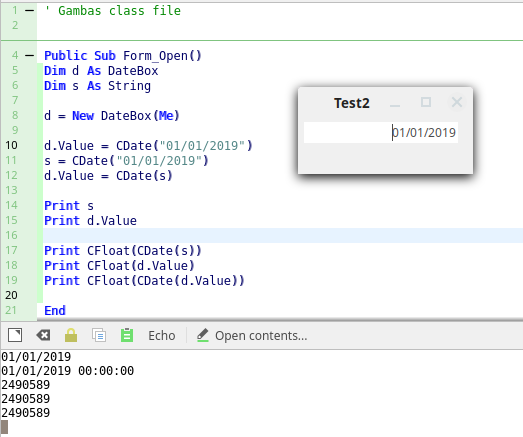
You can change line 10 to: -

Code (gambas)

  1. d.Value = "01/01/2019"

Same result.
Online now: No Back to the top

Post

Posted
Rating:
#14
Avatar
Regular
Cedron is in the usergroup ‘Regular’
Somewhat tracing what happens in the code (shown below)

Code (gambas)

  1.         Dim t As String
  2.         Dim v As Date
  3.         Dim f As Float
  4.         Dim w As Date
  5.        
  6.         v = CDate("01/01/2019")
  7.         t = Format(v, "mm/dd/yyyy")
  8.         f = Val(t)
  9.         w = f  ' Implied CDate
  10.        
  11.         Print v
  12.         Print CFloat(v)
  13.         Print CStr(v)
  14.         Print Str(v)
  15.         Print t
  16.         Print f
  17.         Print CDate(f)
  18.         Print w
  19.  
  20.  

Produces:

Code

12/31/2018 20:00:00
2490589
01/01/2019
12/31/2018 20:00:00
12/31/2018
2490588.16666667
12/31/2018 00:00:00
12/31/2018 00:00:00

So I am a bit puzzled.  I've always understood internal date representation to be Integer Date + Fraction Of Day Time.

Looks like Str and Val might be problematic.

Ced

From: gambas-master/comp/src/gb.form/.src/Date/DateBox.class

Code (gambas)

  1. Private Function Value_Read() As Date
  2.  
  3.   Dim vVal As Variant
  4.  
  5.   If Not $bShowDate Then
  6.     vVal = Time(Val(Format(Date(1, 1, 1), "dd/mm/yyyy") & " " & $hButtonBox.Text))
  7.   Else
  8.     vVal = Val($hButtonBox.Text)
  9.  
  10.   If vVal And If TypeOf(vVal) = gb.Date Then Return vVal
  11.  
  12.  
  13. Private Sub Value_Write(Value As Date)
  14.  
  15.   If IsNull(Value) Then
  16.     $hButtonBox.Text = GetNullDate()
  17.   Else
  18.     $hButtonBox.Text = Format(Value, GetDateFormat())
  19.  

Code (gambas)

  1. Private Sub GetDateFormat() As String
  2.  
  3.   Dim sFormat As String
  4.  
  5.   If $bShowDate Then
  6.     sFormat = Format(Date(3333, 11, 22), gb.ShortDate)
  7.     sFormat = Replace(sFormat, "3333", "yyyy")
  8.     sFormat = Replace(sFormat, "22", "dd")
  9.     sFormat = Replace(sFormat, "11", "mm")
  10.  
  11.   If $bShowTime Then
  12.     sFormat &= " " & Format(Time(11, 22, 33), gb.ShortTime)
  13.     sFormat = Replace(sFormat, "11", "hh")
  14.     sFormat = Replace(sFormat, "22", "nn")
  15.     sFormat = Replace(sFormat, "33", "ss")
  16.  
  17.   Return LTrim(sFormat)
  18.  
  19.  

.... and carry a big stick!
Online now: No Back to the top

Post

Posted
Rating:
#15
Avatar
Regular
Cedron is in the usergroup ‘Regular’
It helps to RTFM.  The Str$ vs CStr is a localization issue.

/lang/cstr - Gambas Documentation

vs

/lang/str - Gambas Documentation

Same with val vs CDate.

So, val and str use localization, CDate and CStr do not.

Hence the observed behavior.

I have not been able to reproduce the OP's original bug.

Ced

.... and carry a big stick!
Online now: No Back to the top

Post

Posted
Rating:
#16
Avatar
Expert
Quincunxian is in the usergroup ‘Expert’
Quincunxian is in the usergroup ‘Blogger’
Ok that makes sense now.  :roll:
Thanks to all.

I've been keeping a list of things that are either bugs(?) that need to be confirmed or a bit of a wish list.
I'll post in a new thread with a more appropriate title a bit later on.

Cheers - Quin.
I code therefore I am
Online now: No Back to the top

Post

Posted
Rating:
#17
Trainee
chescobar is in the usergroup ‘unknown’
 This work for me:
DateBox1.Value=CDate(CDate("01/01/2019")+1)
Online now: No Back to the top

Post

Posted
Rating:
#18
Banned

chescobar said

This work for me:
DateBox1.Value=CDate(CDate("01/01/2019")+1)

It might not have 2 years ago when the post was made ;)
Online now: No Back to the top
1 guest and 0 members have just viewed this.