






Can no longer edit a program, Gambas crashes
Posted
#1
(In Topic #1844)

Enthusiast

I can edit a comment or a test string, but not a command or varaiable, that does not bring up a syntax popup.
I have reinstalled gambas with the instructions here "Gambas Upgrade Commands" That installed the same version 3.20.99
Same thing happens …. program Quits when trying to edit .
Is there a later version … did the above instructions not work properly ?
It could be a problem with fedora … Thumderbird mail would not work after the update and I had to install it from the Mozilla download rather than from fedora repos.
 Last edit: by GrayGhost


Posted
Enthusiast
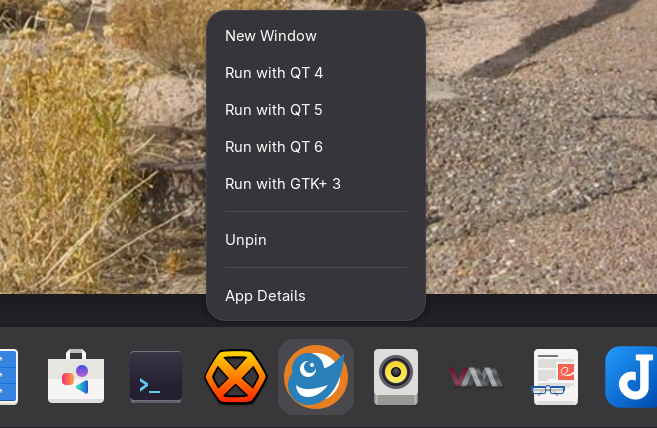
I have found it seems to be a problem with the graphics module it will work if I start the program with QT6 , but fail with QT4 or 5 or GTK
Gambas seem to be the only program that Gnome alowes to be started with different graphic modules .
Last edit: by GrayGhost
Posted
Banned
mostly the ./configure command should show any problems with libraries/packages not being there.
The gambas install page you used (that's my page btw) reads the current fedora config from the gambas .gitlab-ci.yml file so all the commands should be current and okay.
the commands are working with latest fedora build:fedora-latest (#11349539049) · Jobs · Gambas / gambas · GitLab
Posted
Banned
$ gambas3
$ env GB_GUI=gb.qt5 gambas3
$ env GB_GUI=gb.gtk3 gambas3
Ps. you can start any gambas program that uses gb.gui with a choice of toolkit using the env method mentioned above.
eg.
$ env GB_GUI=gb.qt5 /path/to/program.gambas
Posted
Enthusiast
(org.gambas.109857:109857): Gtk-WARNING **: 09:40:50.293: Negative content width -7 (allocation 1, extents 4x4) while allocating gadget (node headerbar, owner GtkHeaderBar)
(org.gambas.109857:109857): Gtk-WARNING **: 09:40:50.294: gtk_widget_size_allocate(): attempt to allocate widget with width -24 and height 19
(org.gambas.109857:109857): Gtk-WARNING **: 09:40:50.294: Negative content width -23 (allocation 1, extents 12x12) while allocating gadget (node label, owner GtkLabel)
(org.gambas.109857:109857): Gtk-WARNING **: 09:40:50.337: Negative content width -7 (allocation 1, extents 4x4) while allocating gadget (node headerbar, owner GtkHeaderBar)
(org.gambas.109857:109857): Gtk-WARNING **: 09:40:50.337: gtk_widget_size_allocate(): attempt to allocate widget with width -24 and height 19
(org.gambas.109857:109857): Gtk-WARNING **: 09:40:50.337: Negative content width -23 (allocation 1, extents 12x12) while allocating gadget (node label, owner GtkLabel)
^C
mhc@unknown0a68c7597b10:~/gambas-stable$
Posted
Enthusiast
Selected with " env GB_GUI=gb.qt6 gambas3" or with the GUI in Gnome as shown above post.
Last edit: by GrayGhost
Posted
Banned
Have you tried changing the gtk theme?
plus latest gambas master is not 3.20.99 it's 3.21.99
perhaps the problem is now fixed?
Posted
Enthusiast
Posted
Banned
(your folder name suggests gambas-stable but a .99 version is dev master)
or re-clone latest
Code
$ git clone https://gitlab.com/gambas/gambas.git --depth=1 --branch=master gambas-master
$ cd gambas-master
you could probably just install 3.21 over 3.20
or remove old first..
cd ~/gambas-stable
sudo make uninstall
Posted
Enthusiast
Posted
Banned
tested gtk3 qt5 and qt6 all okay
[System]
Gambas=3.21.99 9542528 (master)
Distribution=Fedora Linux 40 (MATE-Compiz)
Kernel=6.9.7-200.fc40.x86_64
Platform=x11
Desktop=MATE
WidgetTheme=bluementa
Posted
Enthusiast

I tryed it with Gnome Classic and same results
I am tempted to install a second desktop …. but don't want to mess up a working system .
Last edit: by GrayGhost
Posted
Banned
well I say no problems,, i had all sorts of issues (with the system) using kernel 6.14.5-100
if i use kernel 6.9.7-200 everything is okay.
[System]
Gambas=3.21.99 9542528 (master)
OperatingSystem=Linux
Distribution=Fedora Linux 40 (MATE-Compiz)
Kernel=6.9.7-200.fc40.x86_64
Architecture=x86_64
Cores=2
Memory=4318M
Language=en_GB.UTF-8
Platform=x11
Desktop=GNOME
DesktopResolution=96
DesktopScale=8
WidgetTheme=adwaita
Font=Cantarell,11
Posted
Enthusiast


Enthusiast
I went back to 6.16.8.200 and the nvidia driver had to rebuild … but would not use my vidio card and would not display the correct resoulition …
but Gambas 3 did work
 … so maybe the next kernel will fix it, but I am working now anyways
at least I now have the latest Gambas

Posted
Enthusiast
NO JOY. using this site :
Gambas Upgrade Commands
What have I done wrong ?
etting up libimlib2-dev (1.12.4-2) …
Setting up libwebkit2gtk-4.1-dev (2.48.5-1~deb13u1) …
Setting up qt6-webengine-dev:amd64 (6.8.2+dfsg-4) …
bash: ./reconf-all: No such file or directory
bash: ./configure: No such file or directory
make: *** No targets specified and no makefile found. Stop.
make: *** No rule to make target 'install'. Stop.
Posted
Enthusiast
did work with development version
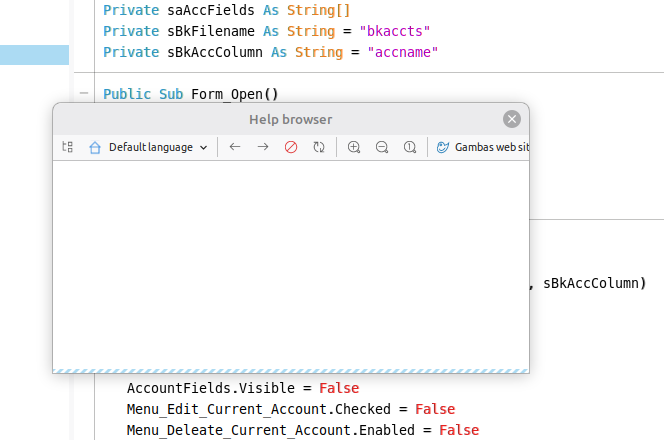
so finaly got 3.21.99 to install … BUT have no help files …Help browser has no information .
 le … but
Last edit: by GrayGhost
Posted
Banned
GrayGhost said
I have given up on Fedora and Gnome for now …. installed LMDE … and tried to install Gambas .
NO JOY. using this site :
Gambas Upgrade Commands
What have I done wrong ?
etting up libimlib2-dev (1.12.4-2) …
Setting up libwebkit2gtk-4.1-dev (2.48.5-1~deb13u1) …
Setting up qt6-webengine-dev:amd64 (6.8.2+dfsg-4) …
bash: ./reconf-all: No such file or directory
bash: ./configure: No such file or directory
make: *** No targets specified and no makefile found. Stop.
make: *** No rule to make target 'install'. Stop.
From “Post #12,674”, October 23rd 2025, 2:16 PM
I do not know.
It looks like the commands were not run from within the gambas-stable cloned folder.
the initial git clone command should create the gambas-stable folder then the next command should cd into it.
Code
git clone --depth=1 https://gitlab.com/gambas/gambas.git --branch=stable gambas-stable
cd gambas-stable
Last edit: by BruceSteers
Posted
Banned
GrayGhost said
It would not wotk with stable
did work with development version
so finaly got 3.21.99 to install … BUT have no help files …Help browser has no information .
From “Post #12,675”, October 23rd 2025, 2:26 PM
did you use online or offline help?
Posted
Enthusiast
1 guest and 0 members have just viewed this.