For those on GambOS or using GambOS repo on a supported distro -> category update available for GambOS Software Center
Just start GambOS Software Center and click on button Category update.
Enjoy the new addition to the GambOS Desktop And make sure to chack our newspage to stay up to date. This can be done from withing GambOS Learning Center, just like visiting this forum can be done from there
Dear Willy, Just tried to install it and got an error, which has gone after doing this..
gbWilly said
If you run GambOS or have added GambOS repository top your sources and have an installed GambOS Learning Center, just run apt-get update and apt-get upgrade (with elevated rights) to get newest application versions.
From “Post #12,020”, September 24th 2025, 11:21 AM
.. and logging out/in and tried again, Jfyi, Regards, Yogi
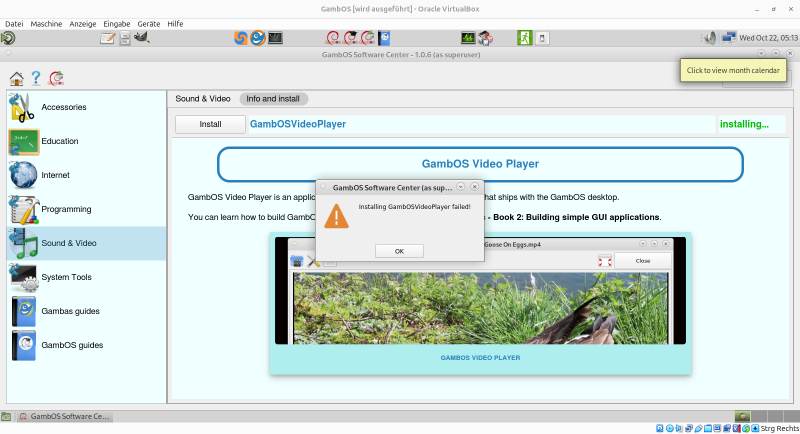
When did you get the error, from doing the Category update?
Or did this happen when trying to install GambOS Video Player affer doing the Category update. (yes details matter )
I presume the latter seeing the step you have taken.
The latter is a bug that is fixed in version 1.0.7 and is currently in testing.
I fixed this last night, when I discovered the trouble, around 4 AM
Your local package management system is not yet aware of the newly added software to the GambOS repo, that is why it happens.
Doing sudo apt-get update ensures your local package management system is up to date again and thus can perform an install.
The sudo apt-get upgrade and rebooting (it's not Widows) are not needed.
Thanks for reporting How to fix doing a Category update
Open GambOS Software Center and do you Category update (it is a button that appears when a category update is available, meaning new software in GambOS Software Center).
Leave the GambOS Software Center open, if so desired while doing following step
Open terminal and do:
Code
sudo apt-get update
Next in GambOS Software Center install newly added GambOS software. This fix is for GambOS Software Center version 1.0.6 ONLY
When did you get the error, from doing the Category update?
Or did this happen when trying to install GambOS Video Player affer doing the Category update. (yes details matter )
I presume the latter seeing the step you have taken.
The latter is a bug that is fixed in version 1.0.7 and is currently in testing.
I fixed this last night, when I discovered the trouble, around 4 AM
The sudo apt-get upgrade and rebooting (it's not Widows) are not needed.
Dear Willy, this time I've been prepared and took a screen shot 😀 Image
Update
I think you guessed the right way.
When something is important, you don't look at the clock. I usually get up between 4 and 5 in the morning, my wife is working at 5:45 a.m so I get up a little earlier and serve her a coffee.
Dear Willy,
this time I've been prepared and took a screen shot 😀 Image
Update
I think you guessed the right way.
When something is important, you don't look at the clock.
I usually get up between 4 and 5 in the morning, my wife is working at 5:45 a.m
so I get up a little earlier and serve her a coffee.
That was the one I was talking about. I tested on a few Vm's but there I just happened to do an update of the system before running GambOS Software, so I never got the error.
Then after releasing (when else ) I fired up another vm that I did not first update and I got exactly as what you showed me.
I knew what was wrong and fixed it right away, tested it and release it to contributors for testing and then went to bed. Needed to get up at 9 Am again
I'm not very time aware when fixing code, I guess more coders have that bug
I knew what was wrong and fixed it right away, tested it and release it to contributors for testing and then went to bed. Needed to get up at 9 Am again
I'm not very time aware when fixing code, I guess more coders have that bug
I remember the times running for a problem on a Saturday, about 30 years ago, a real headache, then I went away from the Computer playing with the children, not thinking about the unpleasant situation. Ap. 1 hour later I had the solution without any headache, having fun with the children. That was a lesson for me…










 )
)

 Last edit: by gbWilly