




Know issue (SOLVED): GambOS build 25 - Gambas Farm installed applications lack a menu entry
Posted
#1
(In Topic #1585)

Administrator



After some investigating it turns out to be a bug or maybe even better an unimplemented feature that was missing in Gambas, so I have reported it and await a fix.
Current workaround until fixed and backported
Meanwhile if you happen to install a Gambas application on GambOS from the Gambas Farm it will create a desktop file for it.
The path on GambOS to these desktop files is:
Code
/home/gbuser/.local/share/applications/
Code
gambas-<publisher>-<applicationname>.desktop
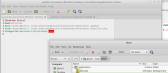
(Click to enlarge)
If in folder /home/gbuser/.local/share/applications/ you right click on such a .desktop file (note that on Caja it doesn't show extension for desktop files) and select Open with other application.. and next select pluma to edit this file. Add following line before the line with Categories and save:
Code
Type=Application
P.s. Screenshot by
 Poly
(thank you
Poly
(thank you  )
)
gbWilly
- Gambas Dutch translator
- Gambas wiki content contributor
- Gambas debian/ubuntu package recipe contributor
- GambOS, a distro for learning Gambas and more…
- Gambas3 Debian/Ubuntu repositories
… there is always a Catch if things go wrong!
- Gambas Dutch translator
- Gambas wiki content contributor
- Gambas debian/ubuntu package recipe contributor
- GambOS, a distro for learning Gambas and more…
- Gambas3 Debian/Ubuntu repositories
… there is always a Catch if things go wrong!


Posted
Administrator
I already backported this fix into Gambas 3.19.6+bpo, the version provided by the GambOS repository and used on GambOS.
I will have to create needed recipes for a full repackage before it will become available in the GambOS repository.
This will ensure that Gambas farm, in the near future, will properly install Farm applications on GambOS.
On a side note, applications that are in none of the provided categories but only in 'All' don't get a menu entry when installed from Gambas Farm. I still have to discuss this matter on the mailing list to see what is happening there.
Correction: I checked above with Benoit and he explained the process. During the upload to the Gambas Farm the author of the apploication has the option to create a menu entry of the applications. So, the only in 'All' category as explained in the side note above has nothing to do with a menu entry not being there.
gbWilly
- Gambas Dutch translator
- Gambas wiki content contributor
- Gambas debian/ubuntu package recipe contributor
- GambOS, a distro for learning Gambas and more…
- Gambas3 Debian/Ubuntu repositories
… there is always a Catch if things go wrong!
- Gambas Dutch translator
- Gambas wiki content contributor
- Gambas debian/ubuntu package recipe contributor
- GambOS, a distro for learning Gambas and more…
- Gambas3 Debian/Ubuntu repositories
… there is always a Catch if things go wrong!
Posted
Administrator
You NO longer need to download patches yourself.
gbWilly
- Gambas Dutch translator
- Gambas wiki content contributor
- Gambas debian/ubuntu package recipe contributor
- GambOS, a distro for learning Gambas and more…
- Gambas3 Debian/Ubuntu repositories
… there is always a Catch if things go wrong!
- Gambas Dutch translator
- Gambas wiki content contributor
- Gambas debian/ubuntu package recipe contributor
- GambOS, a distro for learning Gambas and more…
- Gambas3 Debian/Ubuntu repositories
… there is always a Catch if things go wrong!
1 guest and 0 members have just viewed this.