





Component to preview files in a directory
Posted
#1
(In Topic #623)
Regular



Posted
Banned
If you want to preview more files like nautilus and others then you will have to write the code as they have.
Posted
Banned
it probably safe to assume that where gambas only uses the FileView qt widget other applications like Nautilus that are essentially one big FileView application have written their own complete file viewer control and do not just rely on the generic qt built in one.
Hope that makes sense
:roll:
Posted

Regular
I suggest you take a look at Phil Harvey's Exiftool as this has an argument called JpgFromRaw and can be used in batch mode. So I'm suggesting you extract jpeg files from all RAWs in a directory, save them in /tmp directory (so as not to clog up your hard drive) then display each one as required.
But my preference would be to look at LibRaw, as this has a nice looking C API that you could declare in Gambas (C API | LibRaw).
Maybe its;
Code
int libraw_unpack(libraw_data_t*);function would do what you need.
By using LibRaw you may end up with some useful code that others could use when working with RAWs in Gambas.
For exiftool there is a friendly forum: ExifTool Forum - Index
Posted

Guru


1/. You need to have the exiftool installed.
2/. My camera is a Canon 6D Mark II and the raw format is CR2, so this is the file type I tested this on.
3/. The program has no error catching code.
Posted
Regular
Indeed this have been a helpful knowledge base for me. Attached is the alpha version of my tool. I use (of course) exiftool. A marvelous little program but cumbersome with all the parameters.stevedee said
For exiftool there is a friendly forum: ExifTool Forum - Index
I did- but -JpgFromRaw generates big files with original image size. What I actual need is just a tiny thumbnail. The parameter -PreviewImage generates a ~500kb file and a size of 1.440x960 which is actually too big for my purpose. exiftool cannot generate resized images out of a raw file, unfortunately. A pipe to another tool like imagemagick would be possible but all in all it takes too much time for a simple preview. Since I use exiftool my tool works for all supported raw files incl. CR2. The main focus is to view the GPS location on a map. The program has no error catching code either.cogier said
but I could not get the -JpgFromRaw to work
Interesting you are mentioned this. I stumbled upon the libraw library earlier and looked for an example how to use libraries in general and libraw specifically. I had no luck and didn't find something so I went back to exiftool.stevedee said
Maybe its;
Code: Select all
int libraw_unpack(libraw_data_t*);
function would do what you need.
Ultimately we have the same approach how to handle raw file. So I guess it is the right onestevedee said
Have a look at the attached code with the following provisos:

Posted
Regular
01McAc said
… I stumbled upon the libraw library earlier and looked for an example how to use libraries in general and libraw specifically…
Don't know if you are still interested, but as its a poor TV night, I thought I'd take a look.
Turns out that the libraw C-API plays nice with Gambas.
Code (gambas)
- 'Just some demo code using the C-API of library: libraw
- 'Only needs libraw, a Gambas Form and a PictureBox
- '
- 'steve davis 23-Mar-2021
- '================================================
- Library "libraw:16"
- 'delete last demo image
- Kill strThumbNail
- 'the fun starts here!
- pPoint = libraw_init(0)
- intReply = libraw_unpack_thumb(pPoint)
- intReply = libraw_dcraw_thumb_writer(pPoint, strThumbNail)
- libraw_close(pPoint)
…or download the project which includes a sample RAW file (.DNG)
Although this extracts a 'thumbnail', this image has a resolution of 1024 x 683 for a file size of about 100k.
EDIT
I just found that with an Olympus RAW (.ORF) the thumbnail is much larger with a higher resolution.
Also, you should add
Code (gambas)
Posted
Regular
Yes, I am. The code is exactly what I was looking for. What I can do is just copy and paste the code but, to be honest, I don't understand how a (any) library must be declared. How did you figure that out?stevedee said
Don't know if you are still interested
Re the poor TV night: how about a good book or going out for photography (night shooting with available light)? Helping people in the forum here might be a better idea

Posted
Regular
01McAc said
…What I can do is just copy and paste the code but…stevedee said
Don't know if you are still interested
….I don't understand how a (any) library must be declared. How did you figure that out?
Its better not to just copy any of my examples…its much better to understand how its working and then write your own code better than my simple examples!
Here is the process I followed to establish what needed to be declared;
Knowing that libraw supported a C API, I opened Synaptic package manager and searched for libraw (If you also have a Debian/Ubuntu based Linux distro, this will make sense).
Although I had a package called: libraw1394 this was clearly nothing to do with RAW files. The only other package listed (and it was already installed) was: libraw16 described as a RAW image decoder library.
Initially I declared in Gambas;
…but when I tried to run libraw_init in my code I got an error, something like;
Code
Cannot find dynamic library libraw.soSo then I tried declaring the library as libraw16, but got a similar message.
Third-time-lucky when I declared: libraw:16
This format is basically using ":16" to define a kind of version. I say "kind of" because the actual version is reported as: 0.18.8
…but never let the facts get in the way of celebrating a 'success'
I then checked and verified that I was talking to this library by using the most basic function, declared and used something like this;
I covered the declaration of functions from a C API in a recent post: Gambas One - Gambas ONE but if you have more questions, just ask.
Just how you decide to implement this solution will (I hope) be your choice, as I can't see much point in providing highly polished code. After all, you want to write code, not simply copy-and-paste what others dish up. But I will give a little bit of general advice. As your programs get bigger, it makes sense to take a modular approach.
I've taken my own example and moved the code into a Module called LibRAW, as the only stuff in a Form class should be code that is directly related to the Form. Here are two simple functions in this module;
This makes using the library code in Gambas, more Gambas-like;
…its a bit like a Gambas wrapper for the C library libraw…although not a great example.
I hope some of this nonsense helps!
Further reading:-
Captain Bodgit: Gambas: using external C libraries
/howto/extern - Gambas Documentation
Re the poor TV night: how about a good book or going out for photography (night shooting with available light)? Helping people in the forum here might be a better idea
Thanks for the tips.
I'm reading quite a bit at the moment and having a love affair with my 3D Printer. Like most love affairs, its about 50% fantastic and about 50% rubbish.
Its currently a bit too cold for my fragile body to venture out after dark. But I hope to re-build my strength and regain control of my body's thermostat in the very near future!
Posted
Regular
I'll go through it in the next days.
Posted
Regular
Code (gambas)
- Library "libraw:20"
But - and it seems there is always a 'but' - when I try to get a thumbnail from my DNG's it generates a zero byte jpg. At first I thought it is a timing problem and put a
Code (gambas)
Code (gambas)
- intReply = libraw_dcraw_thumb_writer(pPoint, strThumbNail)
I have been thinking about it and came to the conclusion that my DNG's don't have any embedded jpg as I am shooting raw only. libraw tries to extract the jpg and exiftool generates thumbnail out of the DNG I guess.
Nevertheless, it was a good exercise for me to get into the world of external libraries.
Posted
Regular
01McAc said
…I have been thinking about it and came to the conclusion that my DNG's don't have any embedded jpg as I am shooting raw only. libraw tries to extract the jpg and exiftool generates thumbnail out of the DNG I guess…
When you shoot RAW only on a camera, it should produce a RAW file with a jpeg copy built into the file. One reason for this is that your camera cannot display the RAW file, so needs a simple jpeg copy to show on your camera's screen.
As far as I know, exiftool cannot convert RAWs into jpeg copies.
I would be interested in a copy of your DNG file. Can you send via Firefox Send?
Posted
Regular
Forget Firefox Send, it looks like the service was disabled last September …well nobody told me!
Posted
Regular
I can extract the jpeg from within the RAW file;
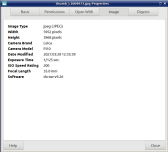
(Click to enlarge)
…and the jpeg image file details (which is a 2.3MB file) look like this;
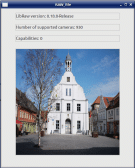
(Click to enlarge)
Posted
Regular
Did you extract the thumbnail with libraw and in the app you provided before for download?
Posted
Regular
01McAc said
hmm, there must be something wrong in my code…
I suggest you paste the libraw section of your code.
Posted
Regular
There must be some magic in the code. I double checked my code, made no changes et voilá: it works. Great stuff. Thank you.stevedee said
I suggest you paste the libraw section of your code.
The only remaining question is still the non-preview of the DNG in the FileView component. Dolphin and Nautilus (see attachment) both are able to show a tiny preview of DNG files. Dolphin is a QT based program and I presume Gambas uses the same components of QT.
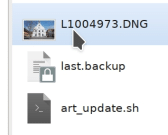
(Click to enlarge)
Posted
Banned
01McAc said
There must be some magic in the code. I double checked my code, made no changes et voilá: it works. Great stuff. Thank you.stevedee said
I suggest you paste the libraw section of your code.
The only remaining question is still the non-preview of the DNG in the FileView component. Dolphin and Nautilus (see attachment) both are able to show a tiny preview of DNG files. Dolphin is a QT based program and I presume Gambas uses the same components of QT.
Screenshot_20210402_130237.jpg
It's got nothing to do with QT
Nautilus/Dolphin are doing the work not QT
It's funny how you seem to think,, Nautilus does it and it uses qt so gambas should too as it uses qt.
After it has been explained

Posted
Regular
01McAc said
There must be some magic in the code. I double checked my code, made no changes et voilá: it works. Great stuff. Thank you.
You are very welcome!
… Dolphin and Nautilus … both are able to show a tiny preview of DNG files…
I'm 95% sure that gnome-raw-thumbnailer is installed on your system, and that file managers such as Nautilus use this to extract jpegs from some RAW files (I think you may have to alter settings or do something to get it to work with other types of RAW files such as {say} .CR2).
The file manager "Nemo" on my light-weight Peppermint system did not display RAW thumbnails until a few minutes ago, when I installed gnome-raw-thumbnailer, and now it does.
So what we need now is for some cleaver guy to modify the FileView class to get it to work with gnome-raw-thumbnailer
Posted
Regular
gnome-raw-thumbnailer uses /usr/share/thumbnailers/gnome-raw.thumbnailer which contains this:-
Code
[Thumbnailer Entry]
TryExec=gnome-raw-thumbnailer
Exec=gnome-raw-thumbnailer -s %s %u %o
MimeType=image/x-adobe-dng;image/x-canon-cr2;image/x-canon-crw;image/x-dcraw;image/x-fuji-raf;image/x-kodak-dcr;image/x-kodak-k25;image/x-kodak-kdc;image/x-minolta-mrw;image/x-nikon-nef;image/x-olympus-orf;image/x-panasonic-raw;image/x-pentax-pef;image/x-sigma-x3f;image/x-sony-arw;image/x-sony-sr2;image/x-sony-srf;
…which does include support for .CR2 and many more.
Posted
Regular
Code
[Thumbnailer Entry]
TryExec=/usr/bin/raw-thumbnailer
Exec=/usr/bin/raw-thumbnailer -s %s %u %o
MimeType=image/x-adobe-dng;image/x-canon-cr2;image/x-canon-crw;image/x-nikon-nef;image/x-olympus-orf;image/x-pentax-pef;image/x-sony-arw;image/x-epson-erf;image/x-minolta-mrw;
raw.thumbnailer (END)Beyond my skills, I am very sorry. Any volunteers :?:BruceSteers said
So what we need now is for some cleaver guy to modify the FileView class to get it to work with gnome-raw-thumbnailer
Posted
Banned
01McAc said
Same thing here. On Fedora Rawhide it's the raw-thumbnailer:Code
[Thumbnailer Entry]
TryExec=/usr/bin/raw-thumbnailer
Exec=/usr/bin/raw-thumbnailer -s %s %u %o
MimeType=image/x-adobe-dng;image/x-canon-cr2;image/x-canon-crw;image/x-nikon-nef;image/x-olympus-orf;image/x-pentax-pef;image/x-sony-arw;image/x-epson-erf;image/x-minolta-mrw;
raw.thumbnailer (END)
Beyond my skills, I am very sorry. Any volunteers :?:BruceSteers said
So what we need now is for some cleaver guy to modify the FileView class to get it to work with gnome-raw-thumbnailer
Haha i didn't write that..
why do i get the feeling if we were all sat in a room you'd all be looking at me right now
:roll:I highly doubt it is beyond anyone's skills here you just need to know where to add it.
I haven't really been following what's been going on here as it was a bit beyond me wich is why mostly all i have been able to advise is about how qt is not doing image processing itself.
Looks like FileView.class is in gb.form
comp/src/gb.form/.src/File/FileView.class · master · Gambas / gambas · GitLab
and the preview magic happens in CTaskPreview.class
comp/src/gb.form/.src/File/CTaskPreview.class · master · Gambas / gambas · GitLab
I would suggest pointing this thread to the gambas M/L so Benoit can see it , he would know much better how to implement it if you guys explain what you have discovered about how the other apps are doing things.
i could almost guarantee that my code would need re-writing for him lol.
Or if Benoit will not add it you could probably copy the 2 above mentioned files into your app and rename them (and change CTaskPreview references to match new name) and add it yourself.
I could help anyone if having problems but am doing other things at present to take this on.
Posted
Banned
BruceSteers said
Or if Benoit will not add it you could probably copy the 2 above mentioned files into your app and rename them (and change CTaskPreview references to match new name) and add it yourself.
I could help anyone if having problems but am doing other things at present to take this on.
I had a quick look and have this starter for you…
It's a test app i have just imported FileView.class and CTaskPreview.class into and called them MyFileView.class and MyTaskPreview.class
I had to pull a couple of other functions in from gb.form and the DirCache.class that i renamed to MyDirCache.Class
then changed any references and made a working app with it's own internal (customisable) fileview class.
I have not added any of your previewing stuff to it just made a base that you folks may find useful and be able to adapt to suit your own needs..
I also didn't add any location controls it just opens in Home/Pictures/
A raw previewer seems specific.
I don't have one unless i install one, thus for this reason i am not sure Benoit will want to add it. (I could well be wrong)
my thumbnailer list is as follows on Mint20
<CODE lang="shell">
Code
$ ls /usr/share/thumbnailers/
ffmpegthumbnailer.thumbnailer       librsvg.thumbnailer           xplayer.thumbnailer
gdk-pixbuf-thumbnailer.thumbnailer  mate-font-viewer.thumbnailer  xreader.thumbnailer
So might be better to make your own version
Hope this helps…
1 guest and 0 members have just viewed this.