




highlighting
Posted
#1
(In Topic #2101)

Enthusiast

Just enhanced the mp3/WebRadio Player with a log File which shows date time and Tags from the stream.
At the moment I use Texteditor Class for showing it on a form, tried also Webview component.
I prefer at the moment the Texteditor, because I can set the .wrap to false, and additionally it is possible
to highlight a part of the text shown in the log.
So now I want to know if it is possible to highlight more than one text without using a special userdefined
file like Gambas, PHP etc.
I use this peace of code to mark the current date in the log:
Code
txtLog.HighlightString(sDat, True)
But if I want to mark all dates I have no idea how to do it.
So my 2nd approach was the Webview, I could there regex replace all dates in the log and replace
with "<b>&1</b>". Great, that works well, BUT I have not found a solution to have the view not line wrapped.
Anyway I stick with the Texteditor at the moment, see here:
Radio1.jpg
The log TextEditor updates itself if the filesize changes via the OPEN FOR WATCH command.
It is not a must have and I can live with the actual solution, I'm just curious if there is a simple way
to have to highlight more than one text beside that what I already tried,
didn't find also how to change the selection colour…
Kind regards,
Yogi


Posted

Administrator



1. property HighLight -> determines what is highlighted (so what keywords)
2. property Theme -> determines how it is highlighted (so what style/colors are used)
What you need is make a custom Highlight and use that.
Now, don't ask me how to make a custom Highlight as I haven't done that.
But, you can have a peek at how current Highlights for Sql, Gambas, sh etc. are done and simplify, as you only need a few things highlighted.
I have made an archive of the highlight files found in the gambas source, so I don't have to explain where and how to find them in the Gambas source code.

Study them and be challeged… Here is the gambas wiki page on the topic.
Keep us posted on your progress, you have my interest as I haven't had situations I needed a custom highlight.

highlight.tar.gz
gbWilly
- Gambas Dutch translator
- Gambas wiki content contributor
- Gambas debian/ubuntu package recipe contributor
- GambOS, a distro for learning Gambas and more…
- Gambas3 Debian/Ubuntu repositories
… there is always a Catch if things go wrong!
- Gambas Dutch translator
- Gambas wiki content contributor
- Gambas debian/ubuntu package recipe contributor
- GambOS, a distro for learning Gambas and more…
- Gambas3 Debian/Ubuntu repositories
… there is always a Catch if things go wrong!
Posted
Enthusiast
gbWilly
Thanks for pointing in that direction, I read that part already and thought there must be an easier way
to do that job.
e.g. putting like this:
Code
texteditor.Highlight = "custom"
texteditor.mode = "custom"
and then a userdefined sub will be called - how to raise that event and what to do in sub…
This is from the IDE help:
If the highlighting mode is set to "custom", "none" or a null string, then the Highlight event will be raised each time a line must be highlighted. If you do not implement the handler for that event, nothing will be highlighted.
How to trigger that event? Maybe it is not necessary to have a definition file, just that event.
I find that component useful, even not really needed at that time, but if there is the need for having
a definition file there should be a class to accept just one or more regex or strings for highlighting
what we want.
Even the existing method could be enhanced to do that with just one additional argument:
Code
texteditor.HighlightString(sText, True, False, True)
The last not existing argument in that case "true" should keep the already highlighted text.
If that could be done then no need for a definition file, enough ideas 😁
Thanks,
Kind regards
Yogi

Administrator
 ) to read the link I posted to you earlier.
It shouldn't be that hard to get the date and highlight it as that is litteraly the only thing you want highlighted.
You will need to use the state command match and next come up with a pattern that matches dates.
markup{markup=Keyword}:
match /your.pcre.pattern.to.match.dates/
To get the proper color for keyword make your own theme file. That is really easy.
Open an application in IDE and go to Preferences, tab Theme
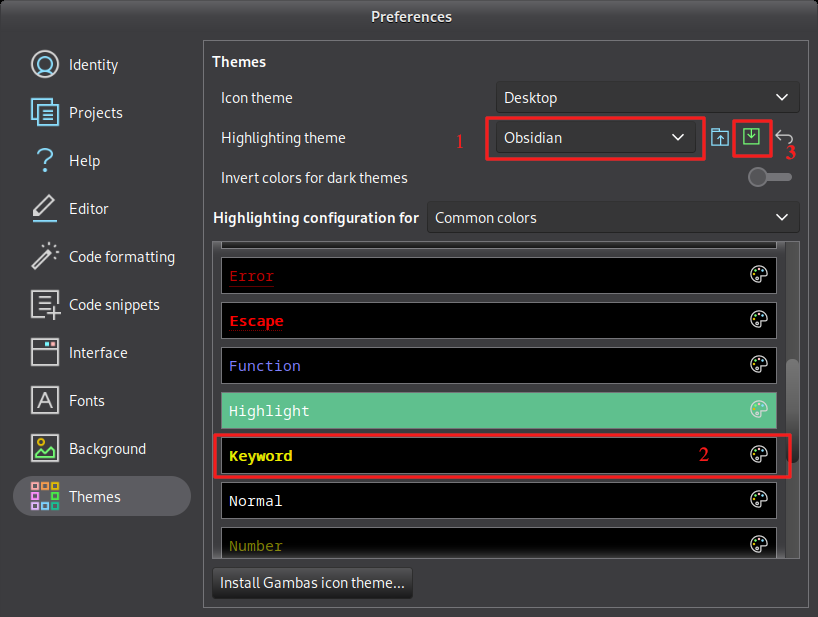
1. Select custom
2. Set the color for Keyword you desire (you can set background as well for this)
3. Export as a theme file (e.g. mydate.theme) for use in your TextEditor
To load into you TextEditor, place the mydate.theme in your project Data/themes folder (create the latter one)
On the form with the TextEditor add following code to get the theme loaded:
That should get you set up to test your custom highlight to use your custom colors from your custom .theme file.
 Last edit: by gbWilly
gbWilly
- Gambas Dutch translator
- Gambas wiki content contributor
- Gambas debian/ubuntu package recipe contributor
- GambOS, a distro for learning Gambas and more…
- Gambas3 Debian/Ubuntu repositories
… there is always a Catch if things go wrong!
- Gambas Dutch translator
- Gambas wiki content contributor
- Gambas debian/ubuntu package recipe contributor
- GambOS, a distro for learning Gambas and more…
- Gambas3 Debian/Ubuntu repositories
… there is always a Catch if things go wrong!
Posted
Administrator
THIS TRIGGERS THE EVENT -> texteditor.Highlight = "custom"Yogi said
Dear
Thanks for pointing in that direction, I read that part already and thought there must be an easier way
to do that job.
e.g. putting like this:
Code
			texteditor.Highlight = "custom"

texteditor.mode = "custom"
If the highlighting mode is set to "custom", "none" or a null string, then the Highlight event will be raised each time a line must be highlighted. If you do not implement the handler for that event, nothing will be highlighted.
How to trigger that event?
From “Post #14,846”, March 29th 2026, 5:14 PM

So Add:
Public Sub texteditor_Highlight()
End
OR right click TextEditor and select Event -> Highlight
You might be right and it's doable without a custom Highlight file, using this event.
gbWilly
- Gambas Dutch translator
- Gambas wiki content contributor
- Gambas debian/ubuntu package recipe contributor
- GambOS, a distro for learning Gambas and more…
- Gambas3 Debian/Ubuntu repositories
… there is always a Catch if things go wrong!
- Gambas Dutch translator
- Gambas wiki content contributor
- Gambas debian/ubuntu package recipe contributor
- GambOS, a distro for learning Gambas and more…
- Gambas3 Debian/Ubuntu repositories
… there is always a Catch if things go wrong!
Posted
Enthusiast
gbWilly
I tried already
Code
			Public Sub form_open

txtlog.Highlight = "custom"

End


Public Sub txtlog_Highlight(Text As String)

  Debug Text

End
But never got an output in the console… 🙈
Hopefully not a bug…, when must a line be highlighted?
If the highlighting mode is set to "custom", "none" or a null string, then the Highlight event will be raised each time a line must be highlighted. If you do not implement the handler for that event, nothing will be highlighted.
Thanks again,
Kind regards,
Yogi
Posted
Administrator
No idea as I stated earlier:Yogi said
But never got an output in the console… 🙈
Hopefully not a bug…, when must a line be highlighted?
If the highlighting mode is set to "custom", "none" or a null string, then the Highlight event will be raised each time a line must be highlighted. If you do not implement the handler for that event, nothing will be highlighted.
From “Post #14,850”, March 29th 2026, 5:32 PM
- "don't ask me how to make a custom Highlight as I haven't done that."
- "You might be right and it's doable without a custom Highlight file, using this event"
I can only think along, based on my experience with Gambas and what wiki says.
Maybe check if the Gambas Farm has an example of custom Highlight.
gb.highlight got introduced in 3.19 and is quite different from the previous implemented possibilities.
gbWilly
- Gambas Dutch translator
- Gambas wiki content contributor
- Gambas debian/ubuntu package recipe contributor
- GambOS, a distro for learning Gambas and more…
- Gambas3 Debian/Ubuntu repositories
… there is always a Catch if things go wrong!
- Gambas Dutch translator
- Gambas wiki content contributor
- Gambas debian/ubuntu package recipe contributor
- GambOS, a distro for learning Gambas and more…
- Gambas3 Debian/Ubuntu repositories
… there is always a Catch if things go wrong!
Posted
Enthusiast
gbWilly
Thanks, just tried to get it running with GambOS, but also not running there, no idea what's going on.
I will ask in the German Forum too, also will have a look in the Farm,
Kind regards,
Yogi
Administrator
Yogi said
Dear
Thanks, just tried to get it running with GambOS, but also not running there, no idea what's going on.
I will ask in the German Forum too, also will have a look in the Farm,
Kind regards,
Yogi
From “Post #14,855”, March 29th 2026, 10:07 PM
I'm curious, so I had to dive into it. Took me about 30 minutes to figure out and have a working solution.
Thanks for your question, now I learned something
Here is your solution.
TextEditorTest-0.0.1.tar.gz
Check the Data/Files folder. I used the custom highlight file to get the job done, as I first suggested.
In there a theme and highlight file loaded when form is opened
The text.txt is a test file to highlight the dates.
Edit (not in above archive):
If the format is different (dd-mm-yyyy) you need to change the regex order in match like this:
value{String}:
match /\d{1,2}-\d{1,2}-\d{2,4}/
If you want to match them both (yyyy-mm-dd and dd-mm-yyyy) use:
value{String}:
match /\d{1,2}-\d{1,2}-\d{2,4}|\d{2,4}-\d{1,2}-\d{1,2}/
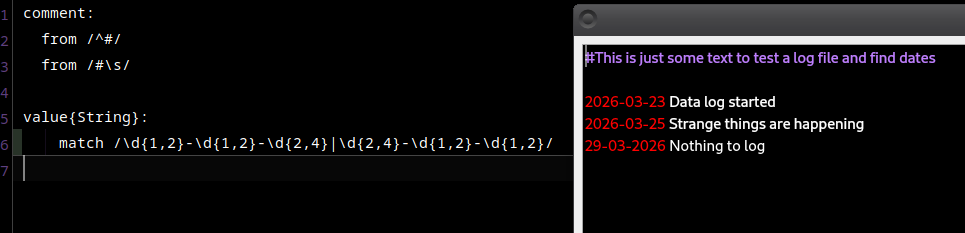
I chose to highlight it using the color for String as set in the mycustom.gambas.theme file.
So, if you now export a theme (see my earlier post) and set Background and String to what you would want, you have got a working highlight to you own liking.
Or simply change Background and String directly in the mycustom.gambas.theme file in the Data/Files folder.
If you switch Background and Normal in the mycustom.gambas.theme file, you will get a white background with black fonts instead of a black background with white fonts as you have now.
Edit (a later one):
There is actually a color defined for Date in the mycustom.gambas.theme file, so you could do this instead of String:
value{Date}:
match /\d{1,2}-\d{1,2}-\d{2,4}|\d{2,4}-\d{1,2}-\d{1,2}/
It will then use the color that theme uses for Date
Last edit: by gbWilly
gbWilly
- Gambas Dutch translator
- Gambas wiki content contributor
- Gambas debian/ubuntu package recipe contributor
- GambOS, a distro for learning Gambas and more…
- Gambas3 Debian/Ubuntu repositories
… there is always a Catch if things go wrong!
- Gambas Dutch translator
- Gambas wiki content contributor
- Gambas debian/ubuntu package recipe contributor
- GambOS, a distro for learning Gambas and more…
- Gambas3 Debian/Ubuntu repositories
… there is always a Catch if things go wrong!

Expert

Txe_Main is the TextEditor control.
I call this subroutine with a selected word and each itineration of it is highlighted in yellow as the applied colour below in code.
You could expand the sub by passing the desired colour as well.
Code
			Private Sub HighlightWords(InWord As String)


  Txe_Main.Styles[Highlight.Highlight].Color = Color.Yellow

  Txe_Main.HighlightString(InWord, True, True)


End
Cheers - Quin.
I code therefore I am
I code therefore I am
Enthusiast
gbWilly
,wow, thanks a lot.
I think this is not the end, but the beginning of what I thought could be possible with
the
Code
texteditor.HighlightString(sText, True, False, True)
I suggested. I have to investigate ….
Kind regards
Yogi
Posted
Enthusiast
Quincunxian
,Thanks also for jumping in, tried your tip and didn't work at the 1st glance,
got it running by doing this:
Code (gambas)
- TextHighlighter.Register("mycustom", "MyCustom", "Files/mycustom.highlight")
- TextEditor1.Theme = TextHighlighterTheme.Load("Files/mycustom.gambas.theme")
- TextEditor1.Highlight = "mycustom"
- 'This is working
- t.Color = Color.Yellow
- TextEditor1.Theme["Highlight"] = t
Edit:
I came to know it is better to use
Code
TextEditor1.Theme["Highlight"].Color=Color.Yellow
Kind regards,
Yogi
Last edit: by Yogi
Posted
Enthusiast
And here is the enhancement of
gbWilly
s approach, not professional but working:TextEditorTest-0.0.2.tar.gz
Search the Editor text after different data, (date, time, "Radio")
store it in sHighLight and create a .highlight temp File and load it:
Code
			  sTemp = Temp("HighLight")
  File.Save(sTemp, sHighLight)
  TextHighlighter.Register("mycustom", "MyCustom", sTemp)
Code (gambas)
- ' Gambas class file
- sHighLight = "comment:" & gb.NewLine
- sHighLight &= "\tFrom /^#/" & gb.NewLine
- sHighLight &= "\tFrom /#\\s/" & gb.NewLine
- sHighLight &= gb.NewLine
- sHighLight &= "value{String}:" & gb.NewLine
- searchit(aSearch)
- searchit(aSearch)
- searchit(aSearch)
- sTemp = Temp("HighLight")
- 'TextHighlighter.Register("mycustom", "MyCustom", "Files/mycustom.highlight")
- TextHighlighter.Register("mycustom", "MyCustom", sTemp)
- TextEditor1.Theme = TextHighlighterTheme.Load("Files/mycustom.gambas.theme")
- TextEditor1.Highlight = "mycustom"
- t.Color = Color.Yellow
- TextEditor1.Theme["Highlight"] = t
- Me.Center
- sHighLight &= "\tmatch /" & sFound & "/" & gb.NewLine
- TextEditor1.HighlightString("")
If there is a better way than saving in the highlight File would be very much appreciated,
Kind regards
Yogi
Edit: Of course, it's also possible to pass a regex instead of regex before…
Code (gambas)
- aSearch = ["^\\d{1,2}\\.\\d{1,2}\\.[0-9]{4}",
- "\\d{2}:\\d{2}:\\d{2}",
- "(?mi)Radio"]
- searchit(aSearch)
Last edit: by Yogi
Posted
Enthusiast
found it in the Texteditor.class. Copied the class into the .src
Thought i'm clever and added a few things, an optional "Keep" argument
and wrapped the "ClearCacheLine" in a if .. endif sequence.
Guess what, a lot of dependencies popped up…
Maybe me first intention was good to see the source and thought the ClearCacheLine
if not executed leaves the already marked text and the next search string will be added
for highlighting.
If anyone has an idea, if that works it would be cool, Gambas cool 😁
Code (gambas)
- $sHighlightString = Text
- $bHighlightWordOnly = WordOnly
- ClearCacheLine
- $hView.Refresh
Edit: Ok, I see the only way at the moment is inheritance, but if I inherit and overwrite this method
there are Private variables which I cannot use in this case - simple because I've less knowledge
about inheritance and classes in general.

Regards,
Yogi
Last edit: by Yogi
Posted
Administrator
Yogi said
Search the Editor text after different data, (date, time, "Radio")
store it in sHighLight and create a .highlight temp File and load it:
From “Post #14,867”, March 30th 2026, 7:56 AM
Using a pre defined highlight file will highlight all at load time, but you seem to be creating them on the fly.
Are you trying to achieve some form of dynamic highlighting, based on a user search?
gbWilly
- Gambas Dutch translator
- Gambas wiki content contributor
- Gambas debian/ubuntu package recipe contributor
- GambOS, a distro for learning Gambas and more…
- Gambas3 Debian/Ubuntu repositories
… there is always a Catch if things go wrong!
- Gambas Dutch translator
- Gambas wiki content contributor
- Gambas debian/ubuntu package recipe contributor
- GambOS, a distro for learning Gambas and more…
- Gambas3 Debian/Ubuntu repositories
… there is always a Catch if things go wrong!
Enthusiast
gbWilly said
Yogi said
Search the Editor text after different data, (date, time, "Radio")
store it in sHighLight and create a .highlight temp File and load it:
From “Post #14,867”, March 30th 2026, 7:56 AM
Using a pre defined highlight file will highlight all at load time, but you seem to be creating them on the fly.
Are you trying to achieve some form of dynamic highlighting, based on a user search?
From “Post #14,873”, March 30th 2026, 5:04 PM
Hi, this should be the next step, letting the user decide what to highlight.
In the German Forum one tried also to get highlighting running with
txtlog.Highlight = "custom"
txtlog.mode = "custom"
and couldn't get the TextEditor1_Highlight() sub running and told he will contact Benoit
if this event is active in the new form of highlighting.
Regards,
Yogi
Posted
Administrator
I think I know why. If you look at this page at the wiki, where Highlight event is explained and demonstrated, you will find it relates to gb.eval.highlight (the old highlight component).Yogi said
In the German Forum one tried also to get highlighting running with
txtlog.Highlight = "custom"
txtlog.mode = "custom"
and couldn't get the TextEditor1_Highlight() sub running and told he will contact Benoit
if this event is active in the new form of highlighting.
From “Post #14,876”, March 30th 2026, 5:13 PM
That is probably why it doesn't work.
gbWilly
- Gambas Dutch translator
- Gambas wiki content contributor
- Gambas debian/ubuntu package recipe contributor
- GambOS, a distro for learning Gambas and more…
- Gambas3 Debian/Ubuntu repositories
… there is always a Catch if things go wrong!
- Gambas Dutch translator
- Gambas wiki content contributor
- Gambas debian/ubuntu package recipe contributor
- GambOS, a distro for learning Gambas and more…
- Gambas3 Debian/Ubuntu repositories
… there is always a Catch if things go wrong!
Posted
Enthusiast
gbWilly said
I think I know why. If you look at this page at the wiki, where Highlight event is explained and demonstrated, you will find it relates to gb.eval.highlight (the old highlight component).Yogi said
In the German Forum one tried also to get highlighting running with
txtlog.Highlight = "custom"
txtlog.mode = "custom"
and couldn't get the TextEditor1_Highlight() sub running and told he will contact Benoit
if this event is active in the new form of highlighting.
From “Post #14,876”, March 30th 2026, 5:13 PM
That is probably why it doesn't work.
From “Post #14,877”, March 30th 2026, 5:19 PM
You are right, It was probably forgotten to be removed or integrated in the new highlight.
Enthusiast
Benoit said
No, it's not raised anymore.
I think I kept it because I planned to implement it back again, but I forgot. I must check first if it's possible to have a backward-compatibility.
Regards,
1 guest and 0 members have just viewed this.